
ADHD Task Management for Professionals: 2026 Guide
Table of Contents
- Why Traditional Task Management Fails ADHD Professionals
- ADHD Time Blocking Techniques That Survive a Real Workday
- How to Prioritize Tasks With ADHD Without a Perfect System
- ADHD-Friendly Notion Templates for Work and Life
- Choosing Tools: A Comparison of ADHD Task Management Options
- External Accountability, Body Doubling, and the Maintenance Phase
- Conclusion: Building a Sustainable ADHD Task Management System
- Frequently Asked Questions
Last Updated: September 18, 2026
Why Traditional Task Management Fails ADHD Professionals
Standard productivity advice assumes a brain that remembers deadlines automatically, starts tasks on command, and feels a small reward each time something gets checked off. ADHD task management for professionals has to account for the fact that none of those assumptions reliably hold. The bottleneck usually isn't motivation or discipline. It's executive function: the cognitive system that handles planning, working memory, and self-regulation.
ADHD Time Blocking Techniques That Survive a Real Workday
ADHD time blocking works when blocks are short, themed, and forgiving. Instead of scheduling every hour, block two or three focus windows around your natural energy, then leave the rest of the day unstructured on purpose.
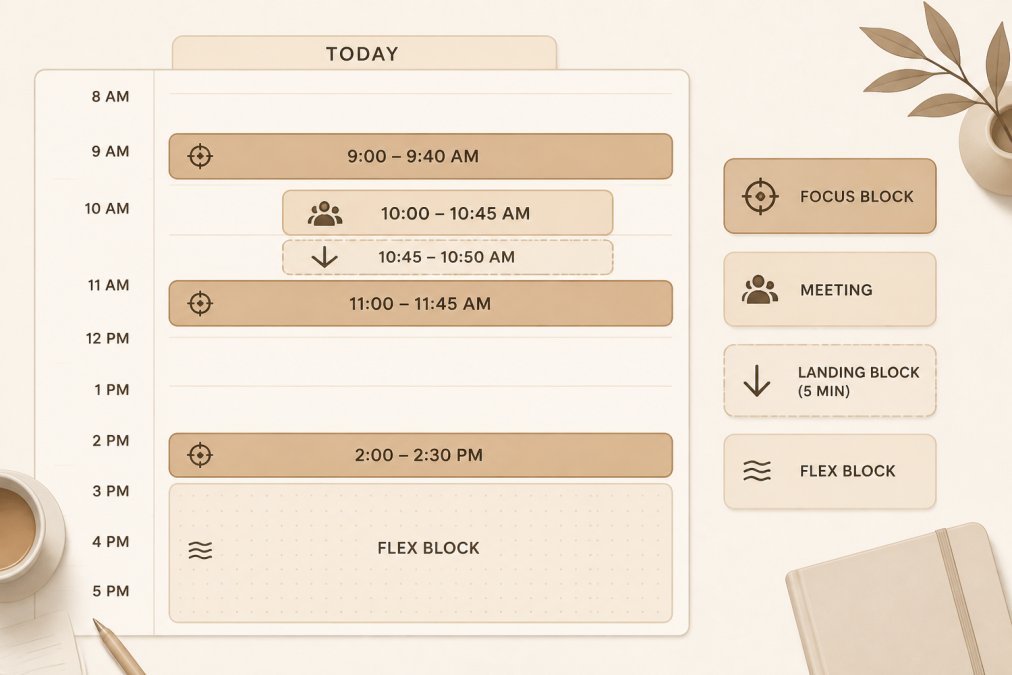
Try these adjustments:
- Cap deep work blocks at 25-45 minutes, then take a real break
- Theme each block by task type, not by project
- Add a five-minute "landing" block after meetings to reset
- Keep one flex block open for the day's inevitable chaos
Task Batching and Hyperfocus Windows
Task batching means grouping similar work, like all your email or all your admin, into one window. It reduces the cognitive load of switching contexts, which is expensive for ADHD brains. Hyperfocus windows are the flip side: when you notice yourself locked in, protect that block and cancel what you can.

How to Prioritize Tasks With ADHD Without a Perfect System
Most prioritization advice assumes you can hold five competing tasks in mind, weigh them against each other, and pick the right one. Working memory is exactly the system ADHD taxes hardest, so the moment you try to rank more than a couple of items, the ranking itself becomes the task. The goal isn't a perfect priority order. It's a decision rule simple enough to run when your executive function is already spent.
Sort by Energy Cost, Then by Deadline
Ask two questions in this order: does this need to happen today, and do I have the fuel for it right now? Importance alone doesn't tell you what you can actually start. A high-stakes report you can't begin is worth less today than a low-stakes email you can clear in four minutes.
| Bucket | Criteria | Action |
|---|---|---|
| Now | Due today, low energy cost | Do it first, no negotiation |
| Next | Due this week, high focus needed | Time block it on your calendar |
| Later | Flexible deadline | Schedule a five-minute review, not the task |
| Drop | No real consequence | Delete it and note why |
The Two-Minute Triage Rule
When you open your list and freeze, run a two-minute triage instead of trying to plan the day. Scan for anything that takes under two minutes and clear it. This isn't about productivity theater; it's about giving your brain a cheap win that lowers the activation energy for the harder item behind it. A common pattern is that the first real task feels impossible until two or three trivial ones are gone.
Externalize the Ranking, Not Just the Tasks
A list holds tasks. It doesn't hold the reason one task outranks another. Write the reason next to the priority: "Now, client is waiting," "Next, needs two uninterrupted hours," "Later, no one has asked since March." When the ranking lives outside your head, you stop re-litigating it every time you open the list, which is where most of the day quietly disappears.
When the Matrix Fails
It will fail on high-stress days, and that's expected. The fallback is a single question: what is the one thing that, if it doesn't happen today, causes a real problem tomorrow? Do that one thing, then stop treating the rest of the list as a debt. Rigid systems demand you clear the board; ADHD-friendly systems let you leave it half-full without shame.
ADHD-Friendly Notion Templates for Work and Life
ADHD-friendly Notion templates work best when they reduce decisions rather than add dashboards. The goal is a single page you can open, glance at, and act on. A useful setup includes a brain dump area, a short priority list, and a way to reschedule without guilt.

Choosing Tools: A Comparison of ADHD Task Management Options
The best ADHD task management tool is the one you'll actually reopen after a bad week. That usually means low visual clutter, no streak-based guilt, and a format that matches how you like to work, whether that's paper, tablet, or a notes app. But for professionals, there's a second filter most guides ignore: does the tool survive contact with the software your job already runs on?
The Enterprise Integration Gap
Most ADHD tool roundups compare personal apps in isolation. That advice breaks the moment your workday lives inside Outlook, Microsoft Teams, Slack, or Jira. A beautiful standalone planner that never touches your work calendar becomes a second system you have to maintain by hand, and hand-maintained systems are the first thing to collapse under deadline pressure.
A practical test before you commit to any tool:
- Can it read from or write to your work calendar, or will you be copying meetings over manually?
- Does it live somewhere you already open every day, or does it require a separate tab and a separate habit?
- Can you capture a task in under ten seconds from wherever you are, including inside a meeting?
- Does it survive a corporate device reset or a locked-down browser environment?
Paper, Tablet, or App: What Actually Differs
- Paper is fastest to start and has zero notification noise, which matters if app pings pull you off task. The trade-off is that it doesn't sync, so anything time-sensitive still needs a digital reminder.
- Tablet with a PDF planner splits the difference: the tactile feel of paper with searchable, duplicable pages. It works best for people who already carry a tablet to meetings.
- Dedicated apps win on reminders and recurring tasks, but they also win on distraction. Every app is one tap from a feed.
The format matters less than the restart cost. An undated, reprintable, or duplicable system means a missed week costs you nothing, which is the single best predictor of whether you'll still be using it in three months.
A Concrete Comparison
Anchor Grove Studio offers four options built around that restart principle:
| Tool | Format | Price | Best Use Case |
|---|---|---|---|
| Printable ADHD Planner | Paper, undated, reprintable | $22 | People who think better on paper |
| Digital ADHD Planner | Tablet/GoodNotes PDF | $22 | Tablet users who want hyperlinked pages |
| ADHD Focus & Deep Work System | Editable PPTX + print-ready PDF | $16 | Task initiation and focus sessions |
| ADHD Planning & Focus Bundle | All three tools above | $52 | Anyone who wants the full system |
What to Ignore When Shopping for Productivity Apps
Ignore feature counts, gamified streaks, and anything that punishes a missed day. A tool with forty features you never open is worse than one page you use daily. Look instead for undated pages, easy restarts, and a design that doesn't make you feel behind. The same logic applies to enterprise tools: a Jira board with two hundred tickets is not a task system, it's an archive.

External Accountability, Body Doubling, and the Maintenance Phase
External accountability is the single most underrated ADHD strategy. Body doubling, where you work alongside another person in person or over video, gives your brain an external cue to start and stay on task.
Conclusion: Building a Sustainable ADHD Task Management System
The real challenge isn't finding the perfect app. It's building something you can return to after the inevitable off week without shame. Anchor Grove Studio designs its planners, trackers, and Notion templates for exactly that: undated pages, no rigid streaks, and instant downloads so you can start today. Every tool is built to work with your brain, not against it.
Frequently Asked Questions
What is the best task management system for ADHD?
There is no single best system, but the most effective ADHD task management setups share three traits: low visual clutter, flexible pages that survive missed days, and a clear starting point for task initiation. Many professionals combine a paper or tablet planner for daily priorities with a short focus session plan for deep work. Anchor Grove Studio's planners are built around three priorities per day rather than long lists, which reduces the overwhelm that makes traditional systems hard to keep using.
How do professionals with ADHD manage their daily tasks?
Most successful routines combine quick capture, time blocking, and external accountability. A brain dump page gets thoughts out of working memory, then a prioritization step narrows the day to a few realistic items. Time blocking gives each task a home on the calendar, and body doubling or a check-in partner adds accountability. The key is keeping the system small enough to maintain on low-energy days, not just good days.
Why do traditional to-do lists fail for ADHD brains?
Long to-do lists overload working memory and offer no cue for where to start, which triggers task paralysis. They also treat every item as equally urgent, so prioritization never happens. Add time blindness, and a list of ten tasks can feel impossible to schedule. Systems designed for ADHD instead limit daily priorities, use visual cues, and break tasks into a first step small enough to begin without negotiation.
How can I improve executive function at work with ADHD?
Support executive function externally rather than relying on willpower. Use reminder systems and visual cues for deadlines, decompose large projects into two-minute starting steps, and batch similar tasks to reduce attention switching. Schedule demanding work during your natural hyperfocus windows and protect those blocks. A task initiation planner that prompts body doubling, the two-minute floor, and distraction triage can carry the load when internal cues are unreliable.
What are the best ADHD-friendly tools for professional productivity?
Look for tools that reduce cognitive load instead of adding setup work. Notion templates work well when they are plug-and-play dashboards rather than blank canvases. For focused work, Anchor Grove Studio's ADHD Focus & Deep Work System ($16) includes a focus session planner, a deep work log, and a distraction triage page. Pair it with the Digital ADHD Planner ($22) for tablet-based planning or the printable version for paper.
How do I keep an ADHD task management system from falling apart?
Plan for the maintenance phase from day one. Choose tools with no rigid streaks, so a missed week does not mean starting over. Review what worked weekly in a few minutes, adjust one thing, and reprint or reopen a fresh page. Bundles like the ADHD Planning & Focus Bundle ($52) include printable, digital, and focus tools so you can switch formats when your energy or schedule changes without buying a whole new system.
Anchor Grove Studio publishes calm, ADHD-friendly planners and digital tools. This guide reflects our approach to flexible, shame-free systems, not medical advice; consult a qualified clinician for diagnosis or treatment.