
ADHD Task Management Tools for Work: 2026 Guide
Table of Contents
- Why ADHD Task Management Tools for Work Matter
- ADHD Productivity Apps for Adults: What Actually Works
- ADHD Planner for Work: Core Planning Features You Need
- ADHD-Friendly Daily Schedule Template: Making Time Visible
- ADHD Task Prioritization Methods: Choosing What Matters
- Focus Support and Distraction Management at Work
- Choosing the Right Tool: Format, Cost, and Flexibility
- What Actually Sticks: Designing for Real Work Days
- Frequently Asked Questions
Last Updated: October 15, 2026
Why ADHD Task Management Tools for Work Matter
Adults with ADHD face a unique challenge at work: knowing what needs to be done doesn't translate to starting it. The gap between intention and action, task initiation, is where traditional productivity systems fail.
The tools we'll cover address the real executive function challenges of work: time blindness, task overwhelm, distraction management, and competing priorities. Some are digital, some printable, some hybrid, the key is finding one that matches how your brain works.
ADHD Productivity Apps for Adults: What Actually Works
When people search for ADHD productivity apps for adults, they often expect a tool that fixes everything at once. That's the first mistake. The best apps don't replace executive function; they support it by removing steps and reducing decision fatigue.
A few patterns emerge in what actually sticks. The tool must handle task capture quickly, since three clicks and a form means you won't use it. It should reduce visual noise, because a cluttered interface adds overwhelm. And it must let you start over without shame, so missing a week feels like opening the tool again rather than failure.
Task initiation vs. task completion
The distinction between starting a task and finishing it matters more than most guides acknowledge.
Task completion, by contrast, often flows naturally once you've started. That's why ADHD task management tools for work should prioritize the initiation moment: define a clear starting point, break work into smaller pieces, and remove decision-making from that first step.
Tools that focus only on tracking completed tasks miss the real problem. A task list that says "Write quarterly report" doesn't help you start. One that says "Open the template and fill in Q1 numbers" removes the ambiguity that stops you cold.
Digital vs. printable formats
The choice between digital and printable isn't about preference, it's about how your brain engages with the tool. Some adults with ADHD find handwriting creates a stronger memory trace and reduces digital distractions; others find a tablet-based system keeps everything in one place.
Digital tools offer instant access, searchability, and syncing. Printable systems offer tactile engagement, reduced screen time, and fewer notifications.
Anchor Grove Studio offers both formats because what works changes with your energy level, work environment, and goals.
ADHD Planner for Work: Core Planning Features You Need
An ADHD planner for work should do three things: get thoughts out of your head, help you choose what matters, and stay flexible when plans change. Most planners do one; the best do all three without adding complexity.
The core features are simpler than you'd expect: a place to dump everything in your head without organizing it first, a way to narrow that list to a realistic daily focus, and the ability to adjust without judgment when energy shifts or something urgent comes up.
Priority limitation and brain dump systems
The Three-Priority Rule, choosing only three things to focus on in a day, sounds almost too simple.
A brain dump system works alongside this. Before choosing your three priorities, get everything out of your head and onto the page or screen, then triage: what has to happen today, what can wait, and what can be dropped.
The Printable ADHD Planner from Anchor Grove Studio includes both features: brain dump pages that let you capture without organizing, and a three-priority structure that forces you to choose what matters.

Flexibility for variable energy days
One of the biggest differences between ADHD-friendly planners and traditional ones is how they handle variable energy. Some days you have focus and momentum; other days you're barely functioning. A rigid daily routine will fail on low-energy days.
The best ADHD task management tools for work acknowledge this, with flexible planning pages for high- and low-energy days.
This flexibility is built into the design philosophy, not added as an afterthought. If your system requires perfect consistency to work, it's not designed for ADHD.
ADHD-Friendly Daily Schedule Template: Making Time Visible
Time blindness is one of the most misunderstood ADHD challenges. It's not about forgetting to check the clock, but losing track of how much time has passed or how long something will take.
Writing down what you're doing and when creates external reference points, so instead of relying on an unreliable internal sense of time, you can check the schedule.
The most useful templates include time blocks, not just task lists. They show the shape of your day, help you estimate how long things actually take, and build a more accurate sense of your own pace and capacity.
ADHD Task Prioritization Methods: Choosing What Matters
Task prioritization is where many ADHD task management tools for work break down. Complicated scoring systems require evaluating each task against multiple criteria, and by the time you've finished, you've lost momentum and your brain is exhausted.
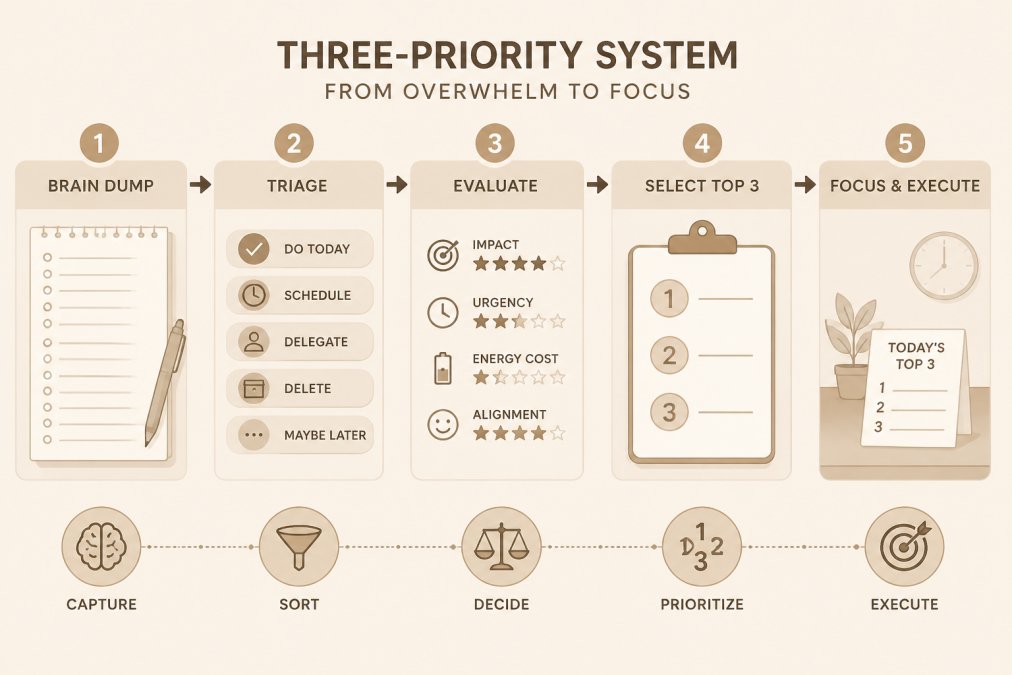
The best prioritization methods are simple enough to use in the moment, but thoughtful enough to guide you toward what matters.
The Three-Priority Rule
Choose three things. Not ten. Not five. Three.
This rule works because it respects how ADHD brains handle competing priorities: you can hold three things in working memory, see a path through the day, and feel the momentum of completion.
The Three-Priority Rule isn't about ignoring everything else, it's about being realistic about what you can focus on in a single day. Everything else goes in the brain dump or tomorrow's list.
When you sit down with your ADHD planner for work, the first step is choosing your three: not everything you could do, but the three things that matter most today.
Breaking tasks into smaller steps
A task like "Finish the report" is too big. Your brain sees an overwhelming project, not a concrete action. Breaking it into smaller steps removes that paralysis.
ADHD Focus & Deep Work System: Task Initiation Planner →
Instead of "Finish the report," you might have:
- Open the template and review the outline
- Fill in the Q1 section with data
- Write the Q2 summary
- Review for accuracy
Each step is small enough for a single work session and concrete enough that you know exactly where to start. That's why the ADHD Focus & Deep Work System from Anchor Grove Studio includes a task-initiation toolkit, turning an overwhelming project into a first step you can actually take.

Focus Support and Distraction Management at Work
Focus isn't the problem. Starting is. But once you've started, staying focused becomes the next challenge, as emails, Slack messages, seemingly urgent tasks, or the urge to check something pull you away.
ADHD task management tools for work should include a system for handling distractions without losing your whole session, whether by capturing the interruption so you don't forget it and returning to focus work, or planning the session in advance so you know what to do if you get stuck.
Work session planning and body doubling
A work session planner helps you define what you're doing, how long you'll work, and what success looks like. Instead of opening email until you get distracted, you set a specific scope: "I'm writing the introduction to the report for 45 minutes."
This creates a container for your focus: you know when it ends, what you're working on, and what counts as done.
Body doubling, working alongside someone else even silently, is a powerful ADHD focus tool.
The ADHD Focus & Deep Work System includes prompts for both approaches, helping you plan your work session and notice what conditions help you focus.
Capturing interruptions without losing momentum
When something urgent comes up or you remember something you need to do, you have two choices: stop working to handle it, or forget it and lose focus wondering if you'll remember.
A distraction triage system gives you a third option: capture it quickly, then return to your work. Write down the interruption, note when you'll handle it, and refocus.
This only works if your capture system is fast. If writing down the interruption takes longer than just doing it, you'll skip the capture and lose focus anyway.
Choosing the Right Tool: Format, Cost, and Flexibility
| Tool | Format | Starting Price | Best For | Key Strength |
|---|---|---|---|---|
| 1-Month ADHD Printable Planner | Printable PDF | $5.00 | Testing before committing | Low-risk trial |
| ADHD Focus & Deep Work System | Digital Download | $16.00 | Task initiation and focus | Distraction triage |
| Printable ADHD Planner | Printable PDF | $22.00 | Daily and weekly planning | Three-priority structure |
| Digital ADHD Planner | Tablet-ready PDF | $22.00 | On-the-go planning | Hyperlinked navigation |
| ADHD Planning & Focus Bundle | Digital Download | $52.00 | Complete system | All three tools together |
One-time purchase vs. subscription models
Most ADHD task management tools for work come as subscriptions. You pay monthly and lose access if you stop, creating pressure to use the tool constantly to justify the cost.

One-time purchases remove that pressure. You buy the tool once, and it's yours.
All of Anchor Grove Studio's tools are one-time purchases.
If you're not sure which format will work, start with the 1-Month ADHD Printable Planner for $5. It's a full month of the planning system at a low price point, so after four weeks you'll know whether this approach works for you.
Printable, digital, and hybrid options
Printable planners work well if you like writing by hand and want less screen time. Print the pages at home or a local print shop for a physical system you can carry or leave on your desk.
Digital planners work well if you want everything in one place and prefer typing or stylus input.
Many people find a hybrid approach works best: a printable planner for daily and weekly planning, paired with a digital tool for capturing tasks and planning focus sessions, combining the tactile engagement of handwriting with the accessibility of digital tools.
What Actually Sticks: Designing for Real Work Days
A system that requires perfect consistency, expects you to start over after missing a day, or adds shame or judgment will fail.
The ADHD task management tools for work that actually stick are built for imperfect use.
If you're tired of planners that make you feel behind, Anchor Grove Studio's tools are built for how your brain actually works.
Start with the 1-Month ADHD Printable Planner to test the approach, the full Printable ADHD Planner or Digital ADHD Planner if you're ready to commit, or the ADHD Planning & Focus Bundle for a complete system from day one.
The real challenge with ADHD task management isn't finding a tool, it's finding one that works with your brain instead of against it.
Frequently Asked Questions
What makes ADHD task management tools different from regular productivity apps?
ADHD-specific tools address executive function challenges like task initiation, time blindness, and overwhelm. They use priority limits (like choosing three daily tasks instead of ten), flexible systems without rigid streaks, and brain dump features to move thoughts out of your head before deciding what matters. Regular productivity apps often assume you can already prioritize and start tasks easily, ADHD tools build in the support for those exact moments where you get stuck.
How do I use an ADHD planner for work if I struggle with task initiation?
Start by capturing everything on your mind in a brain dump section, no judgment, no organization yet. Then triage: what actually needs attention today? Choose three priorities maximum. For each priority, break it into the smallest possible first step. Use a focus session planner to define your starting point and realistic scope. Body doubling (working alongside someone, even virtually) or the two-minute floor (committing to just two minutes) can make starting feel less overwhelming.
Should I use a printable planner or a digital ADHD planner for work?
Printable planners work best if you prefer paper, want to reprint pages without guilt, or need a low-tech option. Digital planners on a tablet (using apps like GoodNotes) suit people who already live in their devices, want searchable notes, or prefer hyperlinked navigation. Some people use both: printable for weekly planning, digital for daily capture. Test the one-month trial ($5) to see which format you actually return to without judgment.
What is the three-priority rule for ADHD task management?
The three-priority rule means choosing exactly three things to focus on each day, instead of listing ten or twenty tasks. This prevents overwhelm and decision fatigue. Your brain has limited executive function; limiting priorities to three makes it possible to actually complete them and build momentum. The rest of your to-do list doesn't disappear, it's captured elsewhere (brain dump) so you can revisit it without feeling guilty about what didn't get done today.