Best Notion Templates for Productivity (ADHD-Friendly)
Table of Contents
- Quick Comparison: Best Notion Templates for Productivity
- Notion Templates for ADHD: What Makes Them Actually Work
- 1. ADHD Life Dashboard, Daily Life, Meals, and Brain Dump
- 2. ADHD Home Management, Zone Cleaning Without the Guilt
- 3. ADHD Relationship Care, People and Gift Tracking
- How to Organize Life in Notion Without Overbuilding Your System
- Minimalist Notion Dashboard Design for Low-Energy Days
- Free vs. Paid Notion Templates for Productivity: What to Know
- Frequently Asked Questions
Last Updated: August 24, 2026
Finding the best Notion templates for productivity when you have ADHD is less about aesthetics and more about survival. Most productivity systems assume you'll remember to open them, feel motivated to update them, and never have a day where executive function disappears entirely. At Anchor Grove Studio, we built our Notion templates specifically for the brain that works differently: toggle-based layouts that hide clutter, mobile quick-capture so nothing requires sitting at a desk, and zero shame when you miss a week.
Below, we cover the three core Notion templates from Anchor Grove Studio, how to set up a system that won't overwhelm you, and what to look for when deciding between free and paid options.
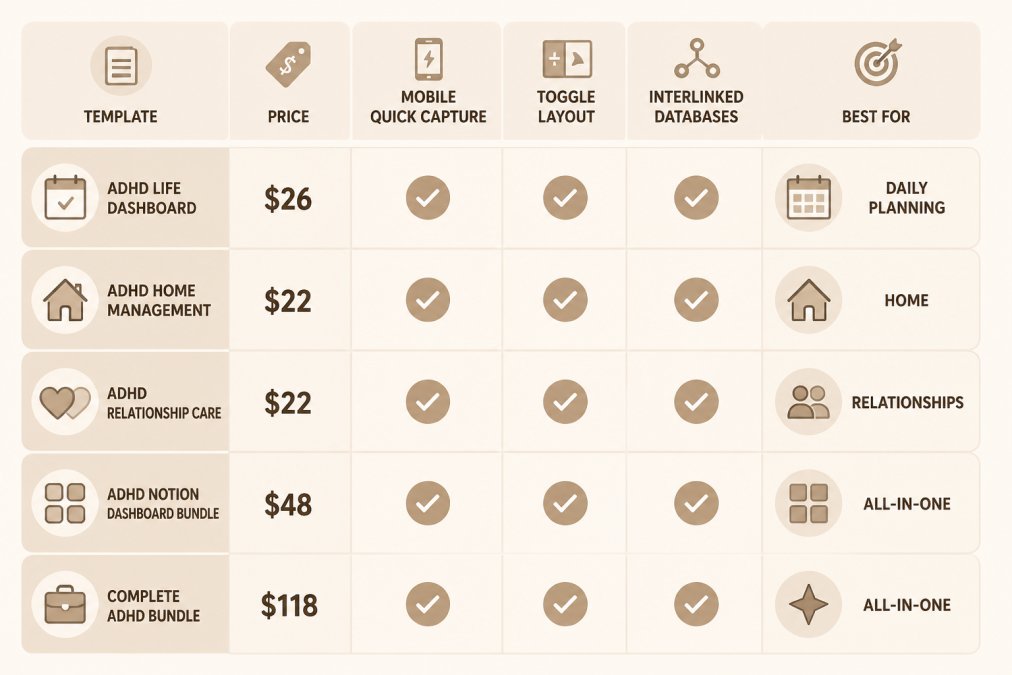
Quick Comparison: Best Notion Templates for Productivity
The best Notion templates for ADHD-friendly productivity share three traits: they hide what you're not using, they work on mobile, and they don't require daily maintenance to stay functional.
| Template | Price | Mobile Quick Capture | Toggle Layout | Interlinked Databases | Best For |
|---|---|---|---|---|---|
| ADHD Life Dashboard | $26 | Yes | Yes | Yes (6 databases) | Daily planning, meals, brain dump |
| ADHD Home Management | $22 | Yes | Yes | No | Zone cleaning, chore rotation |
| ADHD Relationship Care | $22 | Yes | Yes | No | People tracking, gift ideas |
| ADHD Notion Dashboard Bundle | $48 | Yes | Yes | Yes (all 3 linked) | All-in-one daily life system |
| Complete ADHD Bundle (10 products) | $118 | Yes | Yes | Yes | Full ADHD toolkit with planners + Notion |
Quick Picks:

- Best Overall: ADHD Notion Dashboard Bundle ($48), three interlinked dashboards, one duplicate-and-go setup, saves $22 vs. buying separately
- Best Single Template: ADHD Life Dashboard ($26), six databases covering daily life, meals, and brain dump
- Best for Home Tasks: ADHD Home Management ($22), zone-based cleaning matched to energy levels
Notion Templates for ADHD: What Makes Them Actually Work
Most Notion templates fail ADHD users because they show everything at once. A blank database with 12 columns, five views, and a sidebar full of linked pages is cognitively exhausting before you've typed a single word.
According to CHADD's overview of executive function challenges in adults with ADHD, working memory and task initiation are the two functions most commonly disrupted, which means a good template needs to reduce the number of decisions required just to start using it.
The Anchor Grove Studio templates address this through toggle-based architecture. Everything is collapsed by default. You open what you need, when you need it, and the rest stays out of sight. This isn't a design preference; it's a functional accommodation for object permanence challenges that many ADHD adults experience.
Three other features separate genuinely ADHD-friendly templates from ones that just look calm:
- Mobile quick-capture setup: If you can't add a thought in under 10 seconds from your phone, you won't add it at all
- No required daily check-ins: The system should work even if you ignore it for a week
- Interlinked databases: Meal planning connected to a shopping list connected to ingredients means fewer places to look
1. ADHD Life Dashboard, Daily Life, Meals, and Brain Dump
The ADHD Life Dashboard ($26) includes six interlinked databases: Brain Dump, Journal, Recipes, Ingredients, Meal Plan, and Shopping List, all organized into a toggle-based layout that surfaces only what you're actively working on.

The meal planning integration is the standout feature. Most productivity templates treat food as an afterthought. This one connects recipes to ingredients to a shopping list, so meal planning doesn't require opening three separate apps or remembering what's already in your fridge.
The Brain Dump database inverts the common Notion mistake: dump first, sort later (or never). The goal is getting thoughts out of your head and into a place they won't disappear.
Best for: Adults managing daily planning, meal prep, and a high volume of scattered thoughts who want one dashboard that handles all three.
Add to cart: ADHD Life Dashboard, $26
2. ADHD Home Management, Zone Cleaning Without the Guilt
The biggest mistake most cleaning systems make for ADHD is assuming consistent energy. Fixed schedules collapse the moment you have a low-energy day, which then becomes a low-energy week, which then becomes shame about the state of your home.
The ADHD Home Management template ($22) is built around zone-based chore rotation matched to energy level rather than day of the week. Instead of asking "what day is it," you ask "what can I actually do right now." Five-minute resets are built in as their own category, so even a barely-functional day produces some forward movement.

A home brain dump section captures tasks as they occur to you, the leaking faucet you noticed at 11pm, the cabinet that needs reorganizing, without requiring you to immediately schedule or categorize them. According to ADDitude Magazine's guide to managing ADHD at home, breaking household tasks into smaller, energy-matched chunks is one of the most consistently effective strategies for ADHD adults managing home responsibilities.
Best for: Anyone who has tried (and abandoned) a cleaning schedule and needs a system that accounts for variable energy and imperfect weeks.
Add to cart: ADHD Home Management, $22
3. ADHD Relationship Care, People and Gift Tracking
ADHD affects relationships not because of lack of care, but because of object permanence. People you genuinely love can disappear from your awareness simply because they're not physically in front of you. Birthdays pass. Months go by without reaching out.
The ADHD Relationship Care template ($22) addresses this directly with three components: a People database, a Gift Ideas tracker, and a Reach Out Brain Dump. The People database keeps key contacts visible so they don't fall out of awareness. The Gift Ideas tracker captures gift thoughts in the moment, not two days before a birthday when you're panicking. Like the other templates, it includes mobile quick-capture setup and uses the same toggle-based, low-clutter layout.
Best for: ADHD adults who want to maintain relationships more intentionally without relying on memory or motivation.
Add to cart: ADHD Relationship Care, $22
How to Organize Life in Notion Without Overbuilding Your System
The most common Notion mistake among ADHD users isn't picking the wrong template. It's building too much, too fast. A new system feels exciting. You add a habit tracker, a kanban board, a goal-setting database. Then the system becomes the task, and nothing else gets done.
Start With One Dashboard, Not Five
Personal knowledge management works best when it has a single entry point. Pick the template that addresses your highest-friction area and use only that for the first two weeks. Resist the urge to connect it to anything else or add new pages.
The ADHD Notion Dashboard Bundle ($48) is the exception to this rule, but only because the three templates it includes are already designed to work together.
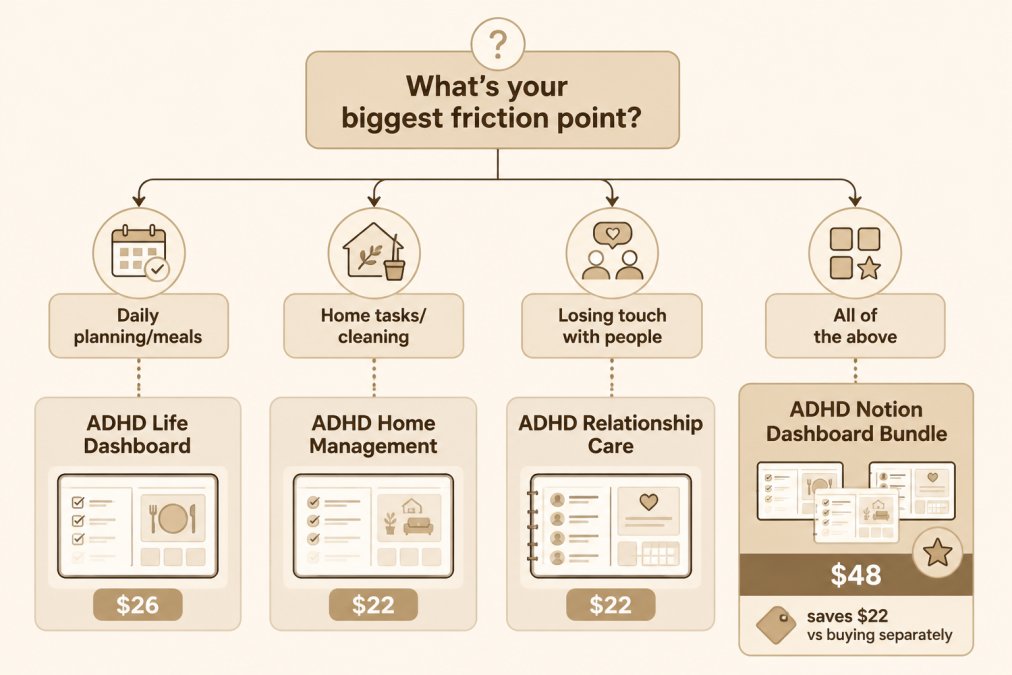
If you're starting from scratch:
- Daily planning and meals are the biggest pain point → ADHD Life Dashboard
- Home management and cleaning are where things fall apart → ADHD Home Management
- Relationships feel neglected → ADHD Relationship Care
- All three feel broken → ADHD Notion Dashboard Bundle (saves $22)
Template Maintenance: Keeping Friction Low Over Time
A common mistake is treating a Notion template like software that needs regular updates and optimization. It doesn't. The goal is the opposite: set it up once, use it imperfectly, and let it keep working even when you don't.
The toggle-based layout is specifically designed for low-maintenance use. Sections you don't use stay collapsed and invisible. Databases you ignore for a week don't break or require catching up.
Minimalist Notion Dashboard Design for Low-Energy Days
For ADHD users, visual clutter is a functional barrier. A page with 20 visible items requires your brain to filter and prioritize before you've done anything useful. A page with three visible items doesn't.
The toggle-based layout used across all Anchor Grove Studio templates operationalizes minimalism at the structural level. The dashboard doesn't show you everything; it shows you the section headers. You expand what you need. Everything else stays hidden until you ask for it.
This design approach aligns with what Understood.org's resource on ADHD and working memory describes as reducing cognitive load for people with working memory challenges: fewer simultaneous demands on attention means more capacity for the actual task.
Mobile-First Usability and Quick Capture Setup
Most Notion templates are designed on desktop and used on desktop. For ADHD users, that's a critical gap. Thoughts arrive on the go. If capturing a thought requires sitting down, opening a laptop, and navigating to the right database, most thoughts won't get captured.
Every Anchor Grove Studio Notion template includes mobile quick-capture widget setup instructions. The setup process places a widget on your phone's home screen that opens directly to the capture database, no navigation, no friction. Tap, type, done.
Quick capture setup checklist:
- Duplicate the template into your Notion workspace
- Follow the included widget setup instructions for your phone (iOS or Android)
- Add the widget to your home screen
- Test it: open the widget, type one thought, close it
- Do not add anything else until you've used this one for a week
Free vs. Paid Notion Templates for Productivity: What to Know
Free Notion templates exist and many are genuinely useful for general productivity. The limitation is specificity. Most free templates are built for a general audience: students, project managers, content creators. They include kanban boards, Gantt charts, and habit trackers with streak counters that actively punish the inconsistency that characterizes ADHD.
Paid ADHD-specific templates are designed around the actual failure points: task initiation, object permanence, energy variability, and shame around falling behind. The design decisions are different because the user's needs are different.
| Option | Cost | Best For |
|---|---|---|
| Free general Notion templates | $0 | Students, project management basics |
| ADHD Life Dashboard | $26 | Daily planning, meals, brain dump |
| ADHD Home Management | $22 | Zone cleaning, energy-matched tasks |
| ADHD Relationship Care | $22 | People tracking, gift ideas |
| ADHD Notion Dashboard Bundle | $48 (saves $22) | All three areas, one system |
| Complete ADHD Bundle (10 products) | $118 | Full toolkit: Notion + planners + guides |
If you've tried free templates and abandoned them, the issue probably isn't Notion itself. It's that the template wasn't built for how your brain actually works. A pre-built, duplicate-and-go template removes the barrier of customization entirely.
The ADHD Notion Dashboard Bundle at $48 is the best starting point for most users. It covers daily life, home management, and relationships in one system, uses consistent design across all three, and costs less than buying each template individually. For users who want the complete Anchor Grove Studio collection including printable planners and financial trackers, the Complete ADHD Bundle (10 products) at $118 offers the best per-item value.
Managing daily life with ADHD means finding systems that keep working even when your motivation doesn't. Most productivity tools are built for consistency, not variability. Anchor Grove Studio's Notion templates are designed specifically for the opposite: low-clutter layouts that hide complexity, mobile quick-capture that removes friction, and no shame built into the design when you miss a week. The ADHD Life Dashboard, ADHD Home Management, and ADHD Relationship Care templates each address a specific friction point, and the ADHD Notion Dashboard Bundle brings all three together at a lower cost. Add to cart and have your system duplicated into Notion today.
Frequently Asked Questions
What is the best Notion productivity template for someone with ADHD?
The ADHD Life Dashboard ($26) is a strong starting point for most people. It combines a brain dump, journal, meal plan, and shopping list into one toggle-based workspace so you only see what you're actively working on. If you want daily life, home management, and relationship tracking together, the ADHD Notion Dashboard Bundle ($48) covers all three interlinked dashboards at a lower cost than buying each separately.
Are Notion templates for ADHD actually plug-and-play, or do I need to set them up myself?
The templates from Anchor Grove Studio are duplicate-and-go. After purchase you receive a Notion template link. One click copies the entire workspace into your own Notion account with all databases, toggles, and layout already built. Each template also includes mobile quick-capture widget setup instructions so you can add a home screen shortcut without any technical configuration.
Are free Notion templates better than paid ones for productivity?
Free templates cover basic task management and work well for simple workflows. Paid templates designed for specific needs, like ADHD-friendly systems, tend to include pre-built databases, toggle layouts that reduce visual clutter, and onboarding instructions. The value is in setup time saved and design decisions already made for your use case, not just the feature count.
How can Notion templates help with task initiation?
Task initiation is often blocked by not knowing where to start, not by a lack of motivation. A well-structured Notion template reduces that decision load by showing you only the next visible action. Toggle-based layouts hide everything except the current task. The ADHD Focus and Deep Work System ($16) adds a task-initiation toolkit with strategies like the 2-minute floor and temptation bundling specifically to address the starting barrier.
Is Notion still a relevant productivity tool in 2026?
Notion remains one of the most flexible personal knowledge management tools available. Its database, kanban board, and linked-page structure make it adaptable for everything from daily planning to project management and habit tracking. The biggest shift in 2026 is toward purpose-built templates that reduce setup time, pre-configured workspaces work better for most people than building a system from scratch.
This article was written using GrandRanker