
Buy a Printable ADHD Daily Planner That Works
Table of Contents
- What to Look for Before You Buy a Printable ADHD Daily Planner
- Printable Options Worth Buying: A Quick Comparison
- How to Use a Planner With ADHD Without Quitting in Week Two
- Building an ADHD-Friendly Daily Schedule Template That Fits Your Energy
- Digital vs Printable ADHD Planners: Which One Sticks?
- Why Planner Abandonment Happens and How to Stop It
- What Should You Print First?
- Frequently Asked Questions
Last Updated: September 16, 2026
What to Look for Before You Buy a Printable ADHD Daily Planner
A printable ADHD daily planner is a reprintable, undated planning system built around fewer decisions and lower pressure, so it still works on days when your executive function is not cooperating. Most planners fail ADHD users because they assume consistent motivation and a working memory that holds a list of ten. This guide from Anchor Grove Studio covers what actually matters before you spend money, and where to buy a printable ADHD daily planner that you will still open in week six.

Three Priorities, Not Ten
The single biggest design flaw in conventional planners is the ten-item to-do list. When everything is on the list, prioritization never happens, and the list becomes a record of failure by 2 p.m.
No Shame Language, No Rigid Streaks
Streak-based habit trackers punish exactly the people they claim to help. Miss two days, the chain breaks, and the whole system feels contaminated.
Printable Options Worth Buying: A Quick Comparison
Anchor Grove Studio sells four low-clutter options, and the right one depends on whether you want to test the system or commit to it. All are instant downloads, so there is no shipping or waiting.
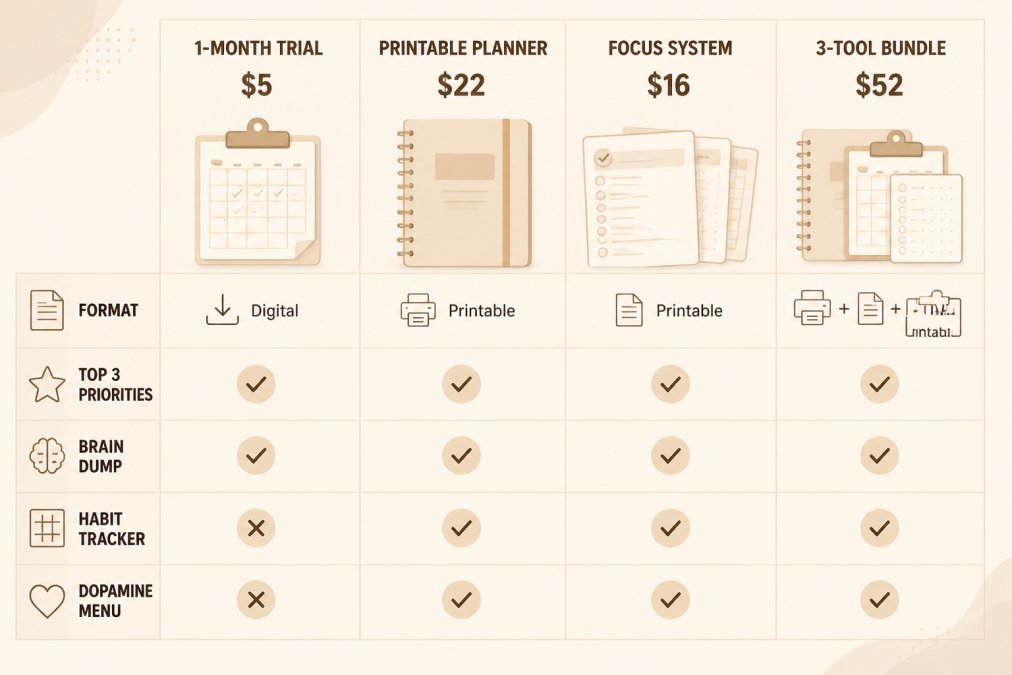
| Product | Price | Format | Key Feature | Best For |
|---|---|---|---|---|
| 1-Month Trial Planner | $5.00 | Printable PDF | Top 3 priorities, 4-week tracker | Testing the system first |
| Printable ADHD Planner | $22.00 | Editable .pptx, US Letter | Brain Dump & Triage, Dopamine Menu | Full daily, weekly, monthly system |
| ADHD Focus & Deep Work System | $16.00 | .pptx plus print-ready PDF | Task-Initiation Toolkit | Getting started, not just planning |
| ADHD Planning & Focus Bundle | $52.00 | All three above | Saves $22 versus buying separately | One system for paper and tablet |
How to Use a Planner With ADHD Without Quitting in Week Two
The answer is to lower the daily commitment to under two minutes. A planner you fill in for 90 seconds beats a beautiful spread you skip because it takes twenty.

- Open the planner at the same anchor point each day, such as with morning coffee
- Brain dump for 60 seconds, no editing
- Circle three items only
- Close it and go
CHADD's overview of executive function in ADHD
Building an ADHD-Friendly Daily Schedule Template That Fits Your Energy
An ADHD-friendly daily schedule template is a flexible daily layout that adjusts to your energy instead of demanding a fixed routine. It plans by capacity, not by clock. The difference between a template that works and one that does not usually comes down to how it manages cognitive load, the amount of working memory, decision-making, and self-monitoring a page demands before you have done a single task.
Why Layout Reduces Cognitive Load
Working memory in ADHD is often described as having fewer slots available at once. Every open loop on a page, an unscheduled task, an unmade decision, an ambiguous category, occupies one of those slots. A planner that shows twenty undifferentiated lines is not neutral; it is actively consuming the capacity you need for the work itself.
Three layout mechanics reliably reduce that load:
- Capped task slots. A fixed number of lines (three priorities, plus a short "if energy allows" list) removes the recurring decision of how many things to write down. The cap does the deciding for you.
- Color coding with a purpose. Color should encode one thing only, for example, blue for must-do, green for maintenance, gray for optional. Multi-purpose color systems add a decoding step and backfire.
- Chunking by time-of-day block, not by clock time. "Morning / midday / evening" blocks tolerate a late start. A 7:00-7:30 a.m. grid does not, and a missed block reads as failure.
A Concrete Daily Layout Anatomy
A workable energy-based daily page usually contains, in this order:
- Brain dump zone at the top, open, unlined space for every open loop, written fast and unedited.
- Top 3 priorities, three numbered lines, no more.
- Energy check, a single row of three boxes (low / medium / high) marked at the start of the day.
- Time-of-day blocks, three to four blocks, each with one intended outcome, not a task list.
- Maintenance row, water, medication, food, movement, sleep. These are not goals; they are baseline, and they should be checkable in one stroke.
- One-line reflection, what actually happened, written at the end of the day in a single sentence.
Matching the Template to Your Actual Energy Pattern
Before building any routine, track your energy for one week using the same three-box scale. Most people find their peak window is narrower than they assumed, often two to three hours, not a whole morning. Schedule the single hardest task inside that window and treat everything outside it as maintenance or low-stakes work.
Accessibility Settings That Belong in the Template Itself
Energy-based planning only works if the page is readable when you are tired. Three settings matter more than aesthetics:
- Font size and weight. Body text at 12-14 pt with generous line spacing is easier to scan than condensed 9 pt type, even if it uses more paper.
- Contrast. Dark text on a light, non-glossy background reduces visual strain. Reversed (light-on-dark) layouts look modern but are harder to read in bright rooms and on cheap printers.
- Typeface choice. Sans-serif faces with distinct letterforms (clear distinction between l, I, and 1) reduce misreading for readers with dyslexia or visual stress. Avoid decorative scripts entirely in functional fields.
CHADD's overview of executive function in ADHD
Printable ADHD Planner: No-Shame Daily →
Digital vs Printable ADHD Planners: Which One Sticks?
Most comparisons frame this as a binary: paper for focus, digital for convenience. That framing is the reason so many people abandon both. The more useful question is which jobs each format is actually good at, and how to split the work between them.
What Paper Does Better
Paper wins on three specific jobs:
- Capture without competition. A printed page has no other app behind it. There is no notification layer, no tab to check, no badge count. For the brain-dump step, that single-purpose surface matters more than any feature.
- Friction as a feature. Writing by hand is slower than typing, and that slowness forces a real prioritization decision. You cannot casually add a fifteenth item.
- No setup cost. Print and go. There is no import step, no stylus pairing, no template alignment to fix.
What Digital Does Better
Digital wins on a different set of jobs:
- Reminders that fire without you opening anything. A paper planner cannot tap you on the shoulder at 4 p.m. A calendar app can.
- Search and history. Finding what you wrote three weeks ago is trivial in a PDF annotation app and tedious in a paper notebook.
- Reprint-free resets. A missed week costs nothing to reset on a tablet.
The Hybrid Workflow Most Guides Skip
The pattern that holds up for most people is a split, not a choice:
- Paper for the daily page. Brain dump, top three, energy check, time-of-day blocks. This is the thinking surface.
- Digital for time-based reminders. Anything with a clock attached, appointments, medication, recurring calls, lives in a calendar app with an alarm.
- One weekly transfer. Once a week, move anything still open from paper into a single digital list, then close the paper week. This prevents the paper planner from becoming a graveyard of stale tasks.
A Quick Decision Framework
| Your situation | Start with |
|---|---|
| You lose track of time and miss appointments | Digital calendar first, paper daily page second |
| You already annotate PDFs daily on a tablet | Digital planner, add a printed weekly review page |
| You abandon apps because of notifications | Paper daily page, digital only for alarms |
| You travel and cannot reprint | Digital planner with hyperlinked navigation |
| You are testing whether you will stick with planning at all | Paper, one week printed at a time |
Format Comparison at a Glance
| Factor | Printable | Digital PDF |
|---|---|---|
| Distraction risk | Low, no notifications | Higher, same device as email |
| Reminder capability | None built in | Strong, if you use a calendar app |
| Reprint after a missed week | Yes, print again | Reset the page |
| Search and history | Manual | Fast |
| Setup time | Print and go | Import into an app, add a stylus |
| Best for | Thinking and deciding | Reminders and retrieval |
Anchor Grove Studio's digital planner is built for GoodNotes and similar PDF apps, with hyperlinked navigation and the same low-clutter layouts. If you want both, the three-tool bundle covers paper and tablet for $52.

Why Planner Abandonment Happens and How to Stop It
Planner abandonment is the pattern where a new system gets used intensely for one to two weeks, then stops entirely after a missed day. The cause is almost never laziness. It is that the planner had no re-entry path.
Fix it with three rules:
- Never restart from a blank month. Start from today.
- Keep the old pages. They are a record, not a debt.
- Set one weekly review, ten minutes, no catch-up allowed.
What Should You Print First?
Print one week, not the whole file. This keeps the commitment small and tells you whether the layout fits before you spend paper on a month.
Frequently Asked Questions
What should be included in an ADHD daily planner?
An ADHD daily planner needs fewer moving parts than a standard planner. Look for a Top 3 priority structure instead of a long task list, a brain dump or triage page to get thoughts out of your head, a habit tracker that notices patterns without demanding streaks, and undated pages so a missed day does not create a failed page. The Anchor Grove Studio printable planner includes all four, plus a Dopamine Menu for small rewards that make starting easier.
Are printable ADHD planners effective for executive dysfunction?
They can be, when the layout reduces decisions instead of adding them. Executive function challenges make it hard to start and to re-enter a task after a break. A planner that asks you to pick three priorities and offers a brain dump page lowers the cognitive load of deciding where to begin. The key is choosing a system with no shame language and no expectation of perfect consistency, so returning after an off day feels neutral rather than like a failure.
Can a daily planner help with ADHD time blindness?
A planner helps with time blindness only if it makes time visible. Time blocking, where you assign a task to a specific window rather than a vague someday slot, gives you a concrete anchor. Pair that with a daily schedule template that shows the whole day at a glance, including breaks and buffer time. The planner itself does not fix time blindness, but a visual, low-clutter layout makes it easier to see where the day actually goes.
Where can I buy high-quality printable ADHD planners?
Anchor Grove Studio sells instant digital downloads designed for ADHD brains. The 1-Month ADHD Printable Planner is $5 and includes a weekly layout, Top 3 priorities, brain dump pages, and a 4-week habit tracker. The full Printable ADHD Planner is $22 and adds undated daily, weekly, and monthly pages you can reprint. Both are one-time purchases with no subscription, delivered as editable PowerPoint files you can print at home or at a local print shop.