
Is Digital Planning Good for ADHD? A 2026 Guide
Table of Contents
- Why Digital Planning Fits the ADHD Brain
- Paper vs Digital Planning for ADHD: Which Sticks?
- Best Digital Planners for ADHD: What to Look For
- How to Use a Digital Planner for ADHD Without Abandoning It
- Managing ADHD Paralysis and Task Initiation Digitally
- Common Mistakes That Lead to Planner Abandonment
- Conclusion
- Frequently Asked Questions
Last Updated: September 27, 2026
Why Digital Planning Fits the ADHD Brain
For many adults with ADHD, the question "is digital planning good for ADHD" comes after a drawer full of abandoned paper planners. The short answer: yes, for most people, because digital tools offload working memory, automate reminders, and reduce the visual noise that makes traditional planners feel overwhelming. This guide from Anchor Grove Studio breaks down what actually works, what doesn't, and how to build a system you won't quit.

How Digital Tools Reduce Cognitive Load
Cognitive load is the mental weight of holding everything in your head at once. ADHD brains often run at capacity before the day even starts. A digital planner acts as an external brain: it stores the list so you don't have to. Fewer decisions about where things live means more bandwidth for actually doing them.
Reminders, Notifications, and Time Blindness
Time blindness makes "later" feel abstract. Digital reminders convert future tasks into present-tense prompts. A notification at 4:15 PM is concrete; a note that says "call the pharmacy" is not. Many users find that pairing visual scheduling with gentle alerts reduces missed appointments and forgotten tasks.
Paper vs Digital Planning for ADHD: Which Sticks?
Neither format wins outright. Paper offers tactile feedback and zero setup cost. Digital offers searchability, reminders, and portability. What matters is which one you'll actually open on a low-energy day.
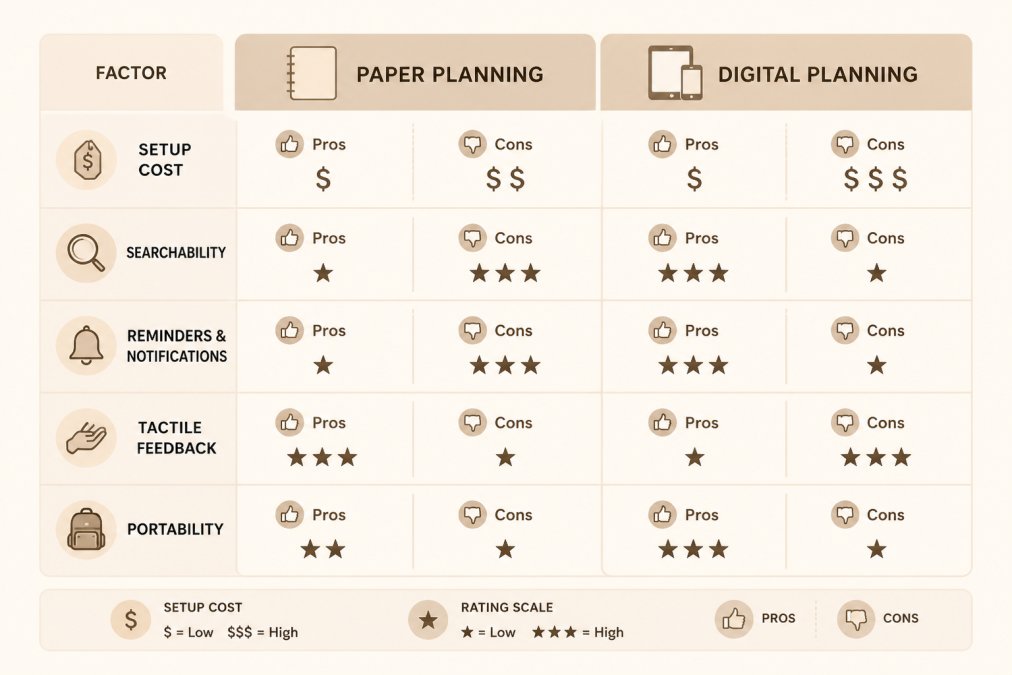
| Factor | Paper Planner | Digital Planner |
|---|---|---|
| Setup cost | Low | Varies by app |
| Searchability | Manual | Instant |
| Reminders | None | Automatic |
| Tactile feedback | Strong | Limited |
| Portability | One notebook | Device-based |
The Case for a Hybrid System
A hybrid system uses paper for brainstorming and digital for reminders. Many people with ADHD find this combination works because it plays to both strengths: the sensory satisfaction of writing things down, plus the reliability of a notification that won't forget.
Best Digital Planners for ADHD: What to Look For
The best digital planner for ADHD is not the one with the most features. It is the one whose interface asks the least of your executive function every time you open it. That distinction matters because most planning apps are designed for neurotypical users who can tolerate dense menus, nested folders, and multi-step setup. For an ADHD brain, every extra tap and every competing visual element is a small tax that compounds until opening the app feels like a chore.
Neurodivergent-Friendly UI/UX: What to Actually Evaluate
When you test a planner, evaluate the interface itself, not just the feature list:
- Color load. A screen with eight accent colors, gradient headers, and colored tags competes for attention. A calm palette with one or two accent colors used only for the current task reduces visual noise. This is not aesthetic preference; it is cognitive load management.
- Tap depth. Count the taps required to add a task from a cold open. One tap is ideal. Three or more taps means the app will lose to a sticky note.
- Tap target size. Small icons and tightly packed toolbars increase mis-taps, which increase frustration, which increases abandonment. Larger targets matter more on a phone than on a tablet.
- Shame language. Watch for copy like "You missed 4 tasks" or "Streak broken." Neutral framing ("4 items moved to tomorrow") preserves the willingness to return.
- Minimalist vs. feature-rich. A minimalist app lowers the entry cost but may lack the reminders and search you need. A feature-rich app offers power but raises the setup burden. The right answer depends on whether your failure mode is forgetting (favor reminders) or overwhelm (favor minimalism).
- Sensory considerations. Animation, sound effects, and haptic feedback help some users and distract others. Check whether each can be disabled.
Features That Actually Help
- Undated, reprintable or reusable pages
- Simple priority limits (three tasks, not ten)
- Brain dump and triage space
- Habit tracking without streak punishment
- Cross-device access
- A visible "today" view that does not require scrolling past overdue items
- One-tap capture from a home-screen widget or lock screen
Free vs Paid: When to Pay and When Free Is Enough
Most free tiers cover the basics: a task list, a calendar, and notifications. That is genuinely sufficient if your main problem is forgetting and you already have a capture habit. Paying for premium is worth it when at least one of these is true:
- You need cross-device sync that the free tier limits or locks behind a subscription.
- You need recurring reminders with custom schedules, not just daily or weekly.
- You need offline access on a tablet you use without reliable connectivity.
- You need a specific layout (undated, hyperlinked, low-clutter) that free templates do not offer.
How to Use a Digital Planner for ADHD Without Abandoning It
Planner abandonment is the norm, not the exception. A common pattern among adults with ADHD is a two-to-three-week honeymoon: elaborate setup, enthusiastic use, one missed day, then total avoidance because reopening the planner now carries a backlog of guilt. The fix is not more discipline. It is a system designed to expect gaps and make re-entry frictionless.
Digital ADHD Planner: Tablet & →
The Restart Protocol (Not the Streak)
Instead of a streak you can break, build a restart ritual you can repeat. A workable version:
- Open, don't plan. Set a recurring five-minute alarm labeled something neutral like "open planner." The only goal is to open the file. No backlog review, no catch-up.
- Archive, don't reconcile. Create a single "Old Weeks" page or folder. Drag every missed day or week into it without reading it. You are not auditing the past; you are clearing the runway.
- Pick one anchor task. Write down the single next physical action for the most time-sensitive item ("open the insurance portal," not "deal with insurance").
- Close it. Closing the planner after one task is a success, not a shortcut.
Habit Stacking for Digital Tools
Habit stacking pairs a new behavior with an existing one so the cue is automatic. For digital planning, the stack has to attach to something you already do on the same device:
- After you dismiss your morning alarm, open the planner and read only today's page.
- After you pour your first coffee or tea, do a two-minute brain dump.
- After you close your laptop for the day, move unfinished items to tomorrow rather than leaving them on today.
Wiring the Planner Into Other ADHD Coping Mechanisms
A digital planner is stronger when it is not the only tool in the system. Three integrations that practitioners and ADHD coaches commonly recommend:
- Medication reminders. Put stimulant or non-stimulant dose reminders in the same app you use for tasks, so the notification stream is unified. Splitting reminders across three apps is how doses get missed.
- Body doubling. Many digital planners and calendar apps support shared sessions or focus timers. Scheduling a body-double block on the calendar turns an abstract intention into a concrete appointment with another person.
- Sensory regulation. If you use noise-canceling headphones, a weighted lap pad, or a specific playlist to settle before work, add a recurring "regulate" block before your first deep-work task. The planner becomes the trigger for the sensory routine, not a replacement for it.
Managing ADHD Paralysis and Task Initiation Digitally
ADHD paralysis is the freeze that happens when a task feels too big or too vague. Digital tools help by breaking tasks into visible next steps. A "brain dump" page lets you empty your head, then pick one item. Task prioritization becomes choosing, not deciding from scratch.
Common Mistakes That Lead to Planner Abandonment
The biggest mistake is building a perfect system before using it. Other culprits: too many categories, streak-based habit tracking, and treating a missed day as failure. The fix is a system that expects off days and welcomes you back without penalty.
Conclusion
Building a planning system that survives real ADHD life takes the right tools and zero shame. If you're tired of starting over, Anchor Grove Studio offers calm, ADHD-friendly planners, trackers, and Notion templates designed to work with your brain, including undated pages you can restart anytime, no rigid streaks, and instant digital downloads with no shipping wait. Get started with Anchor Grove Studio and build a system you'll actually come back to.
Frequently Asked Questions
Does digital planning help with executive dysfunction?
Digital planning can support executive function by offloading memory and prioritization to an external system. Reminders and notifications reduce reliance on working memory, while visual scheduling makes time more concrete for people with time blindness. The key is choosing a low-clutter layout so the tool reduces cognitive load instead of adding to it.
What is the best digital planner for someone with ADHD?
The best digital planner for ADHD is one with low visual clutter, flexible undated pages, and simple navigation. Look for planners that let you start over without penalty, avoid rigid streaks, and support both high- and low-energy days. Tablet-ready PDF planners with hyperlinked navigation, like the Digital ADHD Planner from Anchor Grove Studio, are built for this kind of flexible use.
What is the 24 hour rule for ADHD?
The 24 hour rule is a common ADHD strategy where you wait a day before acting on an impulse purchase, commitment, or big decision. It creates a buffer between the initial urge and follow-through, which gives you time to check whether the choice fits your goals. Some people apply it to spending, others to scheduling, and it pairs well with a digital tracker that logs the decision.
How do I choose a planner I will actually use with ADHD?
Start with the format you will reach for most: tablet, print, or a hybrid of both. Then check for ADHD-friendly design, meaning fewer pages, clear priorities, and no shame language when you miss a day. Pick one system, use it for two weeks, and adjust rather than switching. A planner you return to after an off day beats a perfect one you abandon.