
Minimalist Digital Task Managers for ADHD: 2026 Guide
Table of Contents
- Why Minimalist Design Matters for ADHD Task Management
- Key Features to Look for in a Minimalist Task Manager
- Notion Templates for ADHD Task Management
- How to Organize Tasks With ADHD
- Best Task Management Systems for Time Blindness
- Building a Sustainable Task Management Routine
- Frequently Asked Questions
Last Updated: October 5, 2026
Why Minimalist Design Matters for ADHD Task Management
The problem with most task managers isn't that they lack features. It's that they overwhelm you with them. A minimalist digital task manager strips away this excess to support ADHD brains.
When you have ADHD, cognitive load is real. Every button, notification, and color choice competes for your attention. A tool designed to help you organize tasks can become another source of mental clutter. Minimalist design changes this.
A minimalist digital task manager strips away unnecessary visual noise and focuses on clarity, simplicity, and the ability to start.
The Problem With Feature-Heavy Tools
Feature-heavy task managers assume consistency and reward perfection with unlockable features and streak counters. For ADHD brains, this creates shame, not motivation.
Tools that demand daily logins, micro-task tracking, and perfect streaks require more executive function to maintain than the actual tasks do, leading to abandonment within two weeks.
The real cost is the guilt that follows. The minimalist alternative removes this trap by design.
How Minimalist Interfaces Reduce Cognitive Load
Minimalist interfaces reduce sensory overload by limiting colors and animations, cut decision fatigue by showing only what matters right now, and support task decomposition without forcing rigid systems.
When you open a minimalist task manager, you see your three priorities for today, a brain dump space, and a simple way to start, no gamification badges, no shame language.
A minimalist design addresses time blindness and task initiation by providing visual time markers and reducing friction between intention and action.
Key Features to Look for in a Minimalist Task Manager
The best minimalist task managers share specific features that support ADHD-specific challenges: time blindness, executive dysfunction, and decision fatigue.
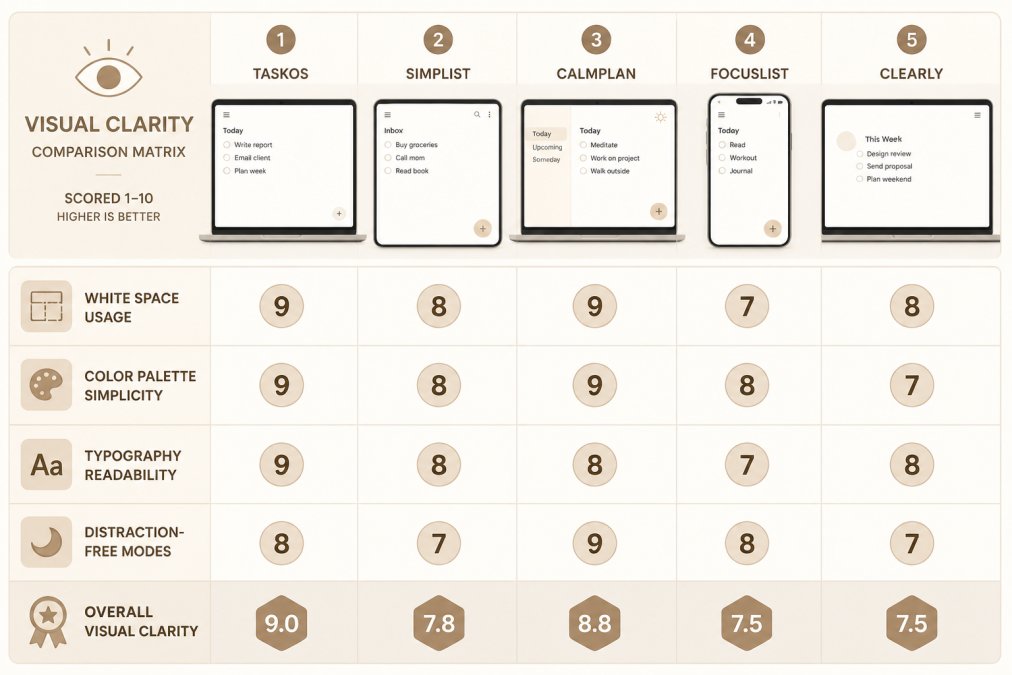
Visual Clarity and Low Distraction
A truly minimalist interface uses white space strategically and lets you focus on one area at a time through toggle-based layouts, collapsible sections, or distraction-free modes.
Visual clarity means readable typography, consistent spacing, and a color palette that doesn't cause sensory overload. True minimalism is elegant and functional.
The best minimalist task managers offer customization without complexity, adjust colors, fonts, or layout without diving into settings menus.
Task Decomposition and Starting Support
Executive dysfunction often shows up as task initiation paralysis. A minimalist task manager should make breaking tasks into smaller steps feel natural, not forced.
Look for tools that ask clarifying questions like "What's the very first step?" These prompts reduce planning's cognitive load and support the moment between knowing what to do and actually doing it.
Some tools include starting supports like body doubling prompts or the two-minute floor technique.
Flexibility for Variable Energy and Capacity
ADHD energy fluctuates. A minimalist task manager should work on both productive and low-energy days without judgment.
This means no rigid daily requirements, no streak counters, and no "failed" pages. The system should let you return at any point without penalty and adjust priorities based on actual capacity.
Flexibility also means supporting both analog and digital preferences, printable, digital, or Notion-based, so you can choose what your brain needs today.
Notion Templates for ADHD Task Management
Notion is popular for ADHD task management because it's flexible and customizable. The key is starting with a template designed for ADHD brains, not building from scratch.
Brain Dump and Triage Systems
A brain dump is essential for ADHD. It's a judgment-free space to capture every thought, task, and idea that's cluttering your mind. Once everything is out of your head and into the system, you can triage it: What actually needs your attention? What can wait? What can be deleted?
In Notion, a brain dump database should be simple to add to, ideally from your phone while you're on the go. It should have a quick-capture setup so you're not fumbling through menus.
The ADHD Life Dashboard from Anchor Grove Studio includes a brain dump database specifically designed this way. You can capture thoughts quickly, then organize them into your meal plan, journal, or task list without leaving the dashboard.

Flexible Daily and Weekly Planning
Weekly planning is where minimalist Notion systems shine. Instead of forcing you into a rigid daily routine, a good template lets you plan around your actual week: meetings, energy levels, and unexpected changes.
Look for templates that use a simple three-priority structure for daily planning. Instead of a 20-item to-do list, you choose the three things that matter most today.
Weekly reviews should be optional, not mandatory. The best templates include a weekly check-in that helps you notice patterns without grading your performance. Did you start tasks more easily on certain days? Were there conditions that supported your focus? This kind of reflection builds self-awareness without shame.
How to Organize Tasks With ADHD
Organization without rigidity is the goal. You want systems that support consistency without demanding perfection.
ADHD Life Dashboard: Notion Brain Dump, Meals & Journal →
The Three-Priority System
Most ADHD task managers fail because they ask you to manage too many priorities at once. Decision fatigue sets in, and you end up doing nothing.
The three-priority system flips this. Each day, you choose three things that matter. Not ten. Not twenty. Three. This reduces cognitive load immediately. Your brain can hold three priorities. It can't hold twenty.
The three priorities can be anything: a big project, a small task, or even "rest and recover." The point is that you're choosing what matters today based on your actual capacity. On low-energy days, your three priorities might be shower, eat, and one small task. On high-energy days, they might be bigger. Both are valid.
Managing Time Blindness Through External Cues
Time blindness is a hallmark of ADHD. You lose track of time easily, which makes it hard to plan your day or stick to deadlines. External cues help: visual time markers, alarms, or anchors in your calendar.
A minimalist task manager should include ways to add visual time markers to your tasks. This might be a time estimate, a deadline color-coded by urgency, or a weekly anchor that helps you see where the task fits in your schedule.
Some people use a habit tracker to notice patterns without rigid streaks.
Best Task Management Systems for Time Blindness
Time blindness is one of the most underrated ADHD challenges. When you can't feel time passing, you can't plan, prioritize, or manage deadlines effectively. The best task management systems for time blindness use external visual cues to compensate.
Visual Time Markers and Anchors
Visual time markers make time concrete. This might be a weekly calendar view that shows how tasks fit into your week, color-coded deadlines, or time estimates that help you see how long things actually take.
Some systems use time-blocking, assigning specific time slots to tasks. Others use visual anchors like "this needs to be done before Friday" or "this is due in three days." The point is that time becomes something you can see and plan around, not something invisible that's always catching you off guard.
According to research on time perception in ADHD, external time markers significantly improve task completion rates. When you can see time visually, you're more likely to start tasks earlier and manage deadlines effectively.
Gamification and Reward Loops Without Shame
Gamification gets a bad reputation in ADHD spaces because streak counters and perfectionism badges often backfire. But gentle reward systems, when done right, can support motivation without shame.
The best approach is letting you define what "winning" looks like. Instead of a system that judges you, you're choosing small rewards that actually motivate you. This might be a dopamine menu where you list things that make starting easier: body doubling, a favorite snack, or five minutes of a show you love.
Anchor Grove Studio's Printable ADHD Planner includes a dopamine menu for exactly this reason. You're not earning badges. You're identifying what actually supports your focus, then using those tools intentionally. It's self-knowledge, not gamification.
Building a Sustainable Task Management Routine
The best system in the world won't help if you abandon it after two weeks. Sustainability means designing a routine that works on your hardest days, not just your best ones.
Starting Small and Returning After Off Days
The biggest mistake people make is trying to implement a perfect system all at once. They download the app, spend hours setting it up, and then burn out because maintaining it feels like another job.
Start smaller. Use one feature. Get comfortable with it. Add another when you're ready. This gradual approach prevents overwhelm and builds momentum.
Equally important: the system should let you return after off days without shame. You missed a week? Open it up and start again. You didn't do your weekly review? Skip it and move forward.
The ADHD coaching research on habit formation shows that flexible return points are critical for long-term adherence. When you can start over without judgment, you're more likely to keep trying.
Avoiding Common Abandonment Patterns
Most people abandon task managers for predictable reasons: they're too complex, they require too much maintenance, or they trigger shame when you fall behind.
A minimalist system avoids these traps by design. It's simple enough to use on hard days. It doesn't require daily logging or perfect consistency. It includes no shame language or "failed" markers.
The key is choosing a system designed for ADHD brains from the start, not trying to adapt a generic productivity tool. Executive function support in ADHD management emphasizes that systems designed specifically for neurodivergent needs have significantly higher adoption rates.
If you've tried five planners and abandoned all of them, the problem isn't you. It's that those systems weren't designed for how your brain actually works.
The ADHD Focus & Deep Work System from Anchor Grove Studio specifically targets task initiation, the moment where most ADHD brains get stuck.

Frequently Asked Questions
What makes a minimalist digital task manager better for ADHD than a traditional planner?
Traditional planners often overwhelm ADHD brains with too many features, color-coding systems, and decision points. Minimalist digital task managers reduce cognitive load by showing only what you need right now. They eliminate visual clutter and decision fatigue, making it easier to start tasks and maintain focus. A simple three-priority system beats a ten-item to-do list for executive function support.
How can Notion templates for ADHD task management help with task initiation?
Notion templates designed for ADHD include brain dump databases to capture scattered thoughts, task-breakdown tools to make large projects feel smaller, and focus session planners that guide you through the starting moment. Templates like the ADHD Focus & Deep Work System include task-initiation prompts such as body doubling, the two-minute floor, and temptation bundling. This external structure removes the executive function burden of figuring out where to start.
What should I do if I've abandoned multiple task managers in the past?
Look for tools designed with flexibility and no shame language. Systems that let you restart on any page or week without guilt are more sustainable than ones that penalize missed days. Start with a low-commitment option, like a one-month trial ($5), before investing in a full system. Choose a tool that matches your current energy level rather than forcing yourself into a rigid routine. Many people succeed when they pick one simple system and use it consistently rather than switching between tools.
How do minimalist task managers help with time blindness?
Time blindness happens when your brain doesn't naturally track time passage. Minimalist task managers address this through visual time markers, weekly review structures, and habit trackers that create external awareness. Tools that include a focus session planner help you set realistic time boundaries for work. Flexible planning pages adapted for high- and low-energy days prevent the all-or-nothing thinking that derails time management for neurodivergent people.
The real test of a task manager isn't how beautiful it looks or how many features it has. It's whether you'll actually use it on your hardest days. A minimalist digital task manager for ADHD passes this test because it removes the barriers that stop you from starting. It supports your brain instead of fighting it. It lets you build a routine that works with your variable energy and capacity. Start with one tool, one priority, and one next step. That's all you need.