
Printable Budget Tracker for Neurodivergent Adults
Table of Contents
- Why Standard Budgets Fail People with ADHD
- What to Include in Your Printable Budget Tracker
- Setting Up Your ADHD Budget Template
- Using an ADHD Spending Tracker Daily
- Choosing an ADHD-Friendly Budgeting Method
- Getting Started with a Printable ADHD Budget Planner
- Building Savings Goals Without Overwhelm
- Restarting After You Fall Behind
- Frequently Asked Questions
Last Updated: October 8, 2026
Why Standard Budgets Fail People with ADHD
Traditional budgeting demands perfect consistency, tracks every transaction, and punishes missed weeks.
A proper printable budget tracker for neurodivergent adults works differently: no perfection, no tracking every coffee, no streaks.
The difference between a system that works and one that doesn't comes down to three things: it must be visual, flexible, and reset without shame.
What to Include in Your Printable Budget Tracker
Money Snapshot: A one-page view of your current financial picture, not a ledger, just the essentials.
Bill Tracker: Upcoming and recurring bills with dates.

Spending Log: Space to notice patterns without tracking every transaction.
Weekly Check-In: Four categories instead of a dozen, Groceries, Bills, Discretionary, Irregular.
Savings Goal Tracker: One visible goal with visible progress.
Setting Up Your ADHD Budget Template
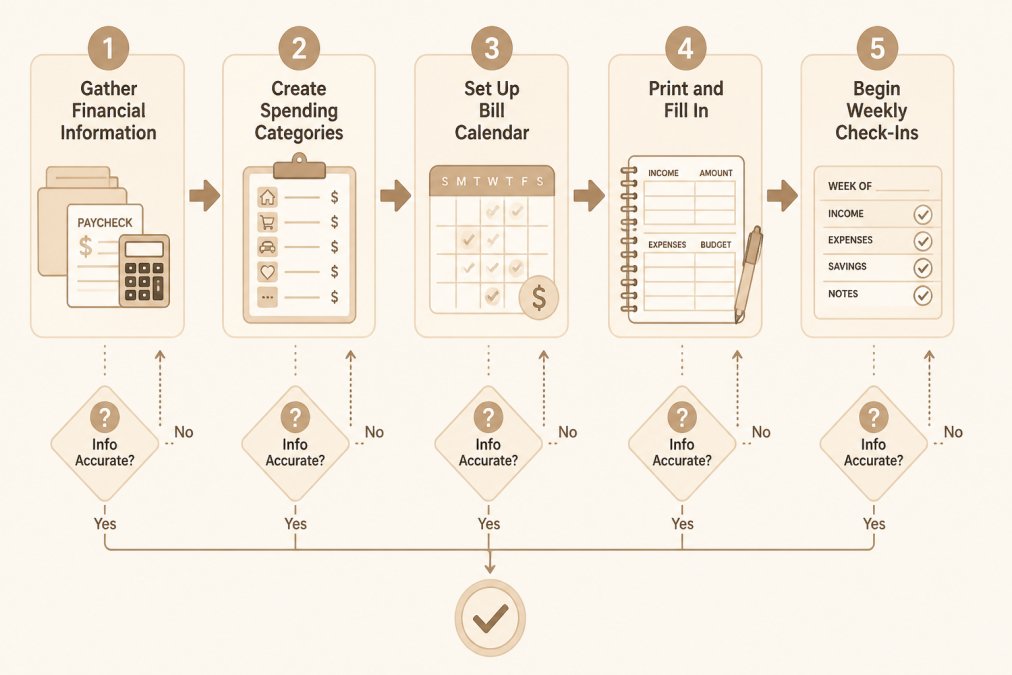
Setting up a printable ADHD budget planner takes about 20 minutes if you gather your information first, and you can start fresh anytime without shame. Here's a walkthrough.

Step 1: Gather Your Financial Information
You need three things: your current balance, your regular income (amount and frequency), and your recurring bills.
Open your banking app and write down the checking balance. That's it, no reconciling. Then list recurring bills with amounts and due dates: rent, utilities, insurance, subscriptions. Five minutes maximum; perfectionism is the enemy.
Step 2: Create Your Spending Categories
Four or five categories can be plenty: Groceries (food you cook), Bills (everything recurring), Discretionary (things you choose to buy), Irregular (car repairs, gifts, surprises). Add a fifth, Debt Payments, if actively paying down debt. Write them on your tracker.
Step 3: Set Up Your Bill Calendar
List each recurring bill with its due date and amount; if it varies, write the average or a range. Seeing all bills on one page can help reduce surprises and missed payments.
Step 4: Print and Fill In, A Worked Example
Here's what a completed week looks like. Numbers are illustrative, yours will differ.
Money Snapshot (top of page)
- Checking balance today: $412
- Next paycheck: $1,180 on the 15th
- Known bills before that paycheck: $650 rent, $85 electric
Bill Calendar (middle of page)
| Bill | Amount | Due date |
|---|---|---|
| Rent | $650 | 1st |
| Electric | $85 (varies) | 12th |
| Phone | $45 | 18th |
| Streaming | $16 | 22nd |
Spending Log (bottom of page)
- Mon: groceries $62
- Tue: gas $38
- Wed: coffee $6, pharmacy $14
- Thu: (nothing written, that's fine)
- Fri: takeout $24
Weekly Check-In (four boxes)
- Groceries: $62
- Bills: $0 due this week
- Discretionary: $44
- Irregular: $0
Savings Goal
- Goal: $500 emergency fund
- This week: $20 set aside
- Progress: $140 of $500
Notice what's missing: no line per transaction, no "miscellaneous" category, no running total. The tracker captures enough to see the shape of your week without becoming a second job.
Step 5: Print Settings That Actually Work
- Paper size: US Letter (8.5 × 11 in) is the home-printer default. If your template is A4, choose "Fit to page" so nothing gets cut off.
- Color vs. black-and-white: For mono printing, pick a template that uses shading or line weight, not color alone, color-only layouts turn to gray mush.
- Font size: 12-point minimum for body text, 14-point or larger for headings. If text feels cramped, print at 110% scale.
- One-sided vs. two-sided: Single-sided suits spreading pages out or thick pens; double-sided saves paper but can bleed through markers.
- Binding: A clipboard, three-ring binder, or magnetic fridge clip all work. The point is visibility, a tracker in a drawer is one you'll forget.
Accessible Design Choices for Different Brains
"Neurodivergent" isn't one thing. ADHD, autism, dyslexia, and other profiles interact with printed pages differently, a tracker that works for one reader may be unusable for another. Levers to pull:
- Low-clutter layouts: Fewer boxes, more white space, one section per page. If a template feels busy, cover the bottom half with a blank sheet while filling in the top.
- Color coding: One color per category (green for groceries, blue for bills). Muted highlighters work better than neon for readers sensitive to bright palettes.
- Plain-language labels: Swap "discretionary" for "fun money," "irregular" for "surprises." The label matters less than understanding it at a glance.
- Alternative formats: If handwriting is a barrier, type into the editable version. If dense tables are hard, use icons or checkboxes instead of numbers.
- Screen-reader options: For digital versions, look for tagged PDFs or a spreadsheet you can navigate with keyboard shortcuts.
There's no single "neurodivergent-friendly" design. The right one is the one you'll pick up next week.
Using an ADHD Spending Tracker Daily
You don't need to use your tracker every day, that's the point. But "when you feel like it" isn't a system either. Here's a minimum-effort routine built for inconsistent energy.
The Two-Minute Daily Touch
On days when you have energy, the whole routine is two minutes:
- Open the tracker.
- Write down any purchase you remember today (rough amounts are fine).
- Glance at the bill calendar, anything due in the next three days?
No totals, no reconciliation, no category math. The daily touch keeps the tracker from becoming a stranger.
The Ten-Minute Weekly Check-In
Pick one day, Sunday evening and Friday morning are common, and spend ten minutes:
- Look at the week ahead. Any bills due?
- Skim your spending log for patterns.
- Mark progress on your one savings goal.
- Write one sentence: "Next week I want to…"
You're not balancing accounts. You're noticing patterns and staying aware. That's the goal.
The Low-Energy Version
Some weeks you'll have two minutes, not ten. That's fine, here's the floor:
ADHD Money Snapshot: No-Shame Budget & Bill Tracker →
- Write the current checking balance on the snapshot line.
- Circle any bill due in the next seven days.
- Close the tracker.
A two-minute week is not a failed week. It's a maintained habit.
When You Miss Days (or Weeks)
Most budgeting guides skip what happens when life gets chaotic, you miss three weeks, and shame makes you want to quit. The recovery sequence:
- Don't backfill. Reconstructing missed weeks is the trap, the backlog becomes the reason you never restart.
- Open to a fresh page. New week, new sheet. Old pages are history, not evidence against you.
- Write today's balance. One number is your new starting point.
- List bills due in the next 14 days. Enough horizon to catch what's coming without overwhelming you.
- Pick one savings goal. Keep your old one, or pick something small, $100 is a fine first goal.
- Resume the two-minute daily touch tomorrow. Not today. Give yourself the runway.
No penalties, no "failed" pages, no apology to the tracker. Just: what's happening now, and what do I want to do about it?
Safeguards for Impulse Spending and Overdrafts
A tracker shows you what happened. These safeguards keep it from documenting the same problem every month.
- Overdraft prevention: Most banks let you turn off debit-card overdraft coverage so a purchase is declined rather than pushing your account negative and triggering a fee (How can I avoid debit card overdrafts?). Check your bank's app under card settings. Turning it off is usually free; leaving it on can cost a per-transaction fee each time it triggers.
- Bill reminders: Set a phone reminder two days before each bill's due date, not on it, two days gives you room to move money.
- Impulse buffer: Keep a "wait list" on the back of the tracker. Write down non-essential wants instead of buying them, then review at your weekly check-in. Most items lose their pull within a week.
- Separate spending account: Route discretionary spending through a separate account or a prepaid card with a fixed load. When the balance hits zero, spending stops, no willpower required.
Privacy and Safe Storage of Printed Financial Information
A printed tracker contains real balances and bill amounts. Treat it like any sensitive document.
- Store it out of sight. A binder on a shelf is fine; a page taped to the fridge is visible to guests and service workers.
- Shred when done. Once you've reviewed a month or quarter's patterns, shred the pages rather than recycling them.
- Don't photograph and text. For a digital backup, use your bank's app or a password-protected note, not an unencrypted photo or message thread.
- Be cautious with shared spaces. With roommates or family, keep the tracker in a locked drawer or a bag you carry.
This isn't paranoia. It's the same principle that makes the tracker work: remove friction from habits you want, and easy paths to outcomes you don't.
Choosing an ADHD-Friendly Budgeting Method
Different brains work better with different formats.
Digital spreadsheets offer automatic calculations, but can feel overwhelming to set up and are easy to ignore in a folder.
Notion templates offer flexibility and customization, but setup takes longer and the learning curve can feel like too much friction.
The best method is the one you'll actually use. If paper feels calming and digital feels chaotic, choose paper.
Getting Started with a Printable ADHD Budget Planner
If you're ready for a structured approach, the ADHD Money Snapshot: No-Shame Budget & Bill Tracker from Anchor Grove Studio includes everything we've covered: a money snapshot, bill tracker, spending log, weekly check-in, and savings goal tracker.
It comes as a printable PDF plus an editable PowerPoint file. Print a new copy each week or month and start over anytime, no streak, no "failure" if you miss a week.
Building Savings Goals Without Overwhelm
Saving with ADHD feels impossible when you're saving for five things at once, your brain can't hold that many competing priorities.
Pick one goal. Not five. One.
Maybe it's $500 for an emergency fund, or $200 for something you want.
Write it on your tracker and make progress visible. Mark every dollar you set aside and watch the number grow, that visual progress keeps you engaged when willpower fades.
Restarting After You Fall Behind
Here's the truth: you don't restart from scratch.
You open it. You look at this week. You begin again.
That's it. No penalties. No recrimination.
If you've tried traditional budgeting and it didn't stick, the problem wasn't you.
The ADHD Money Snapshot and Printable ADHD Planner are built on this principle: structure without the rigidity that breaks motivation.
Start with one tracker. Use it for a week.
Building financial awareness doesn't require a complicated system.
Frequently Asked Questions
What should a printable budget tracker for neurodivergent adults include?
A good printable budget tracker for neurodivergent adults includes a snapshot of income and expenses, a bill calendar to track payment dates, a simple spending log organized by category, and a savings goal tracker. Avoid overly detailed line items or rigid formatting. Include space to reset without shame if you miss a week. The ADHD Money Snapshot tracker includes all these elements in a low-pressure format designed specifically for people who find traditional budgets overwhelming.
How often should I update my budget tracker if I have ADHD?
Update your tracker weekly rather than daily. A weekly money check-in can help reduce decision fatigue. Choose the same day each week, Sunday evening or Friday afternoon works well. If weekly feels too frequent on low-energy days, try every other week. The goal is consistency you can actually maintain, not perfection. Many people with ADHD find that a short, regular reset works better than daily tracking that leads to burnout.
Can I restart my budget tracker if I've fallen behind?
Yes, absolutely. One of the biggest advantages of a printable ADHD budget tracker is that you can start fresh on any page or any week without guilt. There's no 'failed' tracker or broken streak. If you haven't updated it in two months, simply print a new page and begin again. This flexibility is built into ADHD-friendly systems specifically because falling behind is normal with executive function challenges. Each week is a new opportunity to check in on your money.
What's the difference between an ADHD spending tracker and a traditional budget?
A traditional budget often requires tracking every single expense and maintaining rigid categories month after month. An ADHD spending tracker focuses on noticing patterns and staying aware of major spending categories without obsessive detail. It emphasizes recurring bills and upcoming expenses so they don't surprise you. It also includes a realistic weekly check-in instead of an all-day budgeting project. The goal is clarity and awareness, not perfect numbers.