
Tiimo vs Structured for ADHD: Which App Wins in 2026?
Table of Contents
- Tiimo vs Structured for ADHD: Quick Comparison Table
- Core Philosophy: Routine-Led vs. Timeline-Led Planning
- Visual Planning Features for Neurodivergent Users
- Calendar Sync, Focus Tools, and AI-Assisted Scheduling
- How to Overcome Time Blindness with Either App
- Pricing, Subscription Value, and Long-Term Data Retention
- Finding an ADHD Friendly Daily Schedule Template That Works
- Frequently Asked Questions
Last Updated: September 13, 2026
Tiimo vs Structured for ADHD: Quick Comparison Table
Tiimo and Structured are both visual planning apps built for ADHD brains, but they solve the problem from opposite directions. Tiimo is a routine-led visual timeline app; Structured is a timeline-led day planner that stacks tasks onto a vertical clock. This comparison from Anchor Grove Studio breaks down where each one wins and which approach fits how you think.
If you have ever downloaded a planner, used it for nine days, and watched it collect dust, you know the real question is not "which app has more features" but "which one will I still open in three weeks." That is the lens we use below.
| Feature | Tiimo | Structured |
|---|---|---|
| Core model | Routine-led visual timeline | Timeline-led day planner |
| Visual style | Icon-based, color-coded blocks | Vertical clock timeline |
| Calendar sync | Two-way with major calendars | Two-way with major calendars |
| Focus mode | Built-in timer and focus sessions | Focus timer tied to current task |
| AI scheduling | Limited assistance | Limited assistance |
| Free tier | Yes, limited features | Yes, limited features |
| Subscription | Monthly or annual | Monthly or annual |
| Data retention | Cloud account history | Cloud account history |
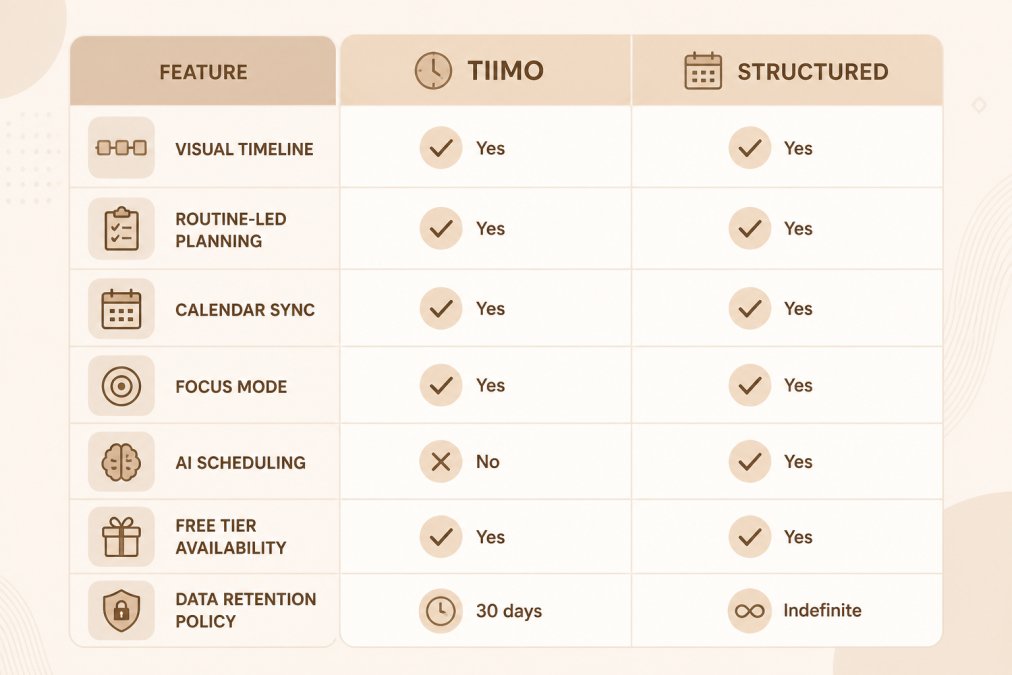
Both apps live on your phone, sync to a calendar, and cost money past the free tier. The difference that matters is philosophical, and it shows up the moment you try to plan a bad day.
Core Philosophy: Routine-Led vs. Timeline-Led Planning
Tiimo is a routine-led planner: you build repeating visual routines, and the app shows you what comes next. Structured is a timeline-led planner: you place individual tasks onto a vertical clock and move them around as the day changes.
That distinction explains almost every other difference. Routine-led apps reward consistency: you set up a morning block, an evening wind-down, a work sprint, and the app nudges you through the sequence. Timeline-led apps reward flexibility: you dump tasks onto a clock, drag them when life intervenes, and see the day as one continuous strip.
For ADHD users, the routine-led approach helps with task initiation because the next step is already defined. The timeline-led approach helps with time blindness because the day is drawn as a physical length you can see.
Neither is universally better. If your days look roughly the same, routines carry you; if they change constantly, a timeline absorbs the chaos better.
Visual Planning Features for Neurodivergent Users
Visual planning is the strongest shared feature of both apps. Tiimo leans on icons, color coding, and progress rings; Structured leans on a color-coded vertical timeline with duration bars. But the differences that matter for ADHD, autism, and other cognitive profiles live one layer below the screenshots.
What each app actually renders. Tiimo builds each day as a stack of rounded blocks, each with an icon, a label, and a progress ring that fills as the block elapses. The ring is the key mechanism: it turns an abstract duration into a shape your eye can read without arithmetic. Structured renders a single vertical clock with colored bars whose length equals the task duration, plus a thin "now" line that sweeps down the day. The bar length is the mechanism, a 90-minute block is visibly three times a 30-minute block, which is the fastest possible cure for underestimating a task.
Cognitive load, concretely. A wall of text tasks creates load before you have done anything. Tiimo reduces decision load: routines are pre-built, so the next action is already chosen. Structured reduces sequencing load: the day is one continuous strip, so you see gaps and overlaps without holding them in working memory. Tiimo helps most on repeatable mornings and evenings; Structured helps most on variable workdays.
Accessibility beyond the visual layer. Neither app is a full accessibility platform, but the practical questions are: Does it support Dynamic Type without breaking the timeline layout? Does it work with VoiceOver and TalkBack, or does the icon-only design leave unlabeled buttons? Are tap targets large enough for users with tremor? Can you reduce motion if the progress rings and sweeping now-line are distracting? Tiimo's icon-forward design is friendly to low-literacy and non-native-English users, but icon-only navigation can be a barrier for screen-reader users unless every icon has a text label. Structured's text-and-bar layout is generally more screen-reader-legible, but drag-to-reschedule can be harder for users with limited fine motor control than Tiimo's tap-to-start model. Test both with your own accessibility settings enabled, the free tiers make this cheap.
Customization and flexibility. Tiimo shines on recurring routine templates: build a morning block once, reuse it daily, and adjust individual steps without rebuilding. Structured shines on in-the-moment flexibility: drag a bar, and the rest of the day reflows around it. If your executive function struggles most at starting, Tiimo's pre-built routines lower the activation energy; if it struggles most at adapting when the day goes sideways, Structured's drag-and-reflow fits better.
Onboarding as a feature. Tiimo's onboarding walks you through building your first routine, which lowers the barrier for people who freeze at a blank screen. Structured's is faster but assumes you already know what to schedule, fine if you do, frustrating if you don't.
A common mistake is judging either app from screenshots. Download both free versions, enable your accessibility settings, and plan one real day in each before deciding.
Calendar Sync, Focus Tools, and AI-Assisted Scheduling
Calendar synchronization decides whether a planner survives past week two. A planner that disagrees with your calendar is one you stop trusting, and once trust is gone the app is gone. Both Tiimo and Structured support two-way sync with Google Calendar, Apple Calendar (iCloud), and Microsoft Outlook, but the behaviors that matter are the edge cases, not the headline.
What two-way sync actually means in practice. Two-way sync means an event created in the planner appears in your calendar, and vice versa. Watch for three failure modes: (1) recurring events, a weekly meeting edited in one place may not propagate cleanly; (2) all-day events, some planners render them as a thin banner rather than a block, hiding them from your timeline; (3) multiple calendars, check whether the planner lets you toggle which are visible or dumps everything into one strip. Test each with your own calendars during the free tier.
Focus tools differ in emphasis, not in kind. Tiimo pairs its focus timer with the routine you are already inside, so starting a session is one tap from the timeline and the timer inherits the block's duration, removing the "how long should I focus?" decision. Structured ties its timer to whichever task is currently on the clock, which suits people who plan task by task. Neither is a Pomodoro replacement out of the box; if you rely on structured work/rest intervals, run a separate timer alongside either app.
AI-assisted scheduling is assistive, not transformative. Both apps suggest when to place tasks, but expect a starting draft you edit, not a finished week. Treat AI as a first-pass scaffold: it can break the blank-page freeze, but it cannot know that Tuesday afternoons are when your energy crashes. You supply that context.
The integration gap most reviews skip: non-calendar ecosystems. If your tasks live in a project management tool (Asana, Todoist, Notion, Trello) or a note app (Apple Notes, Obsidian, Bear), neither Tiimo nor Structured is designed to pull from those systems. Both work best as the layer that shows you when, not the layer that holds everything you have to do. The workaround is a weekly review: copy your open tasks from your project tool into the planner, schedule the ones that need a time slot, and leave the rest in the project tool. That keeps the planner light and the project tool authoritative.
Battery and background behavior. A planner that syncs constantly in the background will show up in your battery settings (support.apple.com). If either app drains more than expected, check whether background refresh is enabled and whether sync is push or pull. Turning off background refresh and syncing manually at the start and end of the day preserves battery at the cost of real-time updates.
How to Overcome Time Blindness with Either App
Time blindness is the difficulty perceiving how long something takes or how much time has passed, and both apps address it by making time visible rather than abstract. The technique is the same in either tool:
- Estimate the task in minutes before you place it.
- Give it a color and a duration bar you can see.
- Set a reminder for the start, not just the deadline.
- Review the day afterward and compare estimate to reality.
- Adjust tomorrow's estimates using what you learned.
Step four is the one people skip, and it is the one that retrains your sense of time. After a couple of weeks of honest comparison, most people's estimates get closer, not because they got better at guessing, but because they finally have data (PubMed).
If you want a lower-tech version of the same method, a printable daily planner gives you the same estimate-and-review loop on paper, which some people find easier to trust than an app notification. The ADDitude resource library on time blindness covers related strategies worth pairing with either app.
Pricing, Subscription Value, and Long-Term Data Retention
Both apps use a subscription model with a limited free tier and paid monthly or annual plans. Exact prices change, so check each app's listing before subscribing rather than trusting a comparison table written months ago.
The value question is not the monthly cost but whether you will still be paying in six months. A subscription you abandon after a month costs more than a one-time tool you actually use, and subscription fatigue hits ADHD users hardest.
Long-term data retention is the underrated factor. If you have tracked routines for a year, that history is proof of what actually works for you. Before committing, check whether you can export your data and whether your history survives a lapse in payment.
If you would rather own your planning system outright, Anchor Grove Studio sells one-time digital planners with no subscription and no streak penalties, including the ADHD Focus & Deep Work System for task initiation and the Printable ADHD Planner for daily and weekly planning. Both are downloadable files you keep, which sidesteps the abandoned-subscription problem entirely.


Finding an ADHD Friendly Daily Schedule Template That Works
An ADHD friendly daily schedule template is a pre-built daily layout that reduces the decisions you make before starting your day. The template does the structural thinking so you only fill in the content.
Here is a decision framework for choosing between an app and a template:
- If your days repeat: build routines in Tiimo, or use a reusable printable template you reprint each week.
- If your days vary wildly: use Structured's timeline, or a flexible daily page with a few priority slots.
- If you abandon apps: use a paper or PDF template you own, with no login and no notification settings to configure.
- If you need both structure and flexibility: run an app for the timeline and a template for the weekly review.
Whichever you pick, expect to miss days. The system that survives a missed week is the one worth keeping, usually the one with fewer moving parts.
The hardest part of ADHD planning is not choosing an app. It is building a system that forgives an off day instead of punishing it. Anchor Grove Studio makes calm, ADHD-friendly planners and Notion templates designed to work with your brain, including flexible daily pages with no rigid streaks, instant digital downloads with no shipping or waiting, and systems you can restart on any page or week. Get started with Anchor Grove Studio and build a planning routine you will still be using next month.

Frequently Asked Questions
Is the Structured app good for ADHD?
Structured works well for ADHD users who think in routines rather than clock times. Its timeline view shows your day as a sequence of blocks, which reduces the friction of translating clock times into action. The free tier covers basic scheduling, but advanced features like recurring routine templates and cross-platform syncing require a subscription. It suits people who already have a rough daily rhythm and want to see it laid out visually.
Is Tiimo good for ADHD?
Tiimo is built specifically for neurodivergent users. Its visual timeline uses icons and color-coded blocks instead of dense text, which lowers cognitive load for people with executive function challenges. It includes focus timers, reminder systems, and customizable templates. The main drawback is that the free version is limited, and the subscription model may not suit everyone. For visual learners with ADHD, it is often the stronger starting point.
What are the key differences between Tiimo and Structured?
The core difference is philosophy. Tiimo is timeline-led: it visualizes your day as a flowing sequence with icons and colors, designed for neurodivergent brains. Structured is routine-led: it organizes your day around recurring blocks and habits, closer to a traditional day planner. Tiimo leans harder into visual cues and cognitive load reduction. Structured leans into simplicity and calendar synchronization. Neither is universally better; the right pick depends on whether you think in pictures or in routines.
How does Tiimo support ADHD time management?
Tiimo addresses time blindness by making the passage of time visible. Instead of abstract clock numbers, you see a moving timeline with color-coded blocks that shrink or grow as the day progresses. It also offers focus mode, gentle reminder systems, and task breakdown prompts. These features reduce the executive function load of deciding what comes next. For many users, the visual feedback loop is what makes time feel tangible rather than invisible.
Are there free alternatives to Tiimo and Structured for ADHD?
Both apps offer limited free tiers. If you want a no-cost option that still supports an ADHD friendly daily schedule template, printable or digital planners from Anchor Grove Studio start at $16 and are one-time purchases with no subscription. Their Task Initiation Planner ($16) and Printable ADHD Planner ($22) give you a flexible, reprintable system without recurring fees. The trade-off is no automatic calendar sync, but for many people with ADHD, fewer moving parts means better consistency.