
ADHD Friendly Productivity Systems Review: What Works
Table of Contents
- What Makes a Productivity System ADHD Friendly
- Comparison Table: Planners, Trackers, and Notion Templates
- Best Habit Trackers for ADHD: Low-Pressure Ways to Notice Patterns
- ADHD Friendly Notion Templates for Brain Dumps and Daily Life
- How to Build a Sustainable ADHD Routine Around Your System
- Free vs Paid ADHD Productivity Tools: What the Extra Cost Buys
- Common Mistakes That Break ADHD Productivity Systems
- Frequently Asked Questions
Last Updated: September 15, 2026
What Makes a Productivity System ADHD Friendly
An adhd friendly productivity system reduces the steps between thinking of a task and starting it, rather than adding structure that demands consistent effort. Most traditional planners assume a brain that remembers, prioritizes, and initiates on schedule, for the roughly 15.5 million U.S. adults with ADHD, that assumption is the problem (the CDC).
This review from Anchor Grove Studio examines what works in an adhd friendly productivity setup: the features worth paying for, the friction points that break systems, and the trade-offs between free and paid tools. We compare planners, trackers, and Notion templates by format, price, and the ADHD challenge each addresses.
The systems we cover range from a $5 one-month trial to a $138 complete toolkit, so you can match the tool to your budget.
Features That Reduce Friction Instead of Adding It
The most important feature is frictionless capture: getting a thought out of your head in under ten seconds, before working memory drops it.
The second is flexibility without guilt. A system that punishes a missed day gets abandoned within a month; one that lets you start over on any page gets used long-term.
Beyond those two, look for:
- Low visual clutter that limits sensory processing load
- Undated layouts so a missed week doesn't waste pages
- A Top 3 priority structure instead of a ten-item to-do list
- Built-in reset routines for after off days
- Support for task initiation, not just task storage
How We Evaluated These Systems
We scored each system on five criteria: capture speed, survival of a missed day or week, setup demands, support for task initiation versus tracking alone, and cost relative to value.
We weighted setup time heavily: a system that takes three hours to configure will not survive a low-energy week.
Comparison Table: Planners, Trackers, and Notion Templates
Here is how Anchor Grove Studio's systems compare across format, price, and primary use.
| System | Price | Format | Best For |
|---|---|---|---|
| Focus & Deep Work System | $16 | Printable/PDF | Task initiation |
| Printable ADHD Planner | $22 | Printable/PDF | Daily priorities |
| Digital ADHD Planner | $22 | Tablet PDF | GoodNotes planning |
| Life Dashboard Notion Template | $26 | Notion | Brain dump and meals |
| Home Management Notion Template | $22 | Notion | Chore rotation |
| Planning & Focus Bundle | $52 | 3 tools | Weekly planning plus focus |
| Core ADHD Toolkit | $118 | 10 tools | Full life coverage |
| Complete ADHD Toolkit | $138 | 12 tools | Everything included |
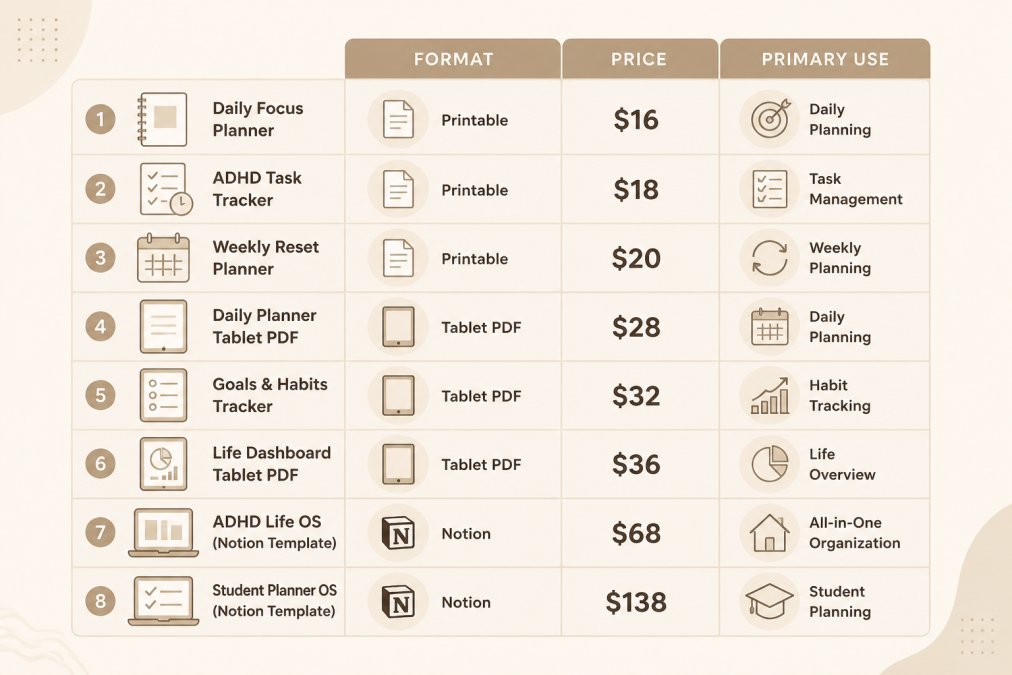
The pattern matters more than the rows: cheaper single tools work for one specific bottleneck, while bundles make sense when the bottleneck moves, which it usually does.

Best Habit Trackers for ADHD: Low-Pressure Ways to Notice Patterns
The best habit trackers for ADHD show patterns without grading performance. A streak counter that resets to zero after one missed day creates deadline anxiety and triggers abandonment, not consistency (pubmed.ncbi.nlm.nih.gov). What almost no guide covers is what happens when the tracker itself gets abandoned, and how to build one that survives that.
Why Streak Mechanics Backfire
A streak is a binary system applied to a non-binary brain: intact or broken. ADHD consistency fluctuates week to week, so a streak tracker spends most of its life in the 'broken' state, the one that feels like failure. It stops being a data tool and becomes a scoreboard you are losing.
The fix is a layout that records without ranking. A 4-week grid of dots works because every day is independent: a missed Tuesday is one empty dot, not a reset to zero. The goal is noticing patterns, that you exercise on Tuesdays, or that meal planning collapses in week two, so you can plan around them.
The Reset Routine Nobody Writes About
Here is the maintenance gap: every habit tracker fails eventually. You forget it for a week, then a month, then you feel too far behind to reopen it. Most guides stop at 'be kind to yourself.' That is not a routine.
A working reset routine has three steps and takes under five minutes:
- Do not backfill. Never try to reconstruct the missed days. Backfilling turns a two-minute reset into a forty-minute guilt exercise, and that is what kills the tracker.
- Restart on today's date, not the first of the month. Waiting for a clean calendar boundary is the most common reason trackers stay dead.
- Drop one habit before you restart. If you were tracking three and stopped, restart with two. The tracker failed because the load was too high, not because you were.
People often abandon a tracker, feel bad, buy a different one, and repeat the cycle. The tool was rarely the problem, the missing piece was a recovery path.
The Cost of Tracker Churn
This is where the 'ADHD tax' shows up in habit tracking. A paper tracker costs a few dollars, so churn is cheap. A subscription app keeps charging after you stop opening it, and cancellation is a task on a list you are avoiding. Before choosing a tracker, ask: if I stop using this for six weeks, what does it cost me? A free reprint passes that test; a recurring subscription usually does not.
The Printable ADHD Planner includes a low-pressure habit tracker built exactly this way, with no streak language and no 'failed' page. If you want to test the format before committing, the one-month printable planner trial is a low-cost way to see whether pattern-noticing works for you.

A common mistake is tracking too many habits at once. Three is the practical ceiling; two is often better.
ADHD Friendly Notion Templates for Brain Dumps and Daily Life
ADHD friendly Notion templates work best with toggle-based layouts that show one area at a time. A dashboard displaying meals, chores, journal, and budget at once recreates the mental clutter you were trying to escape.
The ADHD Life Dashboard ($26) handles brain dump, journal, recipes, meal plan, and shopping list in one workspace, with toggles so you only see one section at a time. The Home Management Template ($22) takes a different approach: zone-based chore rotation with 5-minute reset routines and a home brain dump, built so you decide what to tackle based on your energy that day rather than a fixed schedule.

Both duplicate into a free Notion account. Setup is a link click, not a build.
What most guides miss is that Notion's flexibility is also its risk: without a fixed structure, ADHD users often spend more time customizing than using. Pre-built templates remove the design decision entirely.
How to Build a Sustainable ADHD Routine Around Your System
A sustainable ADHD routine is built around your system's reset points, not a fixed daily schedule. Pick two anchors per week, not seven.
Anchors, Not Schedules
The Five-Part Setup
What to Do When the Routine Breaks
Free vs Paid ADHD Productivity Tools: What the Extra Cost Buys
Common Mistakes That Break ADHD Productivity Systems
Other frequent problems:
Frequently Asked Questions
What is the best productivity system for ADHD?
There is no single best system, but the ones that hold up share a few traits: they capture tasks in one place, they work in short sessions, and they do not punish you for missing a day. A low-clutter planner with a Top 3 priority structure, a task-initiation tool for starting, and a habit tracker that records patterns instead of streaks covers most needs. Start with one tool, use it for two weeks, then add a second only if something is still breaking down.
Are digital or paper-based productivity systems better for ADHD?
Both work, and the deciding factor is friction. Paper wins when you need to see your day without unlocking a device, and it never sends notifications. Digital wins when you need search, mobile capture, or a tablet you already carry. A printable planner at $22 and a GoodNotes-ready digital planner at $22 from the same brand let you test both formats without committing to a subscription. Pick the one you will actually open on a low-energy day.
What features should I look for in an ADHD-friendly planner?
Look for undated pages so a missed week does not waste anything, a small priority limit instead of a long to-do list, and a brain dump section for clearing mental clutter before you plan. A habit tracker that shows patterns without streaks removes the all-or-nothing pressure that leads to abandonment. Also check the format: editable files and print-ready PDFs let you reprint or restart on any page, which matters more than page count.
How can I maintain a productivity system when I have ADHD?
Plan a reset, not a streak. Set a recurring 15-minute check-in, weekly or whenever you notice the system slipping, and use it to clear stale tasks and pick three priorities for the next stretch. Keep the system small enough to rebuild in one sitting. Tools like the ADHD Focus & Deep Work System include a weekly focus review for exactly this, so you notice what helped without grading your performance. Maintenance is part of the system, not evidence that it failed.