
Best Notion Templates for Executive Dysfunction in 2026
Table of Contents
- Why Standard Productivity Systems Fail With Executive Dysfunction
- Quick Comparison: ADHD-Friendly Notion Templates
- What Makes a Notion Template Work for Executive Dysfunction
- Best Notion Templates for Executive Dysfunction
- Why an ADHD Friendly Notion Dashboard Beats a Rigid Planner
- Notion Templates for Task Initiation: How to Get Unstuck
- How to Organize Notion for ADHD: Setup, Mobile, and Maintenance
- Frequently Asked Questions
Last Updated: September 22, 2026
Why Standard Productivity Systems Fail With Executive Dysfunction
Executive dysfunction disrupts the brain's self-management system: planning, task initiation, working memory, and impulse control. When those skills misfire, a color-coded planner becomes another abandoned system.
Quick Comparison: ADHD-Friendly Notion Templates
Five Anchor Grove Studio templates cover the most common executive-function pressure points.
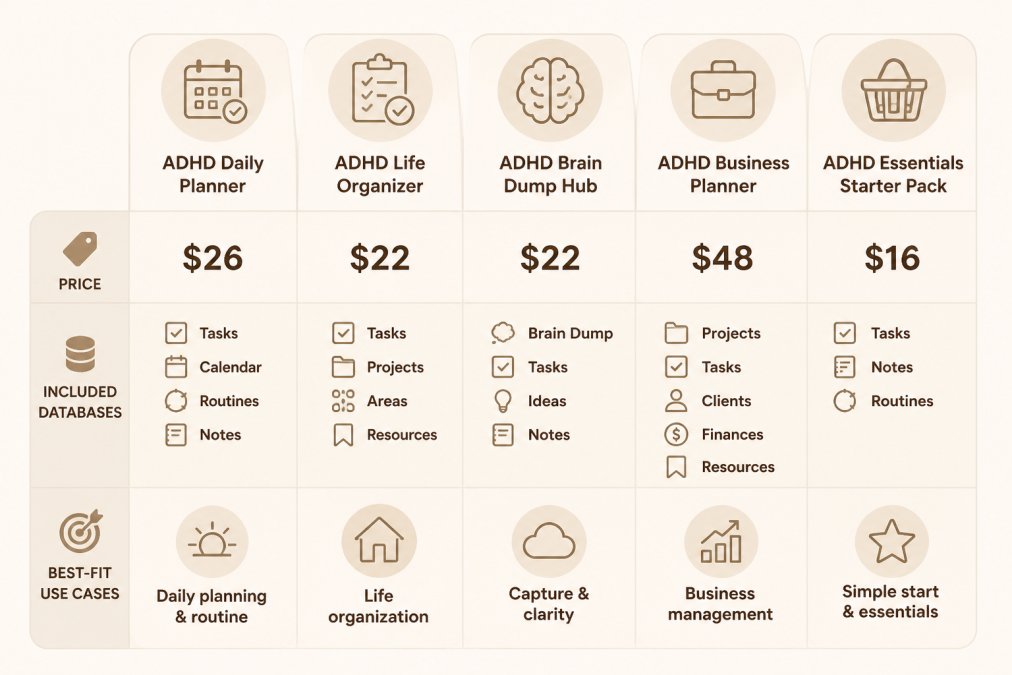
| Template | Price | Core Databases | Best For |
|---|---|---|---|
| ADHD Life Dashboard | $26 | Brain Dump, Journal, Recipes, Meal Plan, Shopping List | Daily life and meal planning |
| ADHD Home Management | $22 | Zone-based chores, reset routines, home brain dump | Keeping home tasks visible |
| ADHD Relationship Care | $22 | Relationship tracker, gift ideas, outreach prompts | Staying connected without guilt |
| ADHD Life, Home & Relationship Bundle | $48 | All three dashboards above | One connected system |
| ADHD Focus & Deep Work System | $16 | Focus Session Planner, Deep Work Log, Distraction Triage | Task initiation and focus |
What Makes a Notion Template Work for Executive Dysfunction
A Notion template works for executive dysfunction when it reduces decisions rather than adding them. Every extra click, property, and option is a place a neurodivergent brain can stall. Here are the Notion mechanics that make the difference.


The visual and sensory layer
Notion's defaults are hostile to sensory regulation: small gray text, low-contrast properties, dense walls of text. A template built for executive dysfunction adjusts them on purpose.
- Typography. Bump page text to the larger size, keep headings short, and avoid all-caps database names. Sans-serif is the safer default.
- Color as signal, not decoration. One accent color per database, blue for capture, green for done, amber for waiting, makes status readable at a glance. Pick three or four colors; rainbow dashboards read as noise.
- Contrast and dark mode. Notion supports dark appearance in Settings → My settings → Appearance. Dark mode with muted accents suits light sensitivity; light mode with larger text suits low vision.
- Motion and density. Toggle blocks, collapsed databases, and whitespace show only what is relevant now. A dashboard opening with six expanded databases has already spent your attention.
The structural layer
Visual calm without structure is just a pretty empty page. The templates that hold up share a few database patterns:
- One capture inbox. A single database, usually called Brain Dump or Inbox, where anything can land with a title and nothing else. Required fields are the most common reason capture fails.
- Linked views instead of duplicate entries. One row can appear in several places: a task captured in the inbox surfaces on filtered "Today" and "This Week" views without re-entry. Templates that ask you to copy tasks between pages fight the tool.
- Status properties with few options. Three to five statuses, Not started, In progress, Waiting, Done, cover almost everything. Ten-option status fields create a decision at every update.
- No streak logic. Streak-based habit trackers punish off days. A "last done" date property is more forgiving because it has no failure state.
- Rollups over manual math. Notion's rollup and relation properties can count open tasks or surface the next due date automatically. Any number you update by hand will go stale.
What most guides miss: customization is a trap
Best Notion Templates for Executive Dysfunction
The best Notion templates for executive dysfunction do the organizational thinking for you. Each targets a different failure point: task initiation, household upkeep, or staying in touch.
ADHD Life Dashboard: Notion Brain Dump, Meals & Journal
The Life Dashboard handles daily chaos, thoughts, meals, and reflection, in one workspace.
ADHD Home Management Notion Template
Home tasks are recurring, invisible, and easy to postpone forever. This template uses zone-based chore rotation instead of a strict daily schedule, so you decide what matters based on your energy that day.
ADHD Relationship Care: Notion Connection Tracker
Out of sight, out of mind is how object permanence tends to work with ADHD. This template is a gentle external memory for the people who matter.
ADHD Life, Home & Relationship Notion Bundle
The three dashboards cost $70 separately; the bundle is $48, saving $22, and they work as one system.
ADHD Focus & Deep Work System: Task Initiation Planner
Focus is not always the problem. Starting is. This system targets the gap between "I need to do this" and the first step.
ADHD Life Dashboard: Notion Brain Dump →
Why an ADHD Friendly Notion Dashboard Beats a Rigid Planner
An ADHD friendly Notion dashboard beats a rigid planner because it adapts to the day you are actually having. A dated paper planner assumes every day looks the same; a dashboard does not care what day it is.
Notion Templates for Task Initiation: How to Get Unstuck
Notion templates for task initiation work by shrinking the first step until it is almost impossible to refuse. The goal is not motivation but a smaller on-ramp. Every guide lists the same prompts, body doubling, the two-minute rule, temptation bundling, but few show how a template turns them into something you do not have to remember.
The prompts, briefly
If you have read any ADHD productivity article, you know these. Skim them and move to the mechanics below.
- Two-minute floor. Commit to two minutes of the task. Starting is the hard part; momentum usually follows.
- Body doubling. Work alongside someone, in person or on a call, even in silence.
- Temptation bundling. Pair the task with something you enjoy, a specific playlist, a drink, a particular chair.
- Distraction triage. When an interruption arrives, capture it in one line and return. Do not chase it.
- Define the first physical action. Not "work on taxes" but "open the folder and find the W-2."
How a Notion template operationalizes them
The difference between knowing these prompts and using them is whether the template asks for the right information at the right moment. Four database fields do most of the work:
- A "First physical action" text property. Every task row carries one line describing the smallest visible next step, so opening a task means reading an instruction instead of deciding.
- An "Energy required" select property. Low, Medium, High. On a bad day, filter to Low and stop negotiating about the High items.
- A "Body double" checkbox. Ticking it moves the task into a filtered "Needs company" view, things you have decided not to do alone. When a friend or focus call is available, open that view instead of the full backlog.
- A "Distraction" inbox database. One line per interruption, no properties required. The triage habit only works if capture costs less than chasing the thought.
The mobile workflow most templates ignore
Three mobile-specific setups make the difference:
- Home screen shortcut. Pin the capture database as a favorite. Two taps from locked screen to a new row is the target; anything slower will not happen.
- Quick-add with defaults. Set the capture database's default view to a simple table with only the title visible. Fill properties in later, during the weekly review.
- Voice capture as a fallback. When typing is the barrier, dictate a one-line task into the inbox. The row does not need to be clean, it needs to exist.
The ADHD Focus & Deep Work System builds each of these into a structured planner, the first-physical-action field, energy filter, body-double view, and distraction inbox, so you are not inventing prompts while already stuck. It arrives as an instant digital download: an editable PowerPoint file plus a print-ready PDF.

How to Organize Notion for ADHD: Setup, Mobile, and Maintenance
To organize Notion for ADHD, keep the workspace shallow, make capture mobile-first, and schedule a short weekly reset.
Frequently Asked Questions
What is the best Notion template for ADHD?
The best Notion template for ADHD is one that reduces friction instead of adding it. Look for a low-clutter layout, a quick-capture brain dump, and flexible databases you can edit without breaking anything. Anchor Grove Studio's ADHD Life Dashboard ($26) covers daily planning and meals, while the ADHD Focus & Deep Work System ($16) targets task initiation specifically. Many people start with one dashboard, then add the bundle ($48) if home and relationship tasks also need a home.
Is Notion ADHD friendly?
Notion can be ADHD friendly, but the default blank page is not. A blank workspace invites endless setup and digital clutter, which stalls task initiation. Notion works well when you duplicate a pre-built dashboard with toggle-based sections, a brain dump database, and mobile quick-capture already configured. That way you spend your mental bandwidth on using the system, not designing it.
How can Notion help with executive dysfunction?
Notion helps executive dysfunction by acting as an external memory and a single place to land. A brain dump database holds thoughts so they stop circling, a second brain setup keeps recurring tasks visible, and dashboard views reduce cognitive load by showing one area at a time. The key is a capture workflow that takes seconds, so starting a task does not require deciding where to put it first.
What features should an ADHD-friendly Notion template have?
Look for five things: a friction-free capture method for thoughts and tasks, toggle or collapsed views to cut visual clutter, energy-based planning fields instead of strict time blocks, mobile quick-capture guidance, and no streak counters that punish off days.
How do I organize Notion for ADHD without getting overwhelmed?
Start with one dashboard, not five. Duplicate a template, set up mobile capture in under ten minutes, and use it for a week before changing anything. When you organize Notion for ADHD, keep the sidebar short, collapse sections you are not using, and schedule a 15-minute weekly reset rather than daily maintenance. If a page goes unused for two weeks, archive it instead of redesigning it.