
How to Use Notion for ADHD: A Complete Setup Guide
Table of Contents
- Why Notion Works for ADHD (When Set Up Right)
- Common Challenges When Using Notion with ADHD
- Building Your First ADHD Notion Brain Dump Template
- Organizing Tasks with a Notion Task Manager for ADHD
- Creating an ADHD-Friendly Notion Dashboard for Daily Planning
- Using an ADHD Notion Template to Skip the Setup
- Maintaining Your System When Routines Lapse
- When Notion Might Not Be the Right Fit
- Frequently Asked Questions
Last Updated: October 17, 2026
Why Notion Works for ADHD (When Set Up Right)
You can use Notion for ADHD management, but only when you approach it differently than you would a traditional productivity system. The key difference is flexibility.
When you use Notion for ADHD, you're not signing up for another rigid planner.
The difference with Notion isn't that it's prettier or more feature-rich. It's that it doesn't punish you for being human.
Common Challenges When Using Notion with ADHD
A blank Notion workspace is overwhelming. There are too many choices. Do you start with a database?
The second challenge is maintenance. Even the best system stops working when life gets messy.
The third challenge is that Notion doesn't have built-in reminders the way other tools do.
The fourth challenge is that many people try to use Notion for everything at once.
Building Your First ADHD Notion Brain Dump Template
The foundation of any ADHD-friendly Notion system is the brain dump. This is where everything goes when it enters your head, without any decision-making required.
A brain dump database should have exactly three properties: the task or idea itself, a quick note if needed, and a date you added it. That's it. No priority levels, no energy tags, no project assignments.
Step 1: Create a Quick-Capture Database
Start by creating a new database in Notion. Call it "Brain Dump" or "Inbox" or whatever makes sense to you. Add these properties:
- Title: The task or idea
- Notes: Optional space for context
- Date Added: Automatically fills with today's date
Create a simple table view that shows all three columns. This is your capture space. Nothing gets organized here. Everything just lands in this one place.
The point of the brain dump is to remove friction. If you have to think about where something belongs or what category it is, you won't use it. You'll keep the task in your head instead, where it will loop endlessly and drain your mental energy.
Step 2: Set Up Mobile Access for On-the-Go Capture
The brain dump only works if you can access it from your phone. Download the Notion app and save your brain dump database as a favorite.
Test this on your phone before you rely on it. Make sure you can add a new item, type quickly, and close the app. If it takes more than 15 seconds, you'll skip it and the system breaks.
Organizing Tasks with a Notion Task Manager for ADHD
Once you have a brain dump full of ideas and tasks, the next step is organizing them in a way that actually helps you move forward.
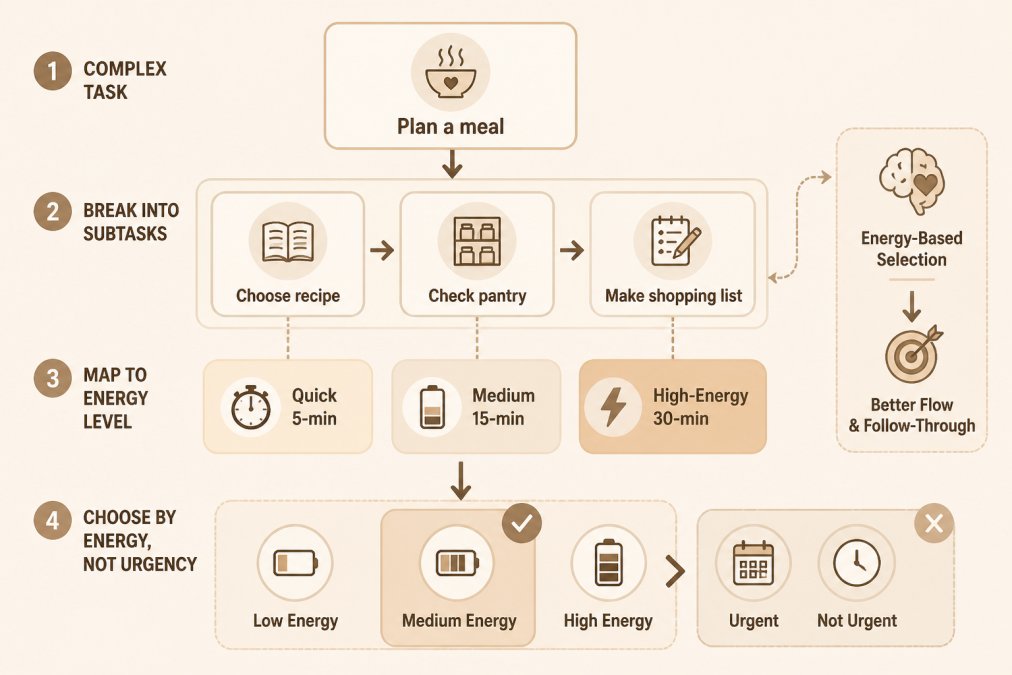
The difference between a regular task manager and an ADHD-friendly one is that you're not sorting by urgency or importance. You're sorting by what's actually possible given how you feel today. Some days you have high energy and can tackle complex projects.
Breaking Complex Tasks Into Manageable Steps
One of the biggest barriers to task initiation is task size. "Plan a meal" feels impossible. "Choose a recipe" feels doable.
In your Notion task manager, create subtasks for anything that feels large. "Meal planning" becomes: choose recipe, check pantry, make shopping list, buy groceries.
When you look at your task list, you should see actions, not projects. "Write report" is too big.
Prioritizing by Energy and Effort Instead of Urgency
Add two properties to your task database: Energy Required (Quick, Medium, High-Energy) and Effort (5 minutes, 15 minutes, 30 minutes). When you're deciding what to do next, don't ask "What's most urgent?" Ask "What matches my energy right now?"
On a low-energy day, filter your tasks to show only Quick tasks. You'll get wins without overwhelming yourself. On a high-energy day, you can tackle the bigger projects.
Creating an ADHD-Friendly Notion Dashboard for Daily Planning
A dashboard is where everything comes together. It's your one-stop view for the day. But here's the critical part: most dashboards are too busy. They show everything at once, which defeats the purpose for someone with ADHD.
An ADHD-friendly dashboard uses toggles to hide information until you need it. You see your brain dump inbox. You see today's tasks. You see your meal plan.
Reducing Visual Clutter with Toggle-Based Layouts
Toggles are your friend. They let you organize information without cluttering the screen. Create a toggle for "Today's Tasks," another for "This Week's Projects," another for "Brain Dump." When you open your dashboard, you see the toggles but not the content.
ADHD Life Dashboard: Notion Brain Dump, Meals & Journal →
This matters because visual clutter creates cognitive load. When you see 50 tasks, 20 ideas, and 10 projects all at once, your brain shuts down.
Building Weekly and Daily Planning Views
Create two views of your task database: a daily view and a weekly view. The daily view shows only today's tasks, filtered by energy level and effort.
The weekly view is where you do your planning on Sunday or Monday. Look at what's on the horizon. Break down anything that feels too big. Add energy tags so you know what to do on which kind of day.
Using an ADHD Notion Template to Skip the Setup
If building a Notion system from scratch feels overwhelming, templates can save you months of setup time.
The best Notion templates for ADHD come pre-built with brain dump databases, task managers, and dashboard views. You don't have to figure out the structure.
Anchor Grove Studio offers several ADHD-focused Notion templates that are designed specifically for this workflow. The ADHD Life Dashboard: Notion Brain Dump, Meals & Journal comes with brain dump, task capture, meal planning, and journal databases already connected.

If you want a more complete system, the ADHD Life, Home & Relationship Notion Bundle includes three connected dashboards covering your daily life, home management, and relationships.

The advantage of using a pre-built template is that you skip the paralysis of a blank workspace.
Maintaining Your System When Routines Lapse
Here's the reality: you will miss weeks. You'll get sick, or busy, or overwhelmed, and you won't open Notion for seven days.
This is where the flexibility of Notion saves you.
When you come back after a lapse, your brain dump will have piled up. Don't try to process it all at once.
The best way to prevent long lapses is to make Notion so simple that it takes less than two minutes a day to use.
When Notion Might Not Be the Right Fit
Notion is powerful, but it's not the right tool for everyone.
Notion also requires a learning curve.
Notion is also a subscription. It's free for personal use up to a point, but if you want advanced features, you'll pay.
The key question is: does this tool work with your brain or against it? If Notion feels complicated or overwhelming, that's useful information.
Building a Notion system for ADHD isn't about creating the most complex or beautiful workspace. If you want a head start, Anchor Grove Studio's ADHD Notion templates come pre-structured with brain dump, task management, and dashboard views so you can skip the setup and start capturing ideas today. Start with the ADHD Life Dashboard if you want meal planning and journaling included, or explore the complete bundle if you want systems for home management and relationships too.
Frequently Asked Questions
Does Notion actually help with ADHD, or is it just another app to abandon?
Notion helps with ADHD when you build it around how your brain actually works, not how productivity apps expect you to work. The key is reducing decision fatigue through templates, using a brain dump to get thoughts out of your head without organizing them first, and keeping visual clutter low. Many people abandon systems because they're too rigid or require constant maintenance. Notion's flexibility means you can restart on any day or week without guilt. Using a pre-built ADHD Notion template (like those from Anchor Grove Studio) removes the setup friction that often derails people before they even start.
How do you use Notion effectively when you have ADHD and struggle with task initiation?
Start with a brain dump, a single database where thoughts, tasks, and ideas land with zero pressure to organize them. Don't sort during capture; just get them out. Then, when you're ready to work, create a separate view that shows only today's tasks sorted by energy level (Quick 5-min tasks, Medium, High-energy). This removes the paralysis of choosing what to do first. Break larger tasks into visible subtasks so you can complete one small piece and feel progress. Mobile quick-capture is essential, add ideas the moment they come to you, not when you remember to open Notion later.
What should an ADHD-friendly Notion dashboard include to avoid overwhelm?
An ADHD-friendly dashboard uses toggle-based layouts so you see one section at a time instead of everything at once. Include a brain dump inbox for quick capture, a task view sorted by energy or effort (not just deadline), a weekly planning section, and space for meal planning or habit tracking if those are problem areas for you. Keep colors calm and consistent. Avoid rigid daily checklists, instead, use flexible prompts like 'What can I do today?' or 'What matters this week?' The dashboard should reduce decision-making, not add more choices. Pre-built templates like the ADHD Life Dashboard ($26) can help reduce setup time.
Are Notion templates actually helpful for ADHD, or do I need to customize them?
Pre-built Notion templates are extremely helpful for ADHD because they eliminate the blank-page problem and the hours of setup that often lead to burnout. A good ADHD template comes with a brain dump, task sorting by energy, and a calm dashboard layout already built in. You can use it as-is or customize it later when you have energy. The ADHD Life, Home & Relationship Bundle ($48) includes three connected dashboards designed specifically for ADHD workflows, brain dump, meal planning, home tasks, and relationship tracking, so you don't start from scratch. Customization is optional, not required.
How do you maintain a Notion system for ADHD when you have off weeks or low-energy periods?
The system should be designed so you can pause without guilt and restart anywhere. Use Notion's database views to hide completed items instead of deleting them, so you can pick up where you left off. On low-energy days, use your 'Quick 5-min tasks' view instead of big projects. Don't aim for a perfect streak, streaks create shame and cause people to abandon systems entirely. Instead, use flexible prompts: 'What's one small thing today?' or 'What can I do with my current energy?' ADHD-friendly templates can include views that show only this week's tasks, so you never feel buried by old incomplete items. The goal is a system that bends with your energy, not one that breaks when you miss a day.
What are the real limitations of using Notion for ADHD planning?
Notion's biggest limitation for ADHD is that it requires initial setup and ongoing maintenance, even a template needs to be duplicated into your workspace and customized. If you struggle with task initiation, the thought of setting up a system can feel paralyzing. Notion also doesn't send automatic reminders the way dedicated task managers do; you have to check it. For people with severe time blindness or those who need push notifications to remember tasks exist, a simpler tool like a paper planner or a dedicated reminder app might work better alongside Notion. Finally, Notion is a web-based tool, so it requires internet access and a device, it's not ideal for people who need offline-first planning.
How do I set up mobile quick-capture in Notion for ADHD so I can add ideas on the go?
Open Notion on your phone and save the web app to your home screen (iOS: tap Share > Add to Home Screen; Android: tap the menu > Install App). Create a simple database with just three fields: Task/Idea, Category (optional), and Date. Set up a form view that shows only the text field, no extra fields to fill. When an idea comes to you, tap the form, type quickly, and close it. No organizing, no sorting. Later, when you're at a desk, move items from your inbox into proper views. This keeps capture frictionless and prevents the 'I'll remember it later' trap that leads to lost ideas.
Should I use Notion or choose a simpler alternative for ADHD task management?
Choose Notion if you want one workspace for multiple areas of life (tasks, meals, home, relationships, journal) and you're comfortable with a setup process. Choose a simpler alternative if you need quick reminders, prefer paper, or feel overwhelmed by customization. Paper planners work well for people who need tactile feedback and don't get lost in digital clutter. Apps like Todoist are faster for pure task management but don't handle meal planning or life tracking. Notion shines when you want flexibility, low visual clutter, and everything in one place, but only if the setup doesn't become another source of overwhelm. Start with a template to skip the blank-page problem; that's the middle ground between complexity and simplicity.