
Organize Your ADHD Brain With Digital Tools
Table of Contents
- Why Digital Organization Works for ADHD Executive Function
- Build Your Foundation: Brain Dump and Task Capture
- Best Digital Planners for ADHD: Paper vs. Tablet vs. Notion
- ADHD Task Management Apps: Choosing the Right System
- Set Up ADHD Reminders and Calendar System That Sticks
- ADHD-Friendly Notion Templates: Building Your Connected Workspace
- Reduce Digital Overwhelm: Simplify Your System
- Maintain Your System Without Burnout
- Frequently Asked Questions
Last Updated: October 10, 2026
Why Digital Organization Works for ADHD Executive Function
Executive function challenges are what make ADHD difficult. You know what needs doing. Your brain just won't cooperate with the starting, the remembering, or the finishing.
Digital tools don't fix ADHD, they compensate for it by helping you organize ADHD brain digital tools that work with your executive function challenges instead of against them. A task manager captures thoughts instantly, freeing working memory so your brain focuses on what matters.
Build Your Foundation: Brain Dump and Task Capture
You need a single place to dump every thought, task, and idea. ADHD brains are idea machines, without capture, you either forget or exhaust working memory holding them. A brain dump lets you write instantly and decide later.
The brain dump is a holding tank, not a to-do list. Tasks, ideas, reminders, meal plans, everything goes in one place with no organizing or deciding. Just capture.
Here's what happens next:
- Capture phase: Ideas land in your brain dump instantly (phone, tablet, or paper)
- Triage phase: Once daily or weekly, you review what's there
- Action phase: You decide what actually needs your attention and move it to a real system
Best Digital Planners for ADHD: Paper vs. Tablet vs. Notion
The right planner format depends on how your ADHD brain works. Some people need paper. Some need tablets. Some need Notion. Most people need a mix.
| Format | Best For | Setup Time | Distraction Risk |
|---|---|---|---|
| Printable Planner | Low-tech days, visual organization, minimal distraction | 10-15 minutes | Very low |
| Tablet Planner | Digital-first workflows, quick capture, portability | 5-10 minutes | Medium |
| Notion Dashboard | Connected systems, multiple databases, customization | 30-60 minutes | High if not simplified |
Printable Planners for Low-Tech Days
The Printable ADHD Planner: No-Shame Daily Planning System removes pressure to be consistent. You pick three daily priorities, get a brain dump section, and restart guilt-free if you miss a week. Printable planners work when energy is low: no crashes, notifications, or logins.
Tablet Planners for Digital-First Planning
The Digital ADHD Planner: Tablet & GoodNotes-Ready PDF uses hyperlinked navigation and low-clutter layout. Tablet planners work when you want handwriting with digital searchability and portability, faster than paper, less distracting than full apps.

Notion Dashboards for Connected Organization
The ADHD Life Dashboard: Notion Brain Dump, Meals & Journal connects brain dump, meal planning, and shopping lists. Planning a meal auto-populates your shopping list. Notion requires more setup and carries customization risk, but becomes a single source of truth once configured.

ADHD Task Management Apps: Choosing the Right System
To organize ADHD brain digital tools effectively, task management apps should fail when they require upfront priority decisions and succeed when they capture first and organize later. They succeed when they capture first and organize later. Match the app to your specific ADHD friction point, different challenges need different tool behaviors.
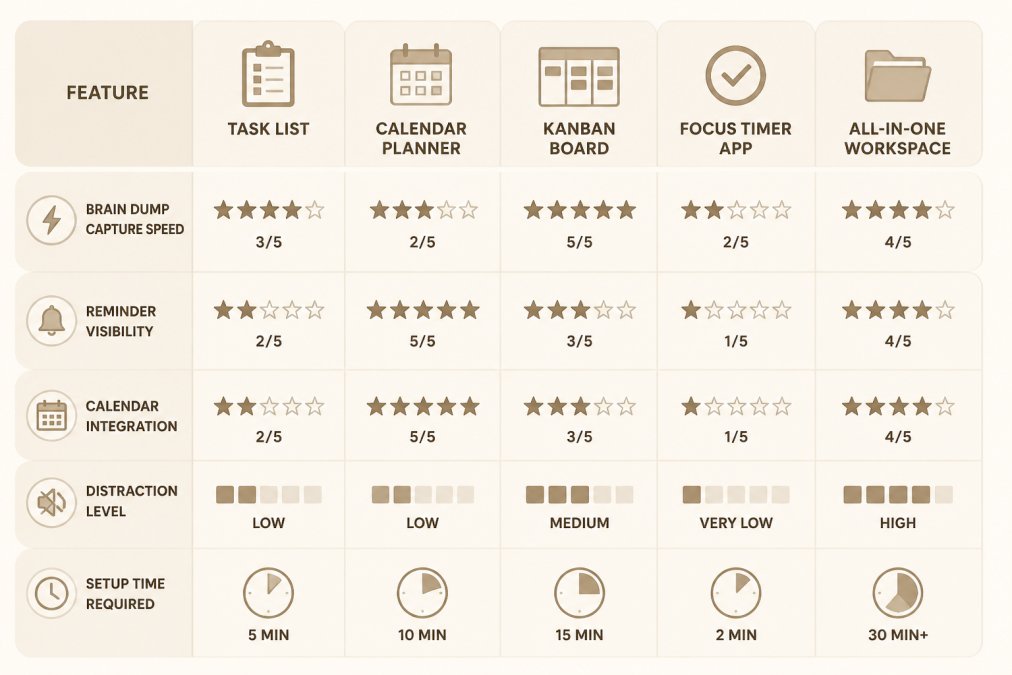
Match Your Friction Point to Tool Features
Identify which ADHD challenge causes you the most friction, then look for apps that directly address it:
Time Blindness: Look for calendar integration and reminders 30-60 minutes before deadlines. Apps that show tasks on a calendar compensate for not feeling time pass. A Friday 3 PM task should remind you Wednesday evening.
Task Initiation Paralysis: Look for one-click capture, "next action" views showing only the immediate step, and timer integration.

Working Memory Gaps: Look for instant capture without multi-step menus and interrupting notifications.
Decision Fatigue: Look for pre-built views, limited filtering, and systems that cap choices to three priorities per day.
Distraction and Notification Overload: Look for customizable notifications, focus modes, and ability to turn off streaks.
Evaluate Apps on These Concrete Behaviors
When testing an app, don't just read the feature list. Use it for three days and answer these questions:
- Can you capture a task in under 5 seconds without opening a full form? If not, you'll abandon it on low-energy days.
- Do reminders actually interrupt you, or do they disappear into a notification center you never check? Silent notifications don't work for ADHD.
- Can you see your entire day at a glance, or do you have to click through multiple views? Visual overwhelm defeats the purpose.
- Does the app let you reset without guilt? If you miss a week, can you clear everything and start fresh, or does it shame you with streaks and "catch up" features?
- How many taps to add a task? More than three taps = you won't use it consistently.
Simple vs. Connected Systems: Which Wins for ADHD?
You'll see two approaches in task management:
Simple system: One app for tasks, one for calendar, one for notes. Each tool does one thing well.
- Pros: Less to learn, fewer notifications, lower distraction risk, easier to abandon and restart
- Cons: You have to check multiple places, context-switching between apps
- Best for: ADHD brains that get overwhelmed by feature-rich tools or those with limited phone storage
Connected system: One app (or workspace) that holds tasks, calendar, notes, and reminders all together.
- Pros: Single source of truth, no context-switching, one notification hub, integrated views (see tasks on your calendar)
- Cons: Longer setup, more customization temptation, higher distraction risk if the app is feature-heavy
- Best for: ADHD brains that benefit from seeing everything in one place and can resist the urge to customize
Red Flags: Apps That Don't Work for ADHD
Avoid apps that require upfront priority assignment, use streak tracking, hide tasks behind multiple clicks, send excessive notifications, require weekly reviews, or prioritize beauty over usability. The best app survives your worst day, test it when tired, stressed, or unmotivated.
Set Up ADHD Reminders and Calendar System That Sticks
Your calendar needs time blocks for recurring commitments (work, sleep, meals, focus time) and reminders that actually interrupt. Add time blocks for everything that takes time. Set reminders 15 minutes before start times with sound and vibration, silent notifications fail for ADHD.
ADHD-Friendly Notion Templates: Building Your Connected Workspace
A good ADHD Notion system has brain dump, task, calendar, habit tracker, and quick-capture layers. The ADHD Home Management Notion Template uses zone-based chore rotation. Don't customize Notion during your first month, use it as designed, then adjust after a month.
Reduce Digital Overwhelm: Simplify Your System
Start with one app for tasks, one for calendar, one for brain dumps. Digital clutter damages ADHD brains as much as physical clutter, every app is another place to check, every notification a distraction. Pick one system, use it for three weeks, then decide if you need more.
Maintain Your System Without Burnout
Systems fail when life happens, illness, work chaos, low-energy weeks. The best maintenance system builds in a reset mechanism so you can recover without shame.
ADHD Life Dashboard: Notion Brain Dump, Meals & Journal →
The Weekly Maintenance Routine (10 Minutes)
When your system is running, maintenance takes minimal time:
- Review your brain dump (5 minutes): Scan everything you've captured since last week. Delete what no longer matters. Move urgent items to your task list. Leave the rest for later.
- Check your calendar for the week ahead (2 minutes): Scan the next 7 days. Are there any surprises? Any time blocks you need to add? Any conflicts?
- Adjust your three daily priorities (3 minutes): Look at what's actually due this week. Pick three things that matter most. Ignore everything else.
That's it. No deep work reviews. No weekly planning sessions. No time-blocking your entire week. Just a quick check to see what's coming and what needs attention.
When Your System Breaks Down: The Reset Protocol
You will miss weeks and abandon your task manager. This is normal ADHD. Instead of catching up (which creates overwhelm), use a reset protocol:
Step 1: Clear everything without guilt (5 minutes) Delete all old tasks, clear your brain dump, and print fresh pages or create a new section. The goal is a blank slate, if it mattered, you would have done it already.
Step 2: Capture what's urgent (5 minutes) Add tasks due in the next 3 days, overdue items, and what's nagging you.
Step 3: Set three priorities for today (2 minutes) Pick three things that matter most. Ignore the rest.
Step 4: Resume your 10-minute weekly routine next week Don't catch up or review what you missed. Just move forward.
Total reset time: 12 minutes. Total shame: zero.
Preventing Breakdown: Low-Maintenance System Design
The best maintenance is prevention. Design your system so it survives neglect:
Use time-based views, not task lists Calendar views hide tasks not due soon, preventing the psychological weight of a 100-item backlog.
Set reminders for recurring tasks only Medication, dentist calls, rent, these get reminders.
Use a "someday" section Move non-urgent items there instead of cluttering your active list.
Limit your brain dump to one place Multiple apps mean you'll forget where things are.
Turn off notifications for low-priority items Only set reminders for real deadlines. Rely on weekly reviews for everything else.
Recovery After a Major System Failure
Sometimes you don't just miss a week. You abandon your system for a month. Your task manager has 200 items. Your brain dump is a graveyard. Your calendar is out of sync with reality.
Here's how to recover:
Week 1: Triage without fixing
- Spend 15 minutes scanning your task list.
- Delete anything that's no longer relevant (anything over 30 days old, anything that doesn't have a deadline, anything you don't actually want to do).
- Don't try to organize or prioritize. Just delete ruthlessly.
Week 2: Rebuild your active system
- Start fresh with a new brain dump.
- Add only tasks due in the next 14 days.
- Set reminders for anything with a hard deadline.
Week 3 onward: Resume your 10-minute weekly routine
- Don't try to catch up on what you missed.
- Just maintain what you have.
- Your system will gradually stabilize as you add new tasks and complete old ones.
The key: recovery isn't about fixing everything. It's about getting back to a functional baseline and moving forward from there.
Choosing Tools That Survive Neglect
When evaluating tools, ask: Does it nag you with notifications? Can you reset without guilt? Does it show only what's due soon? Can you use it on low-energy days? The ADHD Focus & Deep Work System: Task Initiation Planner includes a reset template. Your system works when it survives your worst days, test it when tired, stressed, or unmotivated.
Frequently Asked Questions
How can digital tools help with ADHD organization?
Digital tools remove working memory burden by storing tasks externally, send reminders that reduce time blindness, and let you capture ideas instantly before they disappear. For ADHD brains, this means less mental clutter, fewer missed tasks, and the ability to organize without rigid daily routines. Systems like the ADHD Life Dashboard let you see meal plans, shopping lists, and journal entries in one low-clutter space, reducing decision fatigue.
What should an ADHD-friendly digital planning system include?
An effective ADHD system includes a brain dump for capturing thoughts without judgment, a task list that shows priorities clearly, calendar integration for time-blocking, and reminders that actually notify you. It should avoid visual clutter, allow flexible entry (mobile quick-capture), and not require perfect consistency to be useful. Look for tools with toggle-based layouts and low-pressure habit tracking that don't punish missed days.
Can a digital planner help with task initiation?
Yes. Task initiation, the gap between knowing what to do and actually starting, responds well to tools that break tasks into smaller steps, offer body doubling prompts, and use temptation bundling suggestions. The ADHD Focus & Deep Work System specifically addresses this by letting you define a clear starting point, plan a realistic work session, and capture distractions without losing focus. This turns the freeze into a manageable first step.
How do I avoid getting overwhelmed by productivity apps?
Start with one connected system instead of multiple apps. Choose between a printable planner, tablet planner, or Notion dashboard based on how you naturally work, then add only what you actually use. Digital clutter causes the same overwhelm as physical clutter. Anchor Grove Studio's bundles combine planning, task management, and focus tools into one system. Test for two weeks before adding more.