
Simple Flexible Planners for ADHD: Better Alternatives
Table of Contents
- Why Rigid Planners Get Abandoned (And What Simple Flexible Planners Do Differently)
- ADHD-Friendly Digital Planner Templates: What Actually Reduces Cognitive Load
- Quick Comparison: Simple Flexible Planners Side by Side
- How to Use a Planner With ADHD Without Getting Overwhelmed
- ADHD Planner Layout Examples That Support Task Initiation
- Migration Strategies: Switching Planners Without Losing Momentum
- Breaking the Abandonment Cycle for Good
- Frequently Asked Questions
Last Updated: September 27, 2026
Why Rigid Planners Get Abandoned (And What Simple Flexible Planners Do Differently)
Most planners fail people with ADHD because they demand consistency before delivering any benefit. A planner that requires a perfect streak turns one missed Tuesday into proof you've failed. Simple flexible planners assume inconsistency is normal, build around three priorities instead of thirty, and let you restart on any page without shame.
- Restartability. You can skip a week and reopen it without guilt.
- Low cognitive load. Fewer fields, fewer decisions, less visual noise.
- Task initiation support. It tells you where to start, not just what's pending.
ADHD-Friendly Digital Planner Templates: What Actually Reduces Cognitive Load
Cognitive load is the total mental effort a task demands at once. ADHD-friendly digital planner templates reduce it by cutting decisions per page and removing the interface friction that turns opening the planner into its own task.
The Four Loads a Planner Can Add
Cognitive load splits into four types, each with a different fix:
- Decision load. How many choices a page forces. One priority slot equals one decision; a project dropdown, context tag, energy tag, and time estimate equals four before you've written a word.
- Visual load. How much the eye filters. Dense grids, low-contrast gray text, and decorative icons raise it; high-contrast headings, white space, and one accent color lower it.
- Navigation load. How many taps it takes to reach today. A planner that opens directly to the current day has near-zero load; one that requires scrolling a monthly index adds a step every session.
- Maintenance load. How much upkeep the system demands. Recurring-task engines, rollover prompts, and weekly review templates all add maintenance. If upkeep exceeds payoff, the planner gets abandoned, usually around week two.
Low-Friction vs. Feature-Rich: The Trade-Off Nobody Explains
Feature-rich planners sell better in screenshots. Low-friction planners get used.
What to Actually Look For in a Template
When comparing ADHD-friendly digital planner templates, screen against these checks, not the feature list:
- Undated pages. Dated pages punish a missed week with blank space. Undated pages let you restart on any page without a visual record of failure.
- One primary action per page. A daily page should have one obvious place to start. If two sections compete for attention, initiation stalls.
- Hyperlinked but shallow navigation. Good hyperlinks jump straight to today. Bad hyperlinks create a maze of index pages that add taps without adding value.
- Editable text fields, not just handwriting boxes. Tablet users who write by hand still benefit from a typed brain-dump area for fast capture.
- A visible "done" signal. A checkbox, a strikethrough, a filled circle, something that closes the loop and gives the brain a small completion cue.
- No streak counters. Streaks convert a missed day into a broken system. If the template ships with them, delete or ignore them.
Digital vs. Paper: A Load Comparison
Frame the digital-vs-paper question as load, not preference:
- Paper has low navigation and maintenance load (already open, no sync or updates), but high capture friction (you must find the notebook) and no search.
- Digital has low capture friction (device already in hand) and searchable history, but higher navigation load (unlock, open app, find the page) and maintenance load (sync, updates, file management).
For most people with ADHD, the deciding factor is which friction they hit more often: losing the notebook, or losing the app in a sea of tabs. Pick the format that removes your actual friction, not the one that reviews better.
If you're testing a digital template, time yourself from "pick up device" to "first task written." If it's over sixty seconds, the navigation load is too high for a low-energy day.
Quick Comparison: Simple Flexible Planners Side by Side
Anchor Grove Studio offers four options built around the same low-pressure approach:
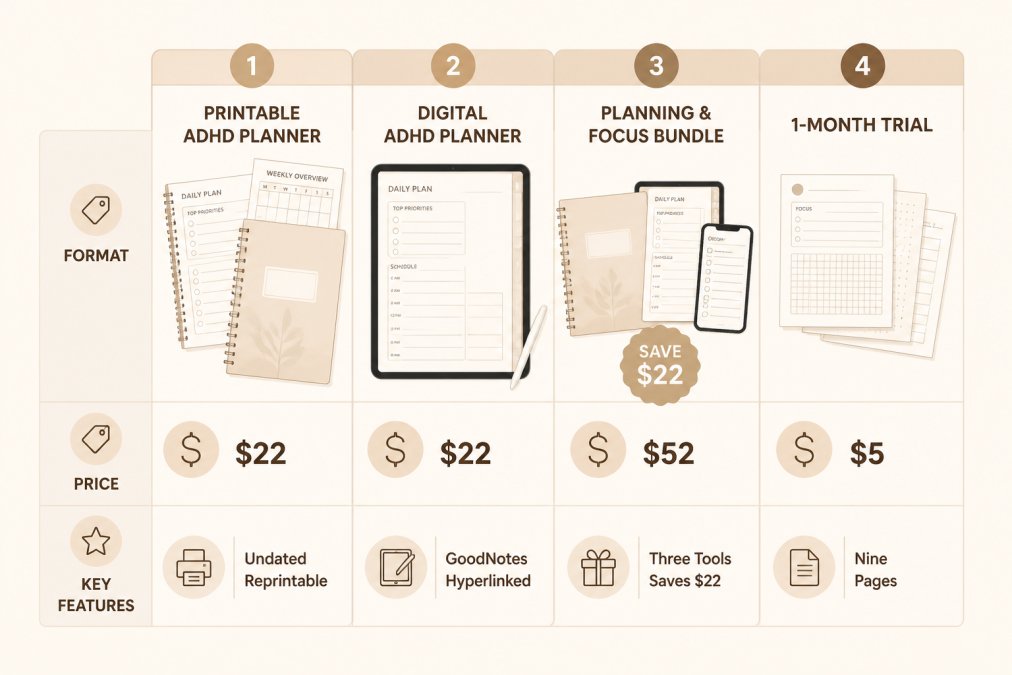
| Planner | Format | Price | What's Inside | Best For |
|---|---|---|---|---|
| Printable ADHD Planner | Printable PDF/PPTX | $22.00 | Daily, weekly, monthly pages, Top 3 priorities, brain dump, habit tracker, Dopamine Menu | People who want paper and reprintable pages |
| Digital ADHD Planner | GoodNotes-ready PDF | $22.00 | Daily and weekly pages, hyperlinked navigation, low-clutter layouts | Tablet users who want to write by hand |
| Planning & Focus Bundle | 3 digital tools | $52.00 | Printable planner, digital planner, Focus & Deep Work System | People who want both formats plus focus support |
| 1-Month Trial | Printable PDF | $5.00 | 9 pages, weekly layout, Top 3 structure, 4-week habit tracker | Testing the system before committing |
How to Use a Planner With ADHD Without Getting Overwhelmed
- Open to today's page. Don't review the week first.
- Brain dump everything in your head onto the dump page.
- Circle three items that actually matter today.
- Write only those three in the priority slots.
- Close the planner and start the first one.
The ADDitude guide to ADHD time management notes that externalizing tasks reduces the working-memory load that makes prioritization feel impossible.

ADHD Planner Layout Examples That Support Task Initiation
The best ADHD planner layout examples answer "what do I do right now" before "what's everything I need to do." When your eye lands on a single next action, initiation stops being a decision and becomes follow-through.

The Top 3 Priority Page
Three slots. Not five, not ten. A Top 3 page forces a real choice, which is what planning paralysis avoids. When everything is a priority, nothing is, and the brain stalls on the decision rather than the work.
Printable ADHD Planner: No-Shame Daily →
- Three numbered slots, visually equal in size, so no slot looks more important than another.
- A single line per slot, not a sub-task list. Sub-tasks reopen the decision.
- A checkbox or fill-in circle next to each slot, so completion is visible at a glance.
- Empty space below, so the page doesn't feel like it needs to be filled.
Brain Dump and Triage Spread
A brain dump and triage spread captures everything first, then sorts it. Dumping without triage creates a longer list; triage without dumping loses the thoughts creating background noise.
- Dump: every task, worry, and half-thought, unsorted. No categories, no order, no judgment.
- Triage: mark each item as today, later, or let go. Three marks, nothing more.
- Transfer: move only the "today" items to your Top 3.
The Two-Page Daily Spread
A common alternative to the single-page Top 3 is a two-page daily spread: left page for capture, right page for commitment. The left page is unstructured, a blank or lightly lined area for whatever is in your head. The right page is structured, three priority slots, a short schedule strip, and a notes line.
The Weekly Reset Page
A weekly reset page is not a weekly plan. It's a single page you open once a week to do three things:
- Close the loop on last week. Cross off what got done, move what didn't, and delete what no longer matters.
- Pick three anchors for the coming week. Not a full schedule, three things that would make the week feel successful.
- Restock the brain dump. Empty anything that's been sitting in your head into the dump page so it stops taking up background space.
What These Layouts Have in Common
Across all four examples, the same design principles repeat:
- One primary action per page. The eye lands somewhere specific and knows what to do.
- Constraint over capacity. Three slots, three triage marks, three weekly anchors. The limits are the feature.
- Capture before commitment. Dumping always comes before choosing.
- No streak or score language. Nothing on the page can be "broken."
- Restartability. Any page can be the first page. A missed week leaves no visible gap.
Migration Strategies: Switching Planners Without Losing Momentum
Switching planners mid-stream is where most people lose their progress. The fix is to migrate in one sitting and cap it at thirty minutes.
A workable migration:
- Open your old planner to the last page you actually used.
- Copy only unfinished, still-relevant tasks. Skip anything older than two weeks unless it's genuinely important.
- Move recurring items (meds, bills, weekly chores) into the new system.
- Archive the old planner. Don't keep it open "just in case."
- Do one full planning session in the new format before the week ends.
Breaking the Abandonment Cycle for Good
The abandonment cycle has a predictable shape: excitement, elaborate setup, one missed day, guilt, avoidance, replacement. Breaking it means interrupting the pattern at the guilt stage.
Three habits that interrupt it:
- Redefine success. Using the planner three days out of seven is a win, not a failure.
- Remove streak language. No "days in a row" counters. They convert a missed day into a broken system.
- Schedule a weekly reset, not a daily requirement. One ten-minute reset beats seven forced check-ins.
Frequently Asked Questions
What kind of planner is best for someone with ADHD?
The best planner for ADHD is one with fewer moving parts. Look for undated pages you can reprint or reset, a Top 3 priority structure instead of a ten-item list, and no streak-based habit tracking that punishes missed days. Simple flexible planners like the Printable ADHD Planner ($22) or the Digital ADHD Planner ($22) from Anchor Grove Studio fit this model. Both let you skip a week and start again without a failed page.
Are digital or paper planners better for ADHD task initiation?
It depends on where friction lives for you. Paper removes notification fatigue and app-switching, which helps some people start faster. A tablet planner keeps everything searchable and portable but adds device distraction. The Digital ADHD Planner is a GoodNotes-ready PDF with hyperlinked navigation and low-clutter layouts, while the Printable ADHD Planner is an editable PowerPoint file you print at US Letter size. Try the $5 one-month trial version of either format before committing.
How do I stop feeling guilty when I stop using my planner?
Pick a system that has no shame language built in. Planners that track streaks or mark incomplete pages as failures reinforce the all-or-nothing thinking that already makes ADHD planning hard. The Printable ADHD Planner uses a low-pressure habit tracker designed to show patterns rather than demand consistency, and there is no failed page if you stop for a while. The practical fix is to reopen it, choose one priority, and start again.
What is the best daily planner app for people with ADHD?
App-based planners work well when you need calendar integration, reminder systems, and cross-platform synchronization. But feature-heavy apps often add cognitive load and notification fatigue. If you want a middle path, the ADHD Life Dashboard Notion Template (part of the $118 Core ADHD Toolkit) gives you a structured Notion workspace without building it yourself. For a lower-commitment start, the Digital ADHD Planner is a one-time $22 PDF download with no subscription.