
Tiimo vs Structured for Productivity: ADHD App Comparison
Table of Contents
- Tiimo vs Structured: Quick Comparison Table
- Core Philosophy and Design Approach
- Visual Planning, Timeline Blocks, and How to Overcome Time Blindness
- Pricing Models, Free Tiers, and Lifetime Access
- Syncing, Cross-Platform Performance, and Calendar Integration
- Building an ADHD Friendly Daily Schedule Template That Actually Sticks
- Where Each App Wins: Use Cases and Verdict
- Frequently Asked Questions
Last Updated: September 16, 2026
Tiimo vs Structured: Quick Comparison Table
Tiimo and Structured are both visual daily planners for people who struggle with time blindness, but they solve the problem in opposite ways. Tiimo is a subscription app centered on a visual timeline and routine building; Structured is a timeline-based daily planner with a strong free tier and a one-time lifetime unlock. This guide compares them on design philosophy, pricing, syncing, and real productivity use cases.
| Feature | Tiimo | Structured |
|---|---|---|
| Core model | Visual timeline plus routines | Visual timeline plus task list |
| Free tier | Limited trial | Yes, genuinely usable |
| Paid model | Subscription | Subscription or lifetime unlock |
| Widgets | Home and lock screen | Home and lock screen |
| Calendar sync | Two-way | Two-way |
| Best for | Routine building and focus | Fast daily planning |
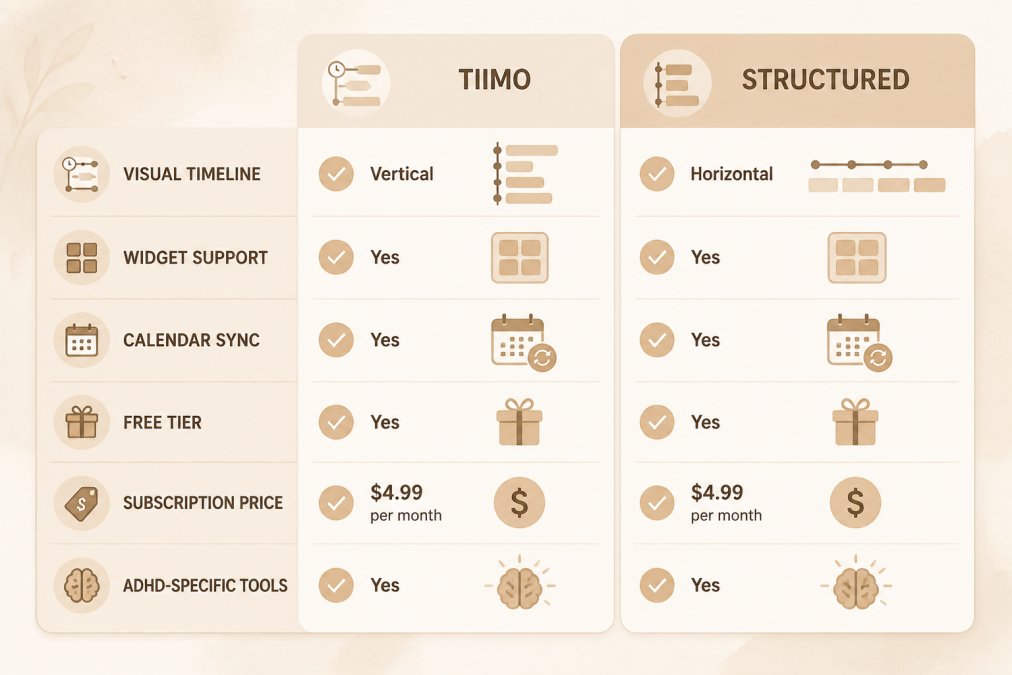
Neither app is universally better. What matters is whether you need a system that builds routines for you or one that gets out of your way while you plan your own day.
Core Philosophy and Design Approach
Tiimo treats planning as a routine-building exercise. The app is built around visual timeline blocks, so your day reads as colored segments rather than a task list. Its design reduces cognitive load: fewer decisions, more visual cues, and a nudge toward repeating the same blocks daily.
Structured takes the opposite stance. It assumes you know what you want to do and just need a fast way to place tasks on a timeline. The interface is deliberately sparse: add a task, drag it to a time, move on. No routine engine pushes you toward consistency.
That difference matters more than any feature list. If deciding where to start is the problem, Tiimo's structure does some of that work. If you plan fine but never look at your plan, Structured's widget-first design keeps the timeline in front of you.
Visual Planning, Timeline Blocks, and How to Overcome Time Blindness
Time blindness is the difficulty perceiving how long tasks take and how much time remains before a deadline (ADHD Time Blindness: How to Detect It & Regain Control Over Time - ADDA). Both apps address it visually, differently.
Tiimo's timeline blocks are the stronger tool for estimating duration. Because each block has a visible length, you can see at a glance that a 90-minute block takes up a third of your working morning, visual weight that makes time feel real for many people with ADHD.
Structured's timeline is more flexible: stack tasks, leave gaps, rearrange the day in seconds. The trade-off is that nothing pushes back when you schedule eight hours of work into four available hours.
A practical way to use either app for time blindness:
- Estimate each task in blocks, not minutes
- Add a buffer block after anything that historically runs long
- Put your hardest task in your first high-energy block
- Check the timeline once mid-morning, not constantly
- Move unfinished blocks instead of deleting them
Pricing Models, Free Tiers, and Lifetime Access
Pricing is where these two apps diverge most sharply. Here is the concrete breakdown.
Tiimo runs on a subscription: a limited free trial, then a monthly or annual plan billed through the App Store or Google Play. Access ends when you stop paying, and there is no lifetime unlock. For a tool you may use intensely for three months then abandon for two, that recurring charge is the real cost.
Structured offers a genuinely usable free tier covering basic daily planning, plus a paid upgrade available as a subscription or a one-time lifetime purchase.
ADHD Planning & Focus Bundle: 3 Digital →
| Cost factor | Tiimo | Structured |
|---|---|---|
| Free access | Limited trial | Usable free tier |
| Recurring option | Monthly / annual | Monthly / annual |
| One-time option | None | Lifetime unlock (per platform) |
| Cost if you stop paying | Access ends | Free tier remains |
| Cross-platform purchase | Tied to store account | Lifetime is per-platform |
current App Store listing and in-app purchase prices
Two things to check before you buy either:
- Whether the lifetime unlock is per-platform. If you switch from iPhone to Android, a Structured lifetime purchase does not follow you. A Tiimo subscription does, because it is tied to your account, not the store.
- Whether the free tier is enough for your actual workflow. Structured's free tier handles a single day well. If you need recurring routines, widgets, or calendar sync, you are likely in paid territory either way.
Syncing, Cross-Platform Performance, and Calendar Integration
This is the section that decides whether you actually stick with a tool. Both apps sync across devices and integrate with external calendars, and both have drawn syncing complaints. The difference is in the details.
- Export format. Can you get your data out as a file you can actually read, not just a proprietary backup?
- Account dependency. If you delete your account, do you lose your history, or does it stay on-device?
- Recurring routine portability. Can you copy a routine from one week to another, or do you rebuild it each time?
What to check before committing:
- Real-time synchronization: Make a change on your phone and confirm it appears on your tablet within seconds, not minutes.
- Two-way calendar integration: Your work calendar events should appear in the app, and app blocks should appear in your calendar.
- Widget integration: Test the home screen and lock screen widgets separately. A planner you never see is a planner you forget.
- Battery and resource consumption: Run the app with widgets active for a full day and check your battery usage.
- Data portability: Confirm you can export your data before you have two years of planning history to lose.
Building an ADHD Friendly Daily Schedule Template That Actually Sticks
An ADHD friendly daily schedule template is a repeatable daily structure with fixed anchor points and flexible blocks between them, designed so a missed day does not break the system. The goal is not a perfect routine but a plan you can restart without guilt.
Here is a structure that holds up in practice:
| Time Block | Purpose | Flexibility |
|---|---|---|
| Morning anchor | One fixed habit, same time daily | Low |
| Priority block | One task only, 60-90 minutes | Medium |
| Reset block | Tidy, eat, move, decompress | High |
| Second priority | Smaller task or admin | Medium |
| Shutdown | Capture tomorrow's first task | Low |
Where Each App Wins: Use Cases and Verdict
Tiimo wins if you need help building routines and seeing time as a physical quantity. Its visual timeline blocks and routine structure do more of the planning work, which helps when decision fatigue is the blocker.
Frequently Asked Questions
Is the Tiimo app worth the subscription cost?
Tiimo's subscription unlocks its full visual timeline, widget support, and routine-building tools. If you rely on seeing your day as a color-coded sequence rather than a list, the subscription pays for itself. If you only need basic task tracking, the free tier may be enough. Try the free version for two weeks before committing, and pay attention to whether the visual layout actually reduces your cognitive load.
How does Structured handle ADHD time blindness compared to Tiimo?
Structured presents your day as a vertical timeline with time blocks, which gives a clear picture of how long tasks take and where gaps exist. Tiimo uses a similar visual approach but adds icons and color coding that many users find easier to scan quickly. Both address time blindness by making duration visible. The difference comes down to whether you prefer Structured's cleaner list-timeline hybrid or Tiimo's more visual, icon-driven layout.
Can Tiimo or Structured integrate with my existing calendar?
Both apps support calendar integration, though the depth varies. Structured syncs with Google Calendar and Apple Calendar, pulling in existing events so your timeline reflects real commitments. Tiimo also offers calendar sync, but some users report syncing issues when managing multiple calendars or recurring events. Check whether your primary calendar provider is supported before committing to either app, and test the sync with a few events first.
Do Tiimo and Structured offer free versions?
Both apps have free tiers. Structured's free version lets you build a basic daily timeline with limited customization. Tiimo's free tier includes core visual planning but locks widget integration and some routine features behind the subscription. For anyone testing whether a visual planner suits their brain, starting free is the right move. Use the free version for at least a week before deciding whether the paid features justify the monthly cost.
Which app is more intuitive for someone with executive dysfunction?
Tiimo tends to feel more approachable for people who struggle with task initiation because its icon-based interface requires less reading and decision-making. Structured appeals more to users who want a straightforward timeline they can fill in themselves. If you freeze when faced with a blank schedule, Tiimo's pre-built routine templates and visual cues reduce that friction. If you prefer building your own structure, Structured gives you a cleaner canvas without extra visual noise.