
Why Do I Abandon My Planners? ADHD-Friendly Fixes
Table of Contents
- Why Do I Abandon My Planners? Diagnosing Your Pattern
- Planner Burnout: When the System Becomes the Problem
- How to Use a Planner with ADHD Without Fighting Your Brain
- ADHD Planner Alternatives: Paper, Digital, and Hybrid Systems
- How to Start Using a Planner Again After You've Quit
- How to Tell If Your Planner Is Actually Working
- Frequently Asked Questions
Last Updated: October 12, 2026
Why Do I Abandon My Planners? Diagnosing Your Pattern
If you keep asking yourself "why do I abandon my planners," the answer is rarely laziness. It is almost always a mismatch between the system you bought and the way your brain actually works.
That is not a character flaw. It is a design problem.
Most planners assume you will show up every day, keep a streak alive, and feel motivated by empty checkboxes. ADHD brains do not run that way. Task initiation stalls. Energy swings.
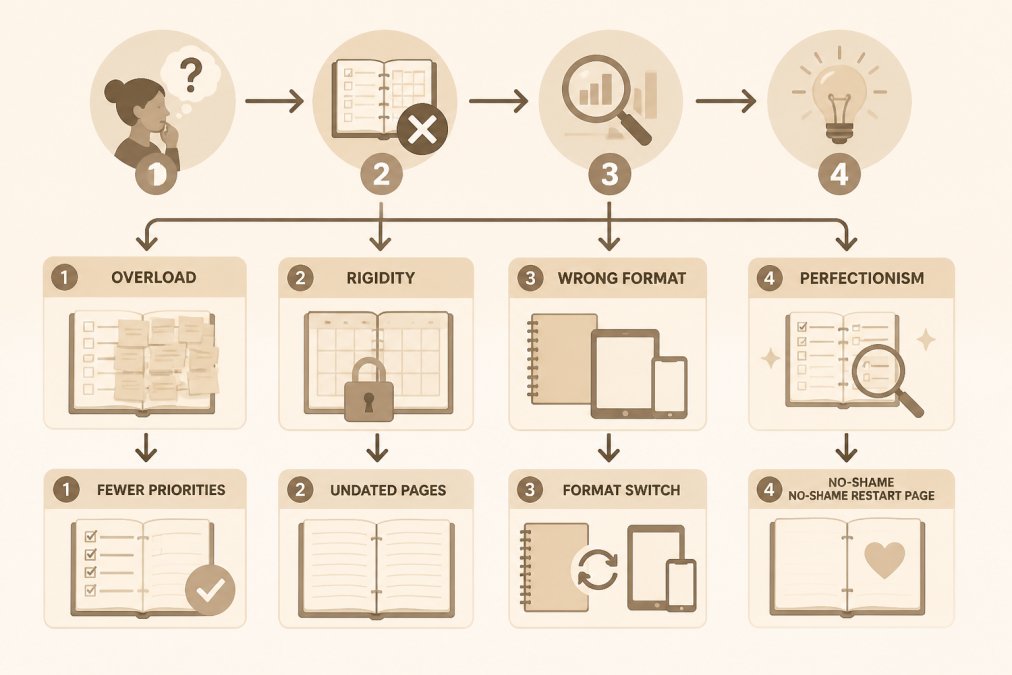
Below, we break down the four patterns behind planner abandonment and show you exactly how to fix each one.
The Four Common Abandonment Patterns
Most people quit a planner for one of four reasons. Find yours before you buy another one.
- Overload. You list ten tasks, finish three, and feel behind by noon.
- Rigidity. The planner demands daily entries. One missed day breaks the streak, and you stop.
- Wrong format. Paper feels slow. Digital feels invisible. Neither matches how you think.
- Perfectionism. A blank page or messy handwriting feels like failure, so you avoid the book entirely.
Here is the fix for each:
| Pattern | What It Looks Like | The Fix |
|---|---|---|
| Overload | Long task lists, nothing finished | Cap it at three priorities per day |
| Rigidity | Missed days, abandoned streak | Switch to undated, reprintable pages |
| Wrong format | Paper or digital never sticks | Try a hybrid: paper for daily, digital for review |
| Perfectionism | Blank or messy pages cause guilt | Use a system with no "failed" pages |
Planner Burnout: When the System Becomes the Problem
Planner burnout happens when maintaining the planner takes more energy than the planning itself. The tool becomes another chore, and chores get skipped first.
Think about what a rigid planner asks of you. Fill every box. Track every habit. Review every week. For a neurotypical brain, that is manageable. For an ADHD brain running low on executive function, it is a second job.
The warning signs show up early:
- You dread opening the planner
- You copy tasks forward day after day
- You feel guilt instead of relief when you see it
- You start avoiding the desk where it sits
A common mistake is treating this as a discipline problem. It is not. It is a signal that the system needs fewer moving parts.
How to Use a Planner with ADHD Without Fighting Your Brain
The best way to use a planner with ADHD is to lower the bar until opening it feels easy, but the reason that works is worth understanding, because it tells you which adjustments actually matter for your brain.
ADHD is not a motivation deficit. It is a difference in executive function: the set of mental skills that handle task initiation, working memory, time awareness, and emotional regulation.
Here is how each common adjustment maps to the executive function it supports:
| Adjustment | Executive Function It Supports | Why It Works |
|---|---|---|
| Cap at three priorities | Task initiation | Fewer choices means less decision friction before you start |
| Brain dump first | Working memory | Offloads open loops so your head is not holding them |
| Drop streaks | Emotional regulation | Removes the shame spike that follows a missed day |
| Plan around energy | Time awareness | Matches tasks to actual capacity instead of clock time |
| Use undated pages | Task initiation | Eliminates the "wasted page" barrier to restarting |
A few concrete adjustments that follow from this:
- Plan three priorities, not ten. Three is enough to feel productive without triggering overwhelm. Write them the night before if mornings are hard, task initiation is often easier when the decision is already made.
- Do a brain dump first. Get every thought on paper, then pick what matters today. This is an external memory aid, not a to-do list. The goal is to stop your working memory from carrying the load.
- Drop the streaks. Track patterns instead of perfect runs. A habit tracker that shows a gap is still useful data; a streak that breaks is just a reason to quit.
- Plan around energy, not just time. Some days you have two hours. Some days you have twenty minutes. Both are valid. Match the task to the capacity you actually have.
- Let the planner be undated. Miss a week, come back, keep going. No wasted pages, no guilt math.
- Use a single capture point. If tasks live in three places, your working memory is still doing the work. One inbox, paper or digital, reduces the number of places you have to check.
The goal is a planning routine you can restart on any day, not one you have to protect. If you are not sure which adjustment to start with, pick the one that matches the executive function you notice failing most often.
ADHD Planner Alternatives: Paper, Digital, and Hybrid Systems
There is no single best format. The right choice depends on how you think, where you work, and how you handle change.
Paper planners work well if you remember things better when you write them by hand. They are visible, tactile, and free of notifications.
Digital planners work well if you already live on a tablet. They are searchable, portable, and easy to edit.
Hybrid systems combine both. Many people plan the day on paper and review the week digitally.
| Format | Best For | Watch Out For |
|---|---|---|
| Paper | Handwriting memory, low distraction | No search, easy to misplace |
| Digital | Tablet users, portability | Device distractions, app overload |
| Hybrid | Mixed energy days, flexible routines | Requires one simple setup rule |
If you are not sure which fits, start with a small trial instead of a full commitment. Our 1-Month ADHD Printable Planner is a $5, 9-page test run.

How to Start Using a Planner Again After You've Quit
Restarting is easier when you lower the entry cost. You do not need a fresh planner, a new month, or a clean slate. You need one page and five minutes, and a plan for the day you inevitably miss.
Printable ADHD Planner: No-Shame Daily Planning System →
Most restart advice stops at "just start again." That is not enough, because the reason you quit the first time is still there. This restart protocol is built to survive a missed day, not to pretend it will not happen.
The First-Week Restart Routine
Day 1, One page, three items. Open the abandoned planner to any blank page.
Day 2, Add a brain dump. Same three-item list, plus a five-minute brain dump on the facing page. Circle anything urgent.
Day 3, Skip the review. No weekly audit, no habit tracker, no color coding.
Day 4, Test the two-minute rule. If opening the planner takes more than two minutes of setup, the system is too heavy.
Day 5, Notice what you avoided. Look at the three items you wrote each day. Which one kept getting pushed?
Day 6, Do a five-minute weekly review. Not a full audit. Three questions: What did I finish? What kept getting pushed?
How to Handle the Day You Miss
You will miss a day. The restart plan has to account for that, or it is just another streak waiting to break.
- Do not backfill. Filling in missed days is guilt with extra steps. Start with today.
- Do not restart the week. A missed Tuesday does not reset the system. Pick up on Wednesday.
- Do not buy a new planner. The abandoned one is fine. A new book does not fix a heavy setup.
- Do write one line about why you missed. "Low energy," "overscheduled," "forgot it existed", that line is data for your next weekly review.
The no-shame approach matters here. Our Printable ADHD Planner: No-Shame Daily Planning System is undated and reprintable, so a missed week never costs you pages. It is built around three priorities, a Brain Dump & Triage system, and a low-pressure habit tracker with no rigid streaks.

How to Know the Restart Is Working
After two weeks, check three things:
- Open rate. Did you open the planner on more days than you avoided it?
- Setup time. Does it take under two minutes to start planning?
- Restart speed. After a missed day, did you come back within 48 hours?
If the answer to any of these is no, the fix is subtraction, not addition. Remove one feature and run the week again. A planner you restart quickly is worth more than a planner you never miss.
How to Tell If Your Planner Is Actually Working
A planner is working if you open it more often than you avoid it. That is the simplest test, and most people skip it.
Use these questions to check your system after two weeks:
- Do you open it without dread?
- Can you find today's priorities in under ten seconds?
- Does it still work after you miss a day?
- Are you finishing at least one priority most days?
- Does it feel lighter, not heavier, than before?
If you answer no to most of these, the planner is not failing you. The setup is too heavy. Cut one feature and try again.
If you want a single system that covers daily, weekly, and monthly planning without the clutter, the ADHD Planning & Focus Bundle gives you a printable planner, a tablet-ready digital planner, and a focus system for task initiation.
For tablet users, the Digital ADHD Planner is a GoodNotes-ready PDF with hyperlinked navigation and low-clutter daily and weekly pages.

Frequently Asked Questions
Why do I keep abandoning my planner even when I want to use it?
Most people abandon planners because the system demands more consistency than their brain naturally provides. If you have ADHD, executive function challenges make it hard to maintain rigid daily routines. The planner becomes another task to manage instead of a tool that helps. Common triggers include too many priorities listed at once, guilt over missed days, and formats that don't match how you actually think. Switching to a flexible, undated system with fewer daily priorities removes the pressure that leads to abandonment.
Can a planner actually work for someone with ADHD?
Yes, but it needs to work differently than a traditional planner. ADHD-friendly systems use fewer daily priorities (three instead of ten), skip rigid streaks, and include tools like brain dumps to clear mental clutter before deciding what matters. Undated pages mean a missed week doesn't ruin the planner. The key is choosing a format that matches your energy levels. A printable planner you can reprint, a tablet-based digital planner, or a hybrid approach all work if the structure stays flexible.
How do I start using a planner again without feeling behind?
Start with one page and one priority. Do not try to catch up on missed days or fill in blank pages from last month. An undated planner lets you open to any page and begin fresh. Write down three things that matter today, do a quick brain dump to clear your head, then pick one next step. If you miss tomorrow, the page still works the day after. This low-friction restart removes the guilt that keeps people from picking the planner back up.
What is the best ADHD planner alternative if paper planners don't work for me?
If paper planners keep getting abandoned, try a digital planner on your tablet or a hybrid system. A GoodNotes-ready PDF planner gives you the same low-clutter layout with hyperlinked navigation, so you can jump between pages without flipping through paper. Hybrid systems combine a printable weekly layout for big-picture planning with a digital task list for daily use. The right choice depends on whether you think better with handwriting, typing, or a mix of both.
Planner abandonment is not a willpower problem. It is a sign that your system is asking for more than your brain can give on a hard day. Anchor Grove Studio builds undated, low-clutter planners with no rigid streaks, no shame language, and no "failed" pages, so you can start over on any page or any week. Add to cart and give yourself a planning system worth coming back to.