
Anti-Boring Alternatives to Notion for ADHD
Table of Contents
- Why Notion Feels Overwhelming (And What to Look For Instead)
- Best Notion Templates for Productivity
- ADHD-Friendly Productivity Tools Beyond Notion
- Feature Comparison: What Matters for Your Brain
- Migration Friction: How Hard Is It to Switch?
- Pricing and Subscription Fatigue
- Conclusion: Finding Your Calm Productivity System
Why Notion Feels Overwhelming (And What to Look For Instead)
Notion promises to be your all-in-one workspace. In reality, it often becomes a blank canvas that demands you build the entire system from scratch. For people with ADHD, that blank page isn't freeing, it's paralyzing (peer-reviewed research).
The problem isn't Notion itself. It's that Notion requires you to have your system already figured out before you can use it. You need to understand databases, relations, formulas, and rollups. You need to design your own workflows. You need to maintain consistency with templates you created yourself. For executive function challenges, this is asking someone to run a marathon before they've learned to walk.
At Anchor Grove Studio, we understand this pattern: someone downloads a Notion template, feels inspired for a week, then abandons it because the cognitive load of maintaining it exceeds the benefit it provides. The real issue is that Notion works best for people who love systems design. For people with ADHD who need structure but feel drained by complexity, alternatives to Notion exist that flip the equation: they come pre-built, low-pressure, and designed specifically for how your brain actually works.
Here's what to look for when evaluating anti boring alternative for notion tools:
- Task initiation support: Can you start without understanding the entire system first?
- Low-clutter design: Does it reduce cognitive load or add visual noise?
- Flexible reset mechanics: Can you restart on any day without shame or "broken streak" penalties?
- Offline or local-first options: Do you need constant cloud sync, or can the tool work without it?
- Knowledge management built in: Can you capture ideas quickly without organizing them perfectly first?
Below, we'll show you exactly how to evaluate your options and find the system that actually fits your brain.
Best Notion Templates for Productivity
If you're still exploring Notion and want to make it work, the right template can reduce the friction significantly. The key difference between templates that stick and ones that gather dust is whether they match your actual workflow.
Many ADHD-friendly Notion templates share these core features: a simple daily priority system (often limited to three tasks instead of endless lists), a brain dump section to capture ideas without organizing them first, and a low-pressure habit tracker that doesn't punish missed days (peer-reviewed research). The best ones also include a "reset button", a way to clear your board and start fresh without feeling like you've failed.
Templates that work well for ADHD focus on reducing decision fatigue. Instead of asking you to choose from ten different planning views, they offer one clear path: capture, triage, prioritize, execute. This linear flow matches how many neurodivergent brains prefer to work.

However, even the best Notion template requires maintenance. You'll need to update your database views, fix broken relations, and adjust formulas when they stop working. This is fine if you enjoy systems design. If you don't, the template becomes another source of friction.
The real value of a Notion template for ADHD is as a starting point, not a forever solution. Use it to understand what structure helps you think, then consider whether you want to maintain that complexity long-term or move to a tool that handles the backend work for you.
ADHD-Friendly Productivity Tools Beyond Notion
When Notion stops working, your next move depends on what broke first: Was it the setup? The maintenance? The cognitive load of the interface itself? Different tools solve different problems.
Local-First and Open-Source Options
Local-first tools store your data on your device first, then sync to the cloud. This means you can work offline, you own your data, and you don't depend on a company's servers staying up. For people with ADHD who value control and data privacy, this matters.
Obsidian is the most popular local-first alternative to Notion. It uses markdown files stored on your computer, so you can access them even if Obsidian disappears tomorrow. The interface is simpler than Notion, it's built around note-taking and bi-directional linking, not database management. Many people find this narrower focus actually reduces overwhelm.
The trade-off: Obsidian has a steeper learning curve for customization. If you want to build complex workflows, you'll spend time in configuration. If you want something that works out of the box, you'll feel limited.
LogSeq is similar to Obsidian but optimized for outlining and daily notes. It's open-source, which means the code is publicly available and the tool won't suddenly change its business model. For people concerned about subscription fatigue and long-term sustainability, this matters.
Open-source tools like Joplin and TiddlyWiki offer privacy and portability, but they require more technical setup. You'll manage your own installation, troubleshoot your own problems, and handle your own backups. This is great if you enjoy that work. It's terrible if you just want the tool to work.
Cloud-Based Alternatives with Knowledge Management
Cloud-based tools handle the infrastructure for you. You don't manage servers or backups. The trade-off is that you depend on the company staying in business and maintaining the service.
Roam Research focuses on bi-directional linking and networked thought. Unlike Notion, which organizes information into separate databases, Roam treats everything as interconnected nodes. This matches how many ADHD brains actually think, in associations and connections rather than rigid categories. The interface is less cluttered than Notion, and the daily note system provides a natural entry point each morning.
Roam's weakness is pricing. At around $15 per month, it's more expensive than Notion, and the value proposition is narrower. You're paying for a knowledge management tool, not an all-in-one workspace.
Logseq (also available cloud-based) and Athens Research offer similar networked thinking models at lower price points. Both emphasize daily notes and graph views, which appeal to people who think in associations rather than hierarchies.
For pure task management without the knowledge management layer, tools like Todoist and Things focus on getting tasks into your system quickly and helping you execute them. These aren't replacements for Notion's database capabilities, they're replacements for the task-management portion of Notion. Many people use them alongside a note-taking tool.
Anchor Grove Studio offers a different approach entirely: instead of trying to build a perfect digital system, we provide ADHD-friendly printable and digital planners that come pre-designed and ready to use. The Printable ADHD Planner ($22.00) uses a simple three-priority system and includes a brain dump section, no setup required. The Digital ADHD Planner for tablets ($22.00) works with GoodNotes and similar annotation apps, giving you the flexibility of digital planning without the complexity of database management. Both formats let you reset on any page without guilt, which is critical for ADHD brains that need fresh starts.

Feature Comparison: What Matters for Your Brain
Not every feature matters equally for ADHD productivity. Some features solve real problems. Others are nice-to-have distractions that add cognitive load without benefit.
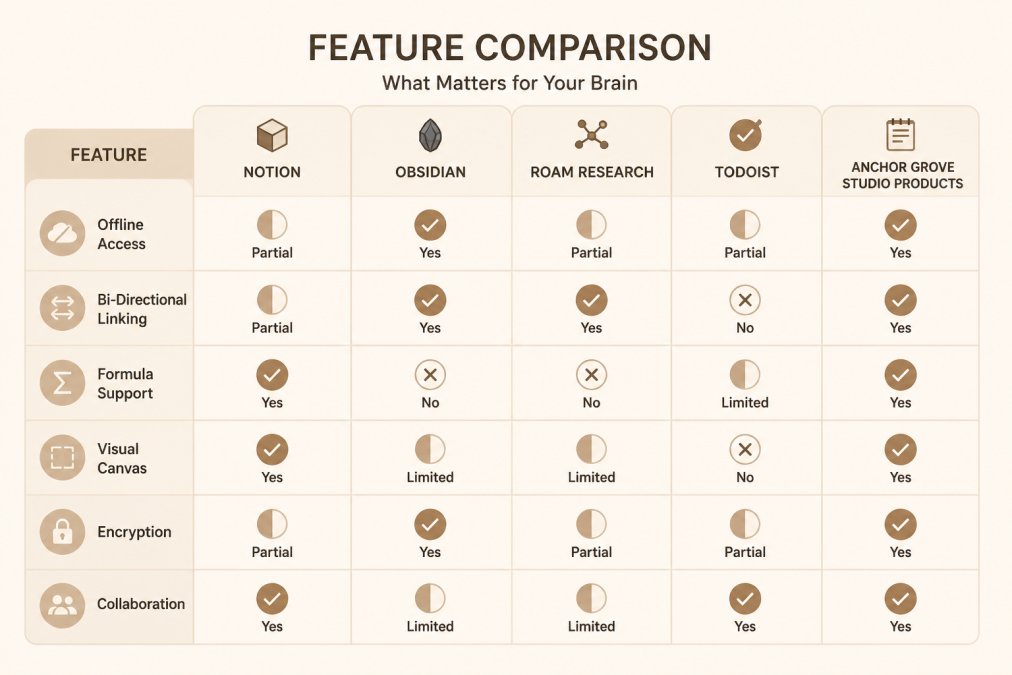
| Feature | Notion | Obsidian | Roam Research | Todoist | Anchor Grove Studio |
|---|---|---|---|---|---|
| Offline Access | Limited | Full | Limited | Limited | Full (printable) |
| Bi-directional Linking | No | Yes | Yes | No | No |
| Database & Formulas | Yes | No | No | No | No |
| Visual Canvas | Yes | No | No | No | No |
| Encryption | Cloud-based | Local files | Cloud-based | Cloud-based | Local files |
| Real-time Collaboration | Yes | No | Yes | Yes | No |
| ADHD-Specific Design | No | No | No | No | Yes |
| Setup Time Required | 2-4 hours | 1-2 hours | 1 hour | 15 minutes | 0 minutes |
| Maintenance Burden | High | Medium | Low | Low | None |
The features that matter most for ADHD are often the ones Notion excels at but makes harder to use: task capture, priority filtering, and the ability to reset without feeling like you've failed. Obsidian and Roam Research handle knowledge management beautifully but don't specialize in task execution. Todoist is excellent at task management but doesn't help with the bigger-picture thinking.
Anchor Grove Studio's approach is different. We've eliminated the features that create decision fatigue (no database design, no formula configuration, no endless customization options) and kept only what matters: a clear place to dump your brain, a simple system to prioritize, and permission to reset whenever you need to.
Migration Friction: How Hard Is It to Switch?
Switching tools costs more than just money. It costs time, emotional energy, and the risk of losing data or momentum in the process.
Moving from Notion to another tool means exporting your data, figuring out how to import it into the new system, and often manually reorganizing everything because the data structures don't match. A Notion database exports to CSV, which is useless in Obsidian. Your carefully organized Notion workspace becomes a pile of unstructured text files that you have to rebuild manually.
This friction is why many people stay in Notion even when it's not working. The switching cost feels higher than the cost of continuing to struggle.
Local-first tools like Obsidian have lower exit friction because your data is stored as plain markdown files. You can open them in any text editor. You're not locked into the tool.
Cloud-based tools like Roam and Todoist have higher friction because your data lives in their databases. Exporting is possible but often messy.
Anchor Grove Studio products have zero migration friction because you own the files. The Printable ADHD Planner is a digital download you can customize or print. The Digital ADHD Planner is a PDF. If you decide to switch systems, you just stop using the tool. There's no data locked in a cloud database. There's no complex export process. You're not trapped.

For people with ADHD who have tried multiple systems and abandoned them, this matters. You're not making a permanent commitment. You're trying a tool that costs $5 for a one-month trial or $22 for the full system. If it doesn't work, you've lost $22, not months of setup time.
Pricing and Subscription Fatigue
Notion costs $10 per month for the Pro plan (after a free tier) (notion.so). That's $120 per year. When you add specialized tools for task management, note-taking, and knowledge management, you're easily spending $30-50 per month on your productivity stack.
Subscription fatigue is real. Every dollar per month feels small until you're paying for five different tools and you're not sure which ones you actually use. You feel trapped in a system because switching costs more than staying.
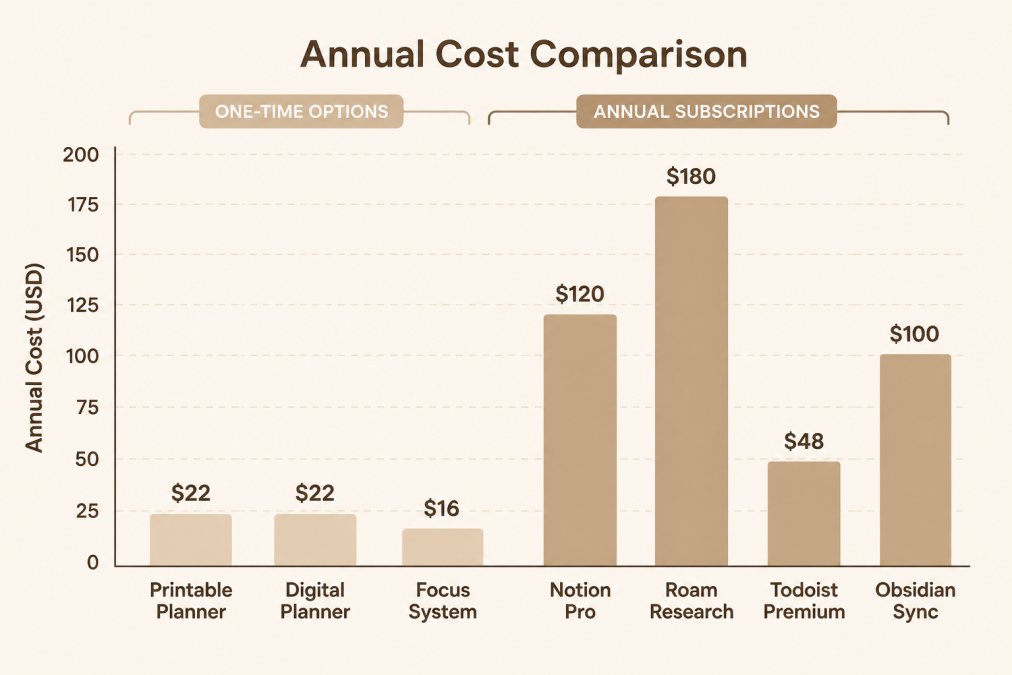
Anchor Grove Studio eliminates subscription fatigue entirely. The Printable ADHD Planner costs $22 one-time. The Digital ADHD Planner costs $22 one-time. The ADHD Focus & Deep Work System costs $16 one-time. There's no monthly charge. There's no commitment. You buy it, download it, and use it as long as it works for you.
If you want to try before committing, the 1-Month Printable ADHD Planner Trial costs just $5. You get four full weeks of the same system, not a stripped-down preview. If it works, you can upgrade to the full undated version. If it doesn't, you've spent $5 and you know it's not for you.
This pricing model reflects a different philosophy: we're not trying to lock you into a subscription. We're trying to solve a specific problem (ADHD-friendly planning without overwhelm) and get out of your way. You own the files. You use them as long as they help. You never wonder if you're paying for something you've forgotten about.
The trade-off is that we don't offer cloud sync, real-time collaboration, or the ability to access your system from any device. If you need those features, you'll need a subscription tool. If you need simplicity and ownership, our model works better.
Conclusion: Finding Your Calm Productivity System
The real problem with Notion for ADHD isn't that Notion is bad. It's that Notion asks you to build your own system before you can use it. For people with executive function challenges, that's the opposite of helpful.
The best anti boring alternative for notion isn't necessarily the most powerful tool. It's the tool that works with your brain instead of against it, one that comes ready to use, doesn't demand constant maintenance, and lets you reset without shame.
Anchor Grove Studio's ADHD-friendly planners and systems are designed for exactly this. The Printable ADHD Planner gives you a three-priority system, a brain dump section, and a habit tracker that doesn't punish missed days. The Digital ADHD Planner works on tablets with GoodNotes. The ADHD Focus & Deep Work System tackles the hardest part: starting.
All of these come as instant downloads. No setup. No formulas to debug. No monthly subscriptions. Just a system that works.
Add to cart and start with the Printable ADHD Planner. If you want to try before committing, the one-month trial is only $5.
Frequently Asked Questions
What makes Anchor Grove Studio's ADHD-friendly productivity tools different from other alternatives to Notion?
Anchor Grove Studio templates are built specifically for ADHD brains, not adapted from generic productivity systems. They use a Top 3 priority structure instead of overwhelming task lists, include a Brain Dump & Triage method to reduce decision fatigue, and offer flexible reset options so you can restart any time without shame. Unlike Notion, which requires setup and customization, these tools arrive ready to use. The Printable ADHD Planner ($22) and Digital ADHD Planner ($22) work across printable, tablet, and digital formats, no database formulas or steep learning curve required.
Are there simpler alternatives to Notion for daily planning that don't require technical setup?
Yes. Obsidian and Logseq offer markdown-based, local-first workflows without Notion's database complexity. For ADHD-specific needs, Anchor Grove Studio's templates provide instant-download, zero-setup planning pages designed for task initiation and flexible scheduling. The 1-Month Printable ADHD Planner Trial ($5) lets you test the system before committing to the full version. These options skip the formula syntax, API integration, and customization friction that make Notion overwhelming for many neurodivergent users.
What's the best alternative to Notion for someone with ADHD who struggles with task initiation?
The ADHD Focus & Deep Work System ($16) directly addresses task initiation by breaking work into smaller, manageable starting points. It includes a Focus Session Planner, Distraction Triage method, and task-initiation toolkit. For broader daily planning, the Printable ADHD Planner ($22) uses a three-priority structure that makes starting easier by limiting choices. Both tools prioritize reducing overwhelm over feature richness, making them more practical than Notion's blank canvas approach for ADHD brains.
How do open-source and local-first alternatives compare to cloud-based Notion for data privacy and offline access?
Open-source tools like Obsidian and Logseq store data locally on your device, offering complete data sovereignty and offline access without sync delays. Cloud-based alternatives like Roam Research and Notion depend on internet connectivity and store data on external servers. For ADHD users who value simplicity and offline reliability, local-first tools reduce latency and eliminate subscription fatigue. Anchor Grove Studio's printable templates offer the ultimate offline option: download once, print or annotate on any device, no cloud dependency or encryption concerns.
This article was written using GrandRanker