
How to Start Planners When Overwhelmed: ADHD Guide
Table of Contents
- Why Traditional Planners Fail When You're Overwhelmed
- How to Start Planners When Overwhelmed: A 5-Step Reset
- How to Use a Planner with Executive Dysfunction
- ADHD Friendly Planner Templates That Reduce Cognitive Load
- Best Digital Planners for ADHD: What to Look For
- Breaking the Planner Guilt Cycle
- Frequently Asked Questions
Last Updated: September 14, 2026
Why Traditional Planners Fail When You're Overwhelmed
Traditional planners fail when you're overwhelmed because they assume a steady supply of executive function that simply isn't there on a hard day. They demand you decide what matters, estimate how long it takes, and then show up consistently, all before you've had coffee. For an ADHD brain, that's three separate initiation tasks stacked on top of each other.
The result is predictable: a planner bought with real hope, used for nine days, then buried under mail. The result is predictable: a planner bought with real hope, used for nine days, then buried under mail. The ending is almost never laziness. It's a design mismatch.
Most planners are built around a rigid daily grid with no tolerance for a bad night's sleep. Miss two days and the blank squares start to feel like evidence. That's the moment planning stops being a tool and becomes a scoreboard you're losing.
The fix isn't more discipline. It's a smaller system, built for how to start planners when overwhelmed rather than for the person you wish you were.
How to Start Planners When Overwhelmed: A 5-Step Reset
The fastest way to start planners when overwhelmed is a five-step reset that takes about 20 minutes total and asks almost nothing of your willpower (Help). Each step removes a decision instead of adding one. Work through them in order, and stop whenever you feel the pressure rising.
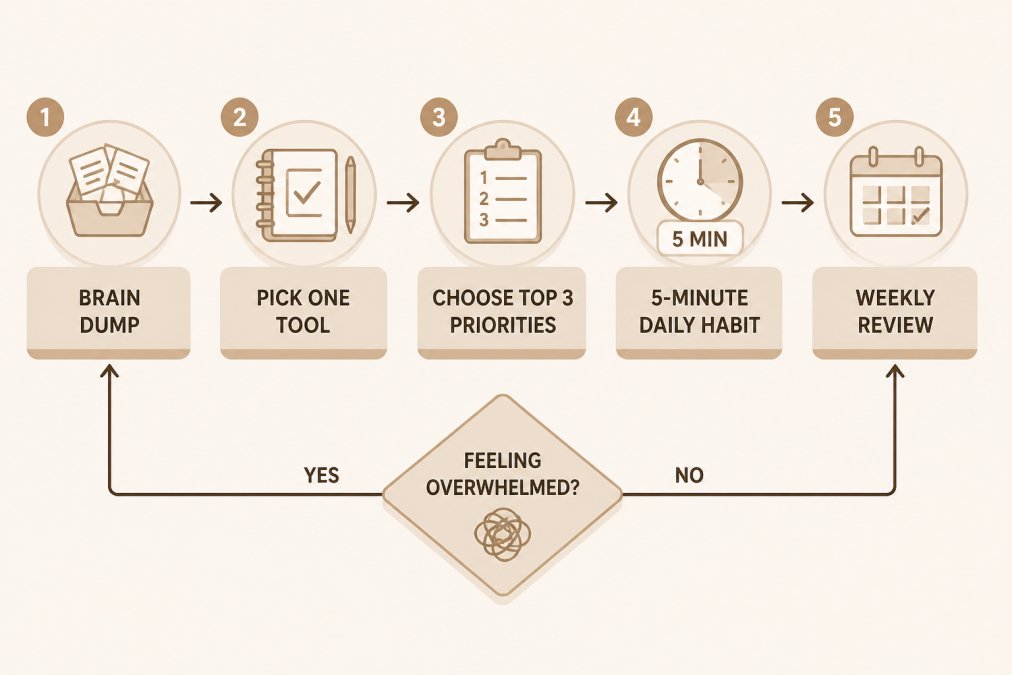
Step 1: Clear Your Mental Load Before You Plan
Open a blank page and write down everything circling in your head for five minutes. No categories, no order, no filtering. The goal is to move the mental load out of working memory and onto paper, because a brain holding twelve open loops has no room left for planning (pubmed.ncbi.nlm.nih.gov).
Step 2: Pick One Planning Tool and Ignore the Rest
Choose a single tool this week: paper, a tablet, or a Notion template. One. Every additional tool multiplies the cognitive load of deciding where things go. If you're unsure, try a low-commitment option first, like the 1-Month ADHD Printable Planner at $5.00, before investing in a full system.

Step 3: Choose Your Top 3 Priorities for the Day
Write down three things, not ten. A Top 3 list is short enough that your brain can hold it without re-reading it four times. If you finish all three, you've had a good day, and you can stop without guilt.
Step 4: Set a 5-Minute Daily Planning Habit
Plan tomorrow in five minutes, at the same anchor point each day, such as right after dinner. Five minutes is short enough that task initiation stays easy even on a low-energy evening. Consistency here matters far more than the quality of the plan itself.
Step 5: Do a Weekly Review Without Judgment
Spend ten minutes once a week asking two questions: what worked, and what got in the way? No grading, no streaks, no catching up on missed days. A weekly review is a reset button, not a performance report.
How to Use a Planner with Executive Dysfunction
Using a planner with executive dysfunction means redesigning the planner around the weak points: task initiation, working memory, and time estimation. Standard advice to "just be consistent" targets none of those.
Start by making the first step absurdly small. Instead of writing "clean the kitchen," write "clear the left counter." A task your brain can picture finishing is a task it can start.
Then externalize time. Time blindness makes "later" feel identical to "never," so pair tasks with a visible cue: a timer, an alarm, or a specific event like "after lunch (the CDC)." You're not fixing time perception; you're routing around it.
- Task initiation: shrink the first action until it feels trivial
- Working memory: write it down immediately, never hold it
- Time estimation: use timers and anchors instead of guesses
- Task switching: finish one item before opening the planner again
If you already know the plan and still can't start, the barrier is initiation, not organization. A tool built for that specific gap, like the ADHD Focus & Deep Work System at $16.00, addresses the moment between knowing and doing rather than adding another task list.

ADHD Friendly Planner Templates That Reduce Cognitive Load
ADHD friendly planner templates reduce cognitive load by removing decisions, not by adding features. The best templates share four traits: they're undated, they fit on one page, they limit choices, and they assume you will skip days.
Undated pages matter more than they sound. A dated planner creates an automatic failure state the moment you miss a week, and that failure state is what ends most planning attempts. Undated pages let you start over on any page or week without a visible record of the gap.
A minimalist setup template usually includes only:
- One page for a brain dump
- A Top 3 priority box
- A short "if I have energy" list
- A notes area for anything that doesn't fit
That's it. Anything more becomes a second job. If you want a ready-made version of this structure, the Printable ADHD Planner at $22.00 is undated and reprintable, so a missed week costs you nothing.

| Planning Problem | Template Fix | What It Removes |
|---|---|---|
| Blank-page paralysis | Pre-labeled brain dump section | The "where do I start" stall |
| Overloaded task list | Top 3 priority box | Guilt from unfinished items |
| Missed days | Undated pages | The failure streak |
| Too many tools | Single-page layout | Tool-switching decisions |
Best Digital Planners for ADHD: What to Look For
The best digital planners for ADHD are the ones you can open in under ten seconds and use without setup work. Speed of access matters more than feature count, because every extra tap is a chance to lose momentum. The deciding factor is not which app you pick but whether the app removes a decision or adds one.
Look for five things:
- Instant access. One tap from the home screen or lock screen. No login, no splash screen, no sync spinner.
- Glanceable layout. The whole day fits on one screen without scrolling. If you have to scroll to find today's list, you will not open it.
- Low-energy mode. A version of the page that still works when you can barely function, a single line, a single task, a single note.
- No streak mechanics. Streak counters turn a bad week into a reason to quit. Turn them off or pick a tool that doesn't have them.
- Offline access. Wi-Fi drops, and a planner that needs a connection is a planner that fails at the exact moment you need it.
Real tools that fit the criteria
- Apple Notes and Google Keep. Free, instant, offline, and already on your phone. A pinned note with a Top 3 list is a legitimate planner. Most people skip this option because it feels too simple, which is exactly why it works.
- Todoist. Fast capture, natural-language dates ("tomorrow 9am"), and a widget that shows today's list on the home screen. The free tier is enough for a Top 3 system; skip the projects and labels until you actually need them.
- Google Calendar. Best for time blocking, not task lists. Use it to anchor appointments and self-care blocks, then keep tasks in a separate list so the two don't blur.
- Notion. Powerful but slow to open and easy to over-build. Only worth it if you already live in Notion and use a plug-and-play template. A template that needs hours of customization before it's usable is a project, not a planner.
- Structured and Tiimo. Visual, timeline-based apps built with neurodivergent users in mind. They show the day as a sequence of blocks rather than a list, which helps with time blindness.
The hybrid workflow most guides skip
The strongest setup for an overwhelmed brain is usually not fully digital or fully analog, it's a hybrid with a clear division of labor:
- Digital for capture and reminders. Your phone is always with you, so it catches the thought the moment it arrives. Voice memos, a pinned note, or a quick-add widget all work.
- Paper for the daily plan. Writing tomorrow's Top 3 by hand forces a slower, more deliberate pass than tapping a checkbox. The friction is the feature.
- Digital for recurring events. Birthdays, appointments, and medication reminders belong in a calendar with notifications, not on a page you might not open.
- Paper for the weekly review. A single printed or handwritten page once a week keeps the review from turning into another screen session.
The handoff between the two is the part that breaks most hybrid systems. Pick one bridge and stick to it: either you copy your digital brain dump onto paper each evening, or you photograph your paper page and drop it into a notes app. Two bridges is one too many.
Digital formats also pair well with printable versions, which is why the ADHD Planning & Focus Bundle at $52.00 includes paper, tablet, and focus tools together. You can print some pages and keep others digital, depending on the day.
Breaking the Planner Guilt Cycle
Planner guilt is a self-reinforcing loop: you buy a planner with enthusiasm, miss a few days, feel ashamed, avoid the planner, and then buy a new one to escape the shame. The cycle repeats because the shame, not the planner, is the actual problem. Planner guilt is a self-reinforcing loop: you buy a planner with enthusiasm, miss a few days, feel ashamed, avoid the planner, and then buy a new one to escape the shame. The cycle repeats because the shame, not the planner, is the actual problem.
Why the loop actually forms
Three psychological patterns keep it running:
- All-or-nothing thinking. The brain treats a missed day as a broken streak rather than a single data point. One blank square becomes proof that the whole system failed.
- Shame avoidance. Avoidance is a pain-reduction strategy. Opening a planner that makes you feel bad is a small punishment, so the brain quietly stops opening it. The planner isn't abandoned out of laziness, it's abandoned to stop the sting.
- The fresh-start effect. New planners feel good because they reset the scoreboard. Buying a new one delivers the relief that using the old one no longer does, which is why the cycle ends in a purchase instead of a habit.
Once you can name these three, the fix becomes obvious: remove the scoreboard.
A concrete reset protocol
When you notice the avoidance starting, run this instead of buying a new planner:
- Turn to a blank page and write the date. No catching up. No backfilling missed days. The gap stays a gap.
- Write one sentence about what got in the way. "Bad sleep week." "Work crunch." "Lost the planner." Naming it once defuses it.
- Write tomorrow's Top 3. Not the week's, not the month's. Tomorrow's.
- Close the planner and put it back where you'll see it. Visible systems get used; stored systems get forgotten.
- Set a ten-minute weekly review for the same day and time each week. The review is the reset button, not a performance report.
The whole protocol takes under five minutes, and it works because it asks for no explanation and no repair work. There is nothing to feel behind on because there is no streak to protect.
Reframing the abandoned planner
A common mistake is treating an abandoned planner as proof that planning doesn't work for you. In practice, it usually means the system was too rigid, too dated, or too complicated for the days you actually have. An undated planner removes the failure state entirely: a missed week leaves no visible record, so there is nothing to avoid.
If you want a system that builds the reset in by default, the Printable ADHD Planner at $22.00 is undated and reprintable, so a missed week costs you nothing but a sheet of paper.
Frequently Asked Questions
How do I avoid planner overwhelm with ADHD?
The key is to start smaller than feels natural. Instead of building a full weekly system, begin with a single daily page and write down only three priorities. Skip color-coding, habit trackers, and elaborate spreads for the first two weeks. An ADHD-friendly planner template with a Top 3 structure removes the pressure of filling every box. If you feel overwhelmed by your planner, that is a signal the system has too many moving parts, not that you are failing.
How do I start a planner when I have executive dysfunction?
Break the act of planning into one physical or digital step at a time. Open the planner, write the date, and stop. The next day, add one task. Executive dysfunction makes task initiation the hardest part, so lowering the entry barrier matters more than completing a full spread. Pair planning with an existing habit, like your morning coffee, so the cue is automatic. A task initiation planner designed for ADHD can guide this sequence without requiring you to design it yourself.
What does an ADHD-friendly planner look like?
It looks sparse. ADHD-friendly planner templates use undated pages, wide open space, and a limited number of prompts per page. You will typically see a brain dump area, a Top 3 priority section, and a small notes or reset box. There are no streak counters, no guilt-inducing empty habit grids, and no requirement to fill every line. The layout assumes you will miss days and gives you a clean page to start over without shame.
Why do I feel overwhelmed by my planner?
Planner overwhelm usually comes from three sources: too many sections, unrealistic time estimates, and the fear of falling behind. When a planner asks you to track habits, goals, meals, finances, and tasks on one page, your cognitive load spikes before you write anything. Simplifying to one priority list and one brain dump page often resolves it. If the planner still feels heavy, the system is the problem, not your motivation.