
Alternatives to Rigid Planners for Executive Dysfunction
Table of Contents
- Why Traditional Planners Fail for Executive Dysfunction
- The Low-Demand Planning Framework
- Best ADHD Planners for 2026: Flexible System Options
- How to Overcome Planner Paralysis and Task Initiation Barriers
- Managing Cognitive Flexibility and System Maintenance
- Recovery Protocols: What to Do When Your System Falls Apart
- Customizing Your Planning System for Energy Fluctuations
- Conclusion
Last Updated: August 26, 2026
Why Traditional Planners Fail for Executive Dysfunction
Traditional planners assume a brain that works like a clock, building routines, maintaining daily streaks, and sustaining consistency across weeks. For people with executive dysfunction, this isn't aspirational, it's impossible.
The core problem isn't laziness. Rigid planners demand constant self-regulation from a brain that struggles with exactly that. When you experience executive dysfunction, your capacity for task initiation, time blindness, and cognitive flexibility fluctuates dramatically. A system built on rigid rules doesn't account for days when your brain simply won't cooperate.
Research on neurodivergent productivity shows many individuals with ADHD abandon planners within weeks because the systems create shame rather than support (peer-reviewed research). The guilt of "falling behind" becomes another barrier to using the tool. Traditional planners were designed for neurotypical brains that can estimate time accurately, initiate tasks without external support, and maintain consistent energy levels (the NIH). For people with executive dysfunction, these are failure points built into the design.
At Anchor Grove Studio, we've built planning systems specifically for brains that don't work that way. The difference isn't aesthetics or features, it's the foundational assumption: your planner should work with your brain, not against it.

The Low-Demand Planning Framework
A low-demand planning framework removes the pressure of perfection and replaces it with flexibility. Your planning system should require less energy than the tasks it helps you manage.
Low-demand alternatives to rigid planners typically include:
- Brain dumps instead of categorized lists. Get everything out of your head without sorting it first.
- Energy-based task matching. Match tasks to your current energy level instead of fixed schedules.
- Permission to restart. No guilt about abandoned pages or starting over mid-month.
- Minimal decision-making. The system tells you what to do next, reducing cognitive load.
- Visual externalizing. Everything important stays visible so you don't hold it in memory.
This framework acknowledges that executive dysfunction means your capacity changes. Some days you can manage complex planning; other days you need a system that asks almost nothing of you.
Best ADHD Planners for 2026: Flexible System Options
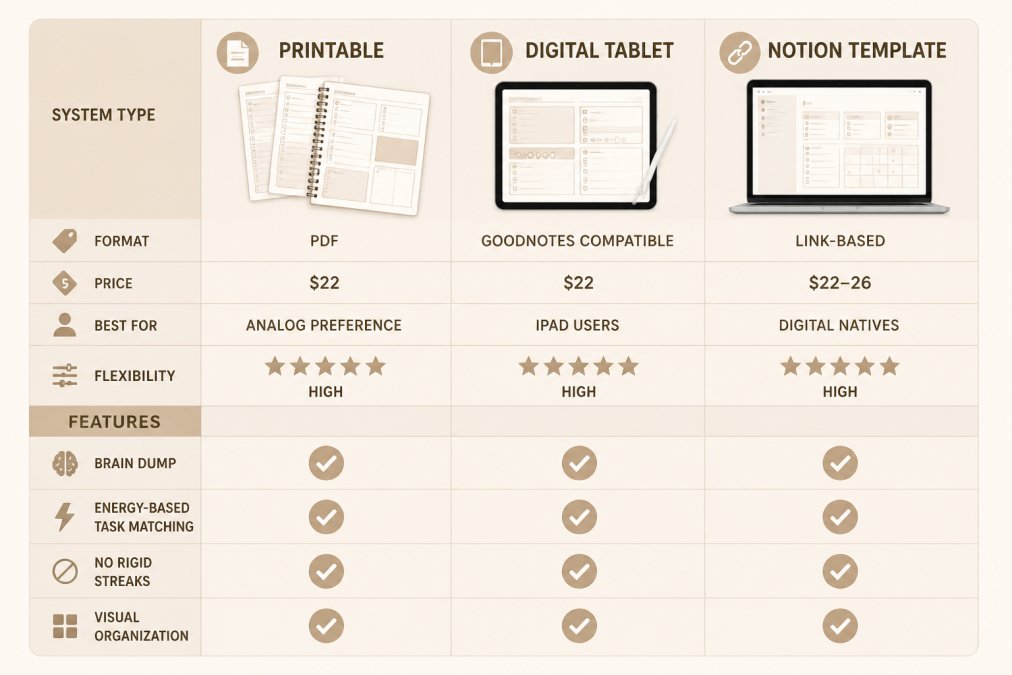
When choosing alternatives to rigid planners, you have three main format options: printable systems, digital tablets, and Notion templates.
Printable Systems for Analog Users
Printable planners offer a tactile, low-tech approach that works well for people who experience task paralysis when facing screens or digital complexity.
The Printable ADHD Planner from Anchor Grove Studio ($22.00) is built around three core principles: choose what matters today, get thoughts out through a brain dump system, and reset after an off day without guilt. It includes daily, weekly, and monthly planning pages focused on three priorities instead of overwhelming lists. The low-pressure habit tracker doesn't use rigid streaks; it notices patterns without judgment.
Printable systems work because there's no digital friction. Print a page, write on it, start again tomorrow. The physical act of writing engages different cognitive pathways than typing, which many people find helps with task initiation.
Digital Planners for Tablet Users
Digital planners for tablets preserve the writing experience of pen-on-paper while keeping everything searchable in one place.
The Digital ADHD Planner (GoodNotes/Tablet-Ready) from Anchor Grove Studio ($22.00) works on iPad and Android tablets through PDF annotation apps. It includes ADHD-friendly daily and weekly planning, simple priority and task organization, and flexible planning for high- and low-energy days. Layouts are intentionally low-clutter to reduce digital overwhelm.
These systems work well for people who want digital benefits (searchability, backup, no paper waste) without the friction of traditional productivity apps. You're writing by hand, which engages different cognitive processing than typing, but you're in a digital environment. There's no setup beyond downloading, open the file, write on today's page, and you're done.
Notion Templates for Neurodivergent Productivity
Notion templates offer the most customizable option for people comfortable with digital systems and willing to set them up.
The ADHD Life Dashboard (Notion Template) from Anchor Grove Studio ($26.00) includes six interlinked databases: Brain Dump, Journal, Recipes, Ingredients, Meal Plan, and Shopping List. Everything uses toggle-based layout so you only see what you're actively working on. Mobile quick-capture widget setup instructions let you capture thoughts from your phone without opening a full computer.
The ADHD Home Management (Notion Template) ($22.00) uses zone-based chore rotation, 5-minute resets, and a home brain dump, matching tasks to your energy instead of a fixed schedule.
Notion templates work best for people already using Notion or willing to learn it. They require more initial setup than printable or tablet options but offer the most integration potential.
How to Overcome Planner Paralysis and Task Initiation Barriers
Planner paralysis is the moment you open your planning system and feel completely stuck. The act of opening the planner itself becomes a barrier.
The ADHD Focus & Deep Work System from Anchor Grove Studio ($16.00) addresses this directly. It includes a Focus Session Planner that helps you plan a manageable session around a clear starting point, a Deep Work Log to notice focus patterns without grading performance, and a Task-Initiation Toolkit with practical supports like body doubling, the two-minute floor, and temptation bundling.

To overcome planner paralysis, your system needs to ask almost nothing of you at activation:
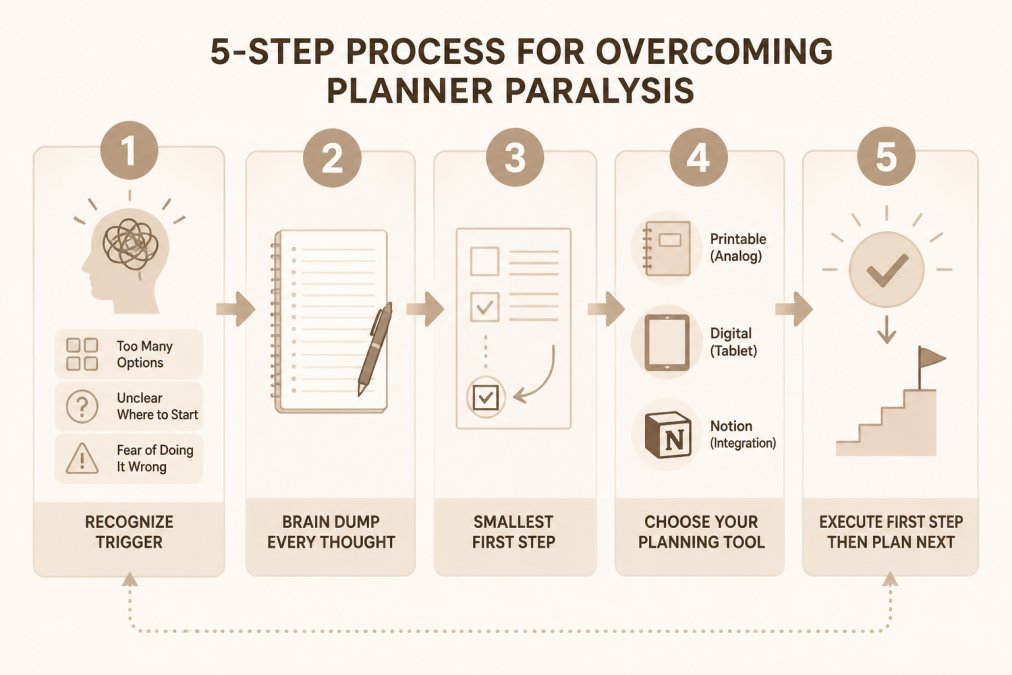
Start with externalization, not organization. Brain dump everything without categories or priority. This removes decision burden and gets overwhelm out of your head.
Make the first step absurdly small. Not "write the email," but "open the email template." Not "clean the kitchen," but "put the dishes in the sink." Once you start, momentum often follows.
Use environmental support. Body doubling, a timer, or a specific playlist can signal to your brain that it's time to work, bypassing the executive function barrier.
Match your planning tool to your current state. On high-capacity days, use your full Notion system. On low-capacity days, printable pages or a brain dump sheet might be all you need.
Separate planning from execution. Plan in one session, execute in another. This reduces cognitive load of switching between modes.
Managing Cognitive Flexibility and System Maintenance
Cognitive flexibility is the ability to shift between tasks and strategies (peer-reviewed research). Executive dysfunction often includes reduced cognitive flexibility, making system switching exhausting.
The most sustainable alternatives to rigid planners acknowledge you won't maintain a complex system perfectly. Instead of fighting this, they build maintenance into the design.
System maintenance works best when it's:
- Scheduled but flexible. A weekly check-in is easier than daily reviews, and it can move to whenever you have capacity.
- Low-pressure. You're noticing patterns, not grading performance.
- Integrated into existing routines. Attach planning review to something you already do.
- Minimal in scope. Review one area at a time instead of everything at once.
Many people find a monthly reset works better than weekly reviews. Look back at the previous month, notice what actually happened, and adjust for the next month. This longer cycle reduces constant evaluation burden.
Recovery Protocols: What to Do When Your System Falls Apart
Your system will fall apart. You'll miss weeks and abandon pages mid-month. This is not failure, this is executive dysfunction.
Recovery protocols create a path back in without shame.
The restart protocol:
- Don't look back at what you missed or judge yourself for the gap.
- Open a new page with today's date and one priority.
- That's it. You're back in.
The shame-free reset:
- If your current system feels too heavy, switch to a simpler one temporarily.
- Move from Notion to printable pages or from detailed tracking to brain dumps.
- Find a version you'll actually use right now.
The integration approach:
- Instead of maintaining multiple systems, integrate everything into one place.
- Notion templates can hold your brain dump, meal planning, financial tracking, and task initiation all in one system.
The ADHD Life Dashboard from Anchor Grove Studio ($26.00) is specifically designed to support recovery. When you fall off, return to a single system that holds everything without requiring you to rebuild from scratch.

Customizing Your Planning System for Energy Fluctuations
Energy fluctuations define executive dysfunction. Some days you can manage complex planning; other days you're barely functioning.
A rigid planner treats every day the same. A customizable system treats every day differently.
High-energy days:
- You have capacity for detailed planning and reviewing past progress.
- Use your full Notion template, review patterns, and update systems.
- Set up supports for low-energy days (pre-written task lists, templated brain dumps).
Medium-energy days:
- You can manage basic planning and execution without deep customization.
- Printable pages or digital tablet planning works well.
- Focus on one area: today's priorities, this week's meal plan, or this month's financial check-in.
Low-energy days:
- Your system needs to ask almost nothing of you.
- A simple brain dump page, pre-made task list, or just opening your planner and writing whatever comes to mind.
- The goal is keeping the system accessible, not planning perfection.
Anchor Grove Studio's templates accommodate this range. The Printable ADHD Planner works on low-energy days. The Digital ADHD Planner adds searchability for medium-energy days. The Notion templates offer full integration for high-energy days.
The key is having multiple versions available so you can match your tool to your actual capacity.
Traditional planners fail because they assume a stable baseline that executive dysfunction doesn't provide. The alternatives that work are built around flexibility, low-demand design, and recovery protocols without shame.
Whether you choose printable pages, digital tablets, or Notion templates, the underlying principle is the same: your planning system should support your brain as it actually works, not as you wish it would work.
Start with the format that feels most accessible right now. The best planning system for executive dysfunction is the one you'll actually use, which means it needs to match your current capacity, not your aspirational one.
Anchor Grove Studio offers all three formats specifically designed for neurodivergent productivity. The ADHD Focus & Deep Work System addresses task initiation barriers directly. The Printable ADHD Planner works for people who prefer analog tools. And the ADHD Life Dashboard Notion Template integrates multiple life areas into one customizable system. Each is built on the principle that your planner should work with your brain, not against it. Start with whichever format matches where you are right now, and remember: restarting is always an option, and it never requires explanation.
Frequently Asked Questions
Why do traditional planners feel so overwhelming for people with executive dysfunction?
Rigid planners demand consistency, perfectionism, and long-term commitment, all things executive dysfunction makes difficult. They create cognitive load through complexity, pressure through streak-based tracking, and shame when you inevitably miss a day. The real problem isn't your effort; it's that the system doesn't match how your brain actually works. Low-demand alternatives remove these barriers by offering flexibility, brain dumps instead of complex categories, and permission to restart anytime.
What are the best Notion templates for neurodivergent productivity?
Notion templates built for neurodivergent brains use toggle-based layouts so you only see what you're actively working on, reducing cognitive overload. The ADHD Life Dashboard ($26) combines brain dump, meal planning, and journal databases in one interlinked system. The ADHD Home Management template ($22) matches tasks to your energy level instead of a fixed schedule. Both include mobile quick-capture widgets for externalizing thoughts instantly, which is essential for managing time blindness and working memory limits.
How do I overcome planner paralysis when I can't even decide where to start?
Planner paralysis happens when the system itself becomes the barrier. Start with externalizing: dump every thought into a brain dump without organizing. Then use the two-minute rule, choose only the smallest possible first step. The ADHD Focus & Deep Work System ($16) is specifically designed for this moment: it helps you make a task feel smaller, plan a realistic work session, and handle distractions. The key is reducing decision-making before you start, not after.
Can I really use these planning systems on days when my energy is too low to function?
Yes. Systems designed for executive dysfunction build in low-energy days as the default, not the exception. The Printable ADHD Planner ($22) works with high-energy and low-energy days equally. On low-energy days, you might only choose one priority or use the brain dump to capture thoughts without organizing them. The flexibility means you're never 'failing' the system, you're adapting it. That's the entire point: a planner that meets you where you are, not where you think you should be.
This article was written using GrandRanker