
Notion System for Managing Executive Dysfunction
Table of Contents
- Understanding Executive Dysfunction and Why Notion Helps
- Building an ADHD-Friendly Notion Dashboard That Works
- Notion Templates for Task Initiation and Overcoming Procrastination
- Overcoming Notion Overwhelm and System Maintenance
- Customizing Your System Without Burnout
- Getting Started Without the Guilt
- Frequently Asked Questions
Last Updated: September 28, 2026
Understanding Executive Dysfunction and Why Notion Helps
Executive dysfunction describes difficulty with task initiation, time management, working memory, and prioritization, challenges that affect how you plan, start, and complete daily tasks. For neurodivergent individuals, especially those with ADHD, executive dysfunction isn't laziness or lack of motivation. It's a neurological reality that makes traditional rigid productivity systems feel impossible to maintain.
A notion system for managing executive dysfunction works because it externalizes structure without forcing you into one-size-fits-all routines. Instead of fighting your brain's wiring, Notion lets you build a workspace that meets you where you are: low-friction capture, flexible views, and customizable dashboards that reduce cognitive load.
The real difference between systems that stick and ones that don't comes down to one thing: whether they work with your actual brain or against it. Most productivity tools assume you'll maintain perfect consistency. Notion-based systems designed for neurodivergent users assume you won't, and they're built to survive that reality.
The shame of falling behind disappears when your tools expect flexibility instead of perfection.
Building an ADHD-Friendly Notion Dashboard That Works
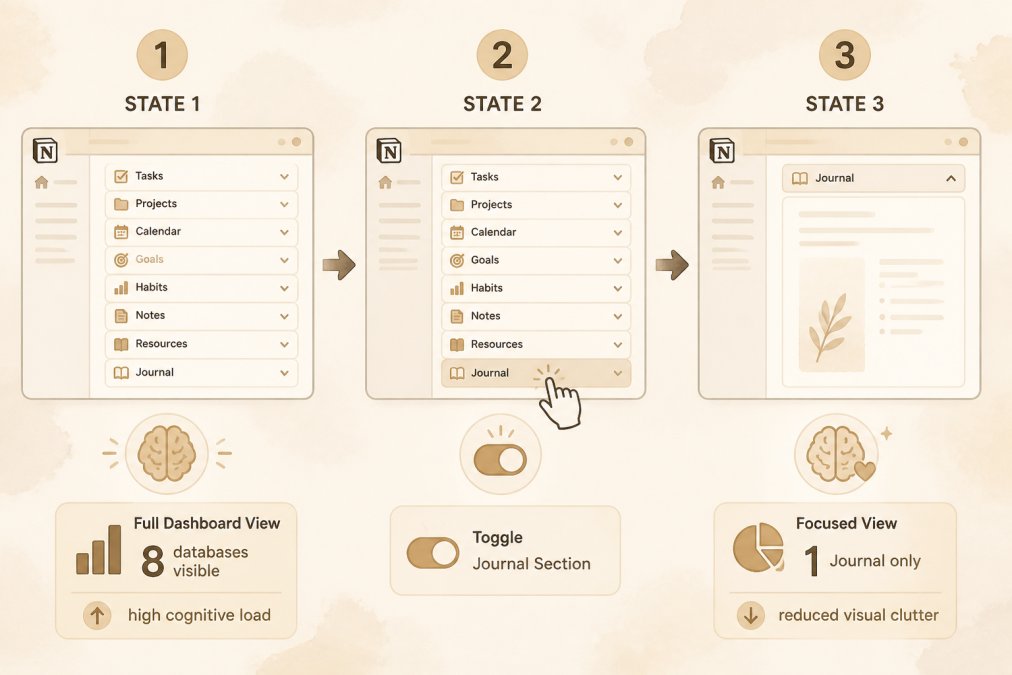
An ADHD-friendly Notion dashboard reduces visual clutter and cognitive load by hiding information until you need it. The core principle is toggle-based layouts: instead of seeing everything at once, you expand only the section you're working on right now.
This approach works because it respects a fundamental truth about executive dysfunction: too many choices visible at once creates decision paralysis. When your brain is already struggling with task initiation, a dashboard full of databases, filters, and options becomes another barrier to starting.
Core Components of a Neuro-Inclusive Workspace
A functional Notion system for managing executive dysfunction includes four essential components working together:
Brain dump database. This is where thoughts, ideas, and tasks go the moment they arrive, no organization required. The goal is low-friction capture. If capturing an idea takes more than 10 seconds, it won't happen consistently. A brain dump should have minimal required fields: just a title and optional notes. Everything else gets sorted later, when your brain has more energy.
Task database with status tracking. Tasks need visible states (Not Started, In Progress, Done) so you can see what's actually happening. Status visibility matters more for neurodivergent users than for others because it provides external accountability when internal motivation is unreliable. Seeing "In Progress" creates a small dopamine hit that can help sustain effort.
Journal or reflection space. This isn't about productivity metrics. It's about tracking energy levels, mood, and what actually worked on difficult days. Over time, patterns emerge: you might notice you initiate tasks better in the morning, or that certain types of work feel less overwhelming after movement. This data helps you schedule realistically instead of fighting your own patterns.
Quick-access templates for low-energy days. On days when executive dysfunction is severe, even opening Notion can feel like too much. Pre-built templates for common tasks (meal ideas, reset routines, simple wins) reduce the activation energy needed to engage with your system at all.
Reducing Cognitive Load Through Toggle-Based Layouts
Toggle-based layouts hide content until you click to expand it. Instead of a dashboard showing your entire life at once, you see category labels: Journal, Meals, Tasks, Brain Dump. Click one, and only that section expands.
This matters because visual clutter directly increases cognitive load. When you have executive dysfunction, your working memory is already taxed. Every extra piece of information visible on screen competes for that limited capacity. Toggling sections on and off means you engage with one area at a time, which allows deeper focus and reduces the decision fatigue that kills task initiation.
The practical effect: you're more likely to actually use the system because it doesn't feel overwhelming the moment you open it.
Notion Templates for Task Initiation and Overcoming Procrastination
Task initiation is the hardest part of executive dysfunction. You can know exactly what needs doing and still feel completely unable to start. A Notion template designed for task initiation removes friction at the moment you need to begin.
The best templates break large tasks into smaller, visible steps and show progress as you move through them. When you can see that you've completed even one small step, it creates momentum. That momentum is what gets you to the next step.
ADHD Life Dashboard: Notion Brain Dump →
Brain Dump and Capture Methods for Low-Friction Entry
A brain dump in Notion should take fewer than 10 seconds to use. If it takes longer, you'll stop using it. The template should ask for only a title and optional context. Everything else, priority, category, deadline, gets added later when you have more cognitive energy.
The key is that the brain dump exists to get ideas out of your head and into external storage. This frees up working memory for actually thinking about the task. When your brain isn't holding 15 different ideas simultaneously, task initiation becomes slightly less impossible.
Many neurodivergent users find that mobile quick-capture matters more than desktop. You're more likely to have your phone nearby when an idea arrives. A Notion template with mobile quick-capture guidance means you can add tasks from anywhere without needing to navigate a complex desktop interface.
Dopamine-Driven Status Tracking and Visual Organization
Status tracking creates external accountability and provides small dopamine reinforcement as tasks move from "Not Started" to "Done." For people with executive dysfunction, this external feedback loop can be the difference between completing tasks and abandoning them.
A visual status system might use color coding: gray for not started, blue for in progress, green for done. The visual change when you update status provides immediate feedback that your effort mattered. This matters more for neurodivergent brains because internal motivation is unreliable, but external feedback is concrete.
Notion templates that include a "Recent Wins" section, showing tasks completed in the last week, combat the common experience of feeling like nothing ever gets done.
Overcoming Notion Overwhelm and System Maintenance
Most people abandon their Notion systems not because the tool is bad, but because they over-engineer them. They build complex databases, add too many properties, create views for every possible filter combination. Then life gets busy, the system gets messy, and maintaining it feels like a second job.
Preventing System Rot Through Sustainable Design
A sustainable Notion system for managing executive dysfunction is deliberately simple. It has fewer databases, fewer properties, and fewer views than you think you need. The template should be usable in 15 minutes a day, not an hour.
Mobile vs. Desktop Workflows for Real-Life Flexibility
Most Notion systems are designed for desktop first. But real life happens on your phone. You're at the grocery store and need to add something to your meal plan. You're in bed and an idea arrives at midnight. You're waiting in a line and want to capture a task.
Customizing Your System Without Burnout
The promise of customization is also the trap. You can spend weeks tweaking your Notion system, adjusting colors, adding properties, creating new views. Then you realize you've spent more time building than using, and the system feels like another obligation.
Template Customization for Different Energy Levels
A good template includes multiple versions of the same view for different energy states. A "High Energy" view might show more information and more options. A "Low Energy" view shows only the absolute essentials: today's meal, one task, one idea capture field.
Integration with Non-Digital Tools and Accessibility
Not everything works digitally. Some people need to print their meal plans. Others need a physical journal alongside Notion. A good system acknowledges this and makes integration easy.
Getting Started Without the Guilt
The biggest barrier to using a new system isn't the tool. It's the expectation that you'll use it perfectly from day one. You won't. And that's okay.
Frequently Asked Questions
Is a Notion system actually ADHD-friendly, or will I just abandon it like other planners?
A Notion system works for ADHD when it's designed around how your brain actually functions, not against it. The difference is externalize structure without rigid rules. Toggle-based layouts reduce visual clutter and cognitive load. Brain dump databases let you capture tasks instantly without organizing them first. What matters most is that you can start over on any page or week without shame. Many people abandon systems because they feel guilt about imperfection; an ADHD-friendly Notion system removes that pressure entirely by design.
What makes Notion templates for task initiation different from traditional to-do apps?
Traditional to-do apps force you to decide and organize before capturing. Notion templates flip this: capture first, organize later. A brain dump database lets you externalize thoughts instantly, which reduces working memory strain. Status tracking with visual properties (color-coded, emoji-marked) creates dopamine-driven feedback that helps overcome procrastination. Templates designed for ADHD include mobile quick-capture setup so you can add tasks from anywhere without friction. This low-friction entry point addresses task initiation directly, the moment where executive dysfunction usually stops you.
How do I prevent my Notion workspace from becoming digital clutter?
System rot happens when you over-engineer and then abandon maintenance. Prevent it by starting simple: one dashboard, three databases. Use toggle-based layouts so you see only what matters now. Schedule a 10-minute monthly check-in to archive old tasks and clean up clutter, not a rigid weekly review. Accept that some weeks you'll skip this; the system should survive that. Separate your active workspace from your archive so completed tasks don't pile up visually. Most importantly, build accountability into your system by tracking what actually gets used, not what should work in theory.
Can I use a Notion system on mobile, or do I need to be at my desk?
Mobile access is essential for ADHD management because task initiation and time blindness happen throughout your day. A properly set up Notion workspace works on mobile, but you need quick-capture guidance to make it low-friction. This means setting up a simple mobile view with just your brain dump and today's tasks, not your full dashboard. Many people benefit from using a printable companion alongside Notion; some tasks feel better on paper while others live in your digital system. The flexibility to switch between tools without guilt is part of what makes the system sustainable.