
How to Choose an ADHD Planner for Adults
Table of Contents
- Why Most ADHD Planners Get Abandoned (And How to Avoid That)
- Key Features to Look for in an ADHD Planner
- Best Digital Planners for ADHD vs. Paper Systems
- ADHD Planning Strategies for Adults: A Step-by-Step Selection Process
- How to Use a Planner With ADHD: Making It Stick
- Common Mistakes When Choosing an ADHD Planner
- Frequently Asked Questions
Last Updated: September 3, 2026
Why Most ADHD Planners Get Abandoned (And How to Avoid That)
Adults with ADHD often cycle through planners the way others cycle through coffee brands (peer-reviewed research). You buy one with enthusiasm, use it for two weeks, and then it sits on your desk collecting dust. The problem isn't lack of discipline, it's that most planners are built for neurotypical brains that don't struggle with task initiation, time blindness, or working memory gaps.
At Anchor Grove Studio, we understand this pattern. People find a beautiful planner, commit to using it, and then abandon it because the system demands more executive function than they have available. The planner becomes another source of shame instead of a tool that works with your brain.
This guide walks you through how to choose an adhd planner for adults that actually sticks. We'll cover the features that matter, the format decision that changes everything, and the strategies that prevent abandonment before it starts.

Key Features to Look for in an ADHD Planner
When shopping for an adhd planner for adults, you're not looking for the prettiest system or the one with the most features. You're looking for the one that removes friction from the exact places where your brain gets stuck.

Low-Clutter Layouts and Visual Clarity
A cluttered planner creates cognitive overload before you even start planning. Look for layouts that give you breathing room: single-page daily views, minimal color coding (two or three colors maximum), clear visual hierarchy, and intentional whitespace.
When you can see exactly what you need to do without decoding a complex system, you're more likely to engage with the planner. Anchor Grove Studio's printable and digital planners prioritize this, your brain doesn't have to work harder just to understand the layout.
Task Initiation and Priority Setting
Time blindness and task initiation are the two biggest executive function challenges for ADHD adults (the NIH). Look for:
- A "choose what matters today" section instead of a massive to-do list
- The ability to list 3-5 realistic priorities instead of 15 tasks you won't finish
- A way to break tasks into smaller, visible steps
- Space to capture scattered thoughts without judgment
Priority setting requires visual clarity about what's actually urgent versus what's just loud. The best planners let you see your priorities at a glance.
Flexibility Without Rigid Streaks
Rigid systems that demand daily consistency or penalize you for missing a day are designed to fail ADHD brains. You don't have consistent energy levels. Look for systems that:
- Let you start over on any page or any week without penalty
- Don't require daily use to be "effective"
- Build in flexibility for low-energy days
- Explicitly acknowledge that consistency looks different for neurodivergent brains
Best Digital Planners for ADHD vs. Paper Systems
The digital versus paper question isn't about which is objectively better. It's about which removes more friction from your specific workflow.
Digital Planner Advantages
Digital planners live on your phone or tablet, which means they're always with you. For ADHD brains that struggle with out-of-sight-out-of-mind, this is crucial.
Specific advantages:
- Instant access. Your planner is always in your pocket. No friction between thinking about a task and capturing it.
- Search and reorganization. You can find old tasks or notes without flipping through pages.
- Reminders and notifications. Digital systems can alert you about time-sensitive tasks, which helps with time blindness.
- No shipping or waiting. Instant download means you start today, not next week.
- Flexibility in format. You can use the same planner on your phone, tablet, or computer depending on your energy that day.
Digital planners work particularly well for people who already live in digital tools.
Paper Planner Advantages
Paper planners have a different kind of friction, the good kind. Writing things down engages your brain differently than typing. For some ADHD adults, the tactile experience of writing and the visual satisfaction of crossing things off creates enough dopamine to keep you coming back.
Specific advantages:
- Reduced digital distraction. You're not tempted to check email or social media while planning.
- Better retention. Writing something down helps you remember it better than typing.
- Dopamine from crossing off. The physical act of marking tasks complete gives immediate feedback.
- No battery or sync issues. A paper planner works whether your phone is charged or not.
The trade-off is that paper planners require you to carry them and remember to use them. Many ADHD adults find a hybrid approach works best: a digital planner for quick capture and reminders, plus a printable planner for the weekly review and priority-setting ritual.
ADHD Planning Strategies for Adults: A Step-by-Step Selection Process
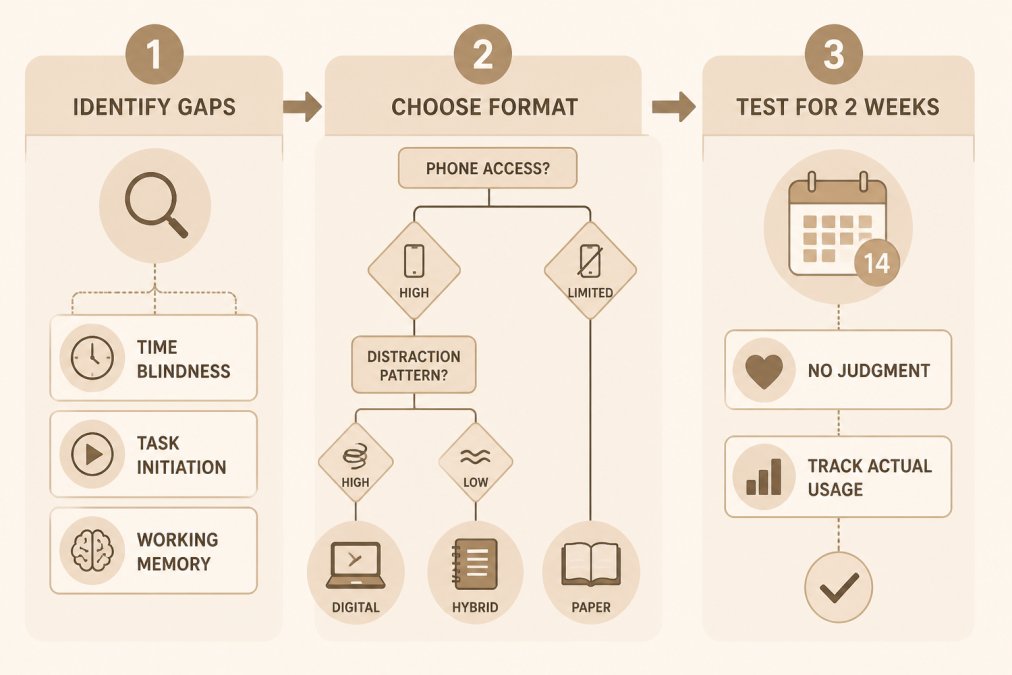
Choosing the right adhd planner for adults requires understanding what you're actually struggling with, then matching that to a planner designed to solve it.
Step 1: Identify Your Executive Function Gaps
Before you look at a single planner, get clear on which executive function challenges are your biggest barriers. Everyone with ADHD is different.
Common executive function gaps:
- Time blindness. You lose track of time, miss deadlines, or have no sense of how long tasks take.
- Task initiation. Starting tasks is harder than finishing them.
- Working memory challenges. You forget what you were supposed to do mid-task.
- Overwhelm from options. Too many choices paralyze you.
- Energy fluctuations. Your productivity varies wildly day to day.
Write down which two or three are your biggest pain points. A planner that solves time blindness won't help if your real problem is task initiation.
Step 2: Choose Your Format and Access Method
Once you know your gaps, the format decision becomes clearer. Ask yourself:
- Do you always have your phone with you? Digital might work better.
- Do you prefer the tactile experience of writing? Paper or printable might stick.
- Do you need reminders and notifications? Digital is essential.
- Do you get distracted by your phone? Paper reduces that friction.
Consider your existing tools. If you already use Notion or GoodNotes, a compatible planner has less friction.
Step 3: Test the System Without Pressure
Commit to a two-week trial with zero judgment:
- Use it as designed for 14 days without modifications
- Notice what feels natural and what feels forced
- Track whether you're actually using it or abandoning it by day three
- Pay attention to which features you actually need
After two weeks, you'll know if this planner works for your brain.
How to Use a Planner With ADHD: Making It Stick
Choosing the right planner is only half the battle. The other half is building habits that keep you using it.
Anchor Your Planner to an Existing Habit
The easiest way to build a new habit is to attach it to something you already do consistently. If you already drink coffee every morning, that's your anchor. Your planner lives next to your coffee.
Common anchors:
- Morning coffee or tea ritual
- Your commute
- Lunch break
- Bedtime routine
- Right after you shower
Pick one thing you do almost every day without thinking about it. That's where your planner lives. You're not creating a new habit from scratch, you're piggybacking on a habit that already has neural pathways built in.
Build a Dopamine Menu Into Your System
ADHD brains have less available dopamine, which is why task initiation is so hard (peer-reviewed research). A dopamine menu is a list of quick activities that give you a dopamine hit when you're stuck.
Your dopamine menu might include:
- A 2-minute walk
- A specific song you love
- A snack you enjoy
- A text to a friend
- A quick stretch or movement break
- A game or puzzle for 5 minutes
Keep this list in your planner so when you're stuck on task initiation, you don't have to figure out what to do. You just open your planner and pick something.
Recovery From Planner Abandonment
At some point, you'll abandon your planner. This is normal and not a failure.
When you notice you've abandoned it:
- Don't shame yourself.
- Open your planner to a blank page, not where you left off.
- Write down three things: what you're working on today, what matters most, what you need to reset.
- Use that as your restart point.
Many ADHD adults need to restart their planner multiple times a year. That's not a sign the planner is broken, that's a sign it's working exactly as it should.
Common Mistakes When Choosing an ADHD Planner
Mistake 1: Choosing based on aesthetics instead of function. Pretty doesn't matter if you don't actually use it. Function first, aesthetics second.
Mistake 2: Buying a planner designed for neurotypical brains. Traditional productivity planners assume you can maintain daily consistency and push through task initiation by willpower alone. You need a planner specifically designed for how your brain actually works.
Mistake 3: Trying to customize before you've used it. Use the system as designed for two weeks first. Then customize if you need to.
Mistake 4: Expecting it to work without any support system. A planner is a tool, not a solution. It works best when you pair it with habit anchors, dopamine menus, and permission to restart.
Mistake 5: Ignoring the flexibility piece. If a planner punishes you for missing days, it's not built for ADHD brains. Flexibility is essential.
Choosing an adhd planner for adults that actually works means starting with honesty about your specific executive function gaps, then matching those to a system designed to work with your brain. The right planner removes friction from the places where your brain gets stuck.
The Anchor Grove Studio collection of printable, digital, and Notion-based planners are built specifically for this. Whether you need the ADHD Productivity Focus Bundle Digital ADHD Planner for instant access and reminders, the Printable ADHD Planner No-Shame Daily System for the tactile satisfaction of paper, or the comprehensive Core ADHD Product Bundle that covers planning, financial tracking, and meal planning together, you have a system designed to work with your brain. Start with a two-week trial, anchor it to an existing habit, and give yourself permission to restart whenever you need to. That's how planners actually stick.

Frequently Asked Questions
Q: What makes an ADHD planner actually different from a regular productivity planner?
A: ADHD planners are built for executive function challenges like time blindness, task initiation difficulty, and working memory issues. They use low-clutter layouts, remove shame-based streak tracking, and include flexibility to reset without penalty. Regular planners assume consistent energy and focus, ADHD planners assume variable energy, hyperfocus patterns, and need for frequent restarts. The difference is in the design philosophy: working with your neurodivergent brain instead of against it.
Q: How do I stop abandoning my planner after a week?
A: Planner abandonment happens when the system requires more executive function to maintain than it saves. Anchor your planner to an existing daily habit (morning coffee, lunch break), start with just one section instead of the full system, and build in a dopamine menu of small rewards for checking in. Most importantly, remove the shame from skipping days, your planner should have a reset button you can press any time without guilt. The Printable ADHD Planner No-Shame Daily System ($22) is designed specifically for this, letting you start fresh on any page or week.
Q: Should I use a digital or paper ADHD planner?
A: Digital planners work better if you have time blindness (notifications help), prefer instant access on your phone or tablet, or struggle with physical organization. Paper planners work better if you need tactile feedback, struggle with screen time, or find handwriting helps with task retention. Many people use both: digital for time-sensitive tasks and reminders, paper for daily priorities. The Digital ADHD Planner Good Notes Tablet-Ready ($22) works on tablets; the Printable ADHD Planner ($22) works on paper or printed digital. Your choice depends on which format reduces cognitive load for you.
Q: What should I do if I've tried multiple planners and keep giving up?
A: Each abandoned planner teaches you something: were you overwhelmed by too many sections, bored by the design, or did it require too much daily maintenance? Start by identifying which feature caused the dropout, complexity, lack of flexibility, or poor task initiation support. Then choose a system specifically addressing that gap. The Core ADHD Product Bundle ($118) includes multiple tools (focus planner, meal planner, financial tracker, Notion templates) so you can build a custom system instead of forcing one rigid approach. You can also start with just one tool and add others as your consistency builds.
This article was written using GrandRanker