
Simple Financial Tracker for ADHD: 5 Tools That Work
Table of Contents
- Why Traditional Budgeting Fails With ADHD
- Key Features to Look for in a Financial Tracker for ADHD
- Quick Comparison: Top Financial Trackers for ADHD
- ADHD Financial Tracker: No-Shame Money Management
- How to Budget With ADHD: Practical Strategies That Stick
- Managing Impulse Spending: An ADHD Impulse Spending Tracker Approach
- Building an ADHD Friendly Budget Template That Works for You
- Conclusion: Start Simple, Stay Consistent
Last Updated: August 27, 2026
Why Traditional Budgeting Fails With ADHD
Traditional budgeting systems assume you can sustain daily tracking, maintain consistent categories, and tolerate rigid structures. If you have ADHD, that assumption breaks almost immediately. The executive function demands of conventional budgets, daily entry logging, weekly reconciliation, strict category adherence, create friction that most people without ADHD never experience. A simple financial tracker for ADHD works differently because it acknowledges how your brain actually operates.
The core problem isn't that you don't care about money. It's that traditional systems demand cognitive resources you may not have available on any given day. When executive function is depleted, even opening a spreadsheet feels insurmountable. A financial tracker designed for ADHD reduces the cognitive load by eliminating unnecessary steps, automating what can be automated, and accepting that some weeks you'll check in and some weeks you won't.
Anchor Grove Studio built the ADHD Financial Tracker specifically for this reality. Instead of demanding daily entries and perfect categorization, it offers a weekly check-in system with a "How I Felt" column that captures spending patterns without judgment. The difference is profound: you're not fighting your brain's natural rhythms; you're working with them.

Key Features to Look for in a Financial Tracker for ADHD
When evaluating a financial tracker for ADHD, focus on features that reduce cognitive load rather than add complexity. The best systems share common characteristics: they minimize daily decision-making, offer visual feedback, automate recurring tasks, and allow you to start over without guilt.
Visual clarity matters more than detailed reporting. A dashboard that shows your money snapshot in one glance beats a tool that requires drilling into multiple tabs. You need to see your bills, your recent spending, and your savings goal without navigating anywhere. If you can't understand your financial situation in 30 seconds, the tool is too complicated.
Automation should handle the repetitive work. Recurring bills, savings transfers, and subscription tracking should be set once and forgotten. Your energy should go toward noticing patterns and making intentional spending decisions, not toward data entry. A financial tracker for ADHD that requires manual logging of every transaction is already fighting against how your brain works.
The "How I Felt" column is underrated. Capturing your emotional state alongside spending reveals patterns that pure numbers never will. You might discover that impulse purchases spike when you're tired, bored, or anxious. That insight, which only emerges from tracking context, not just amounts, is what transforms a tracker into a tool for actual behavior change.
Flexibility is non-negotiable. You need permission to miss a week, restart mid-month, or adjust categories without feeling like you've failed. Systems built on rigid streaks or all-or-nothing thinking will be abandoned. The best tracker assumes you'll have low-energy days and still works on those days.
Quick Comparison: Top Financial Trackers for ADHD
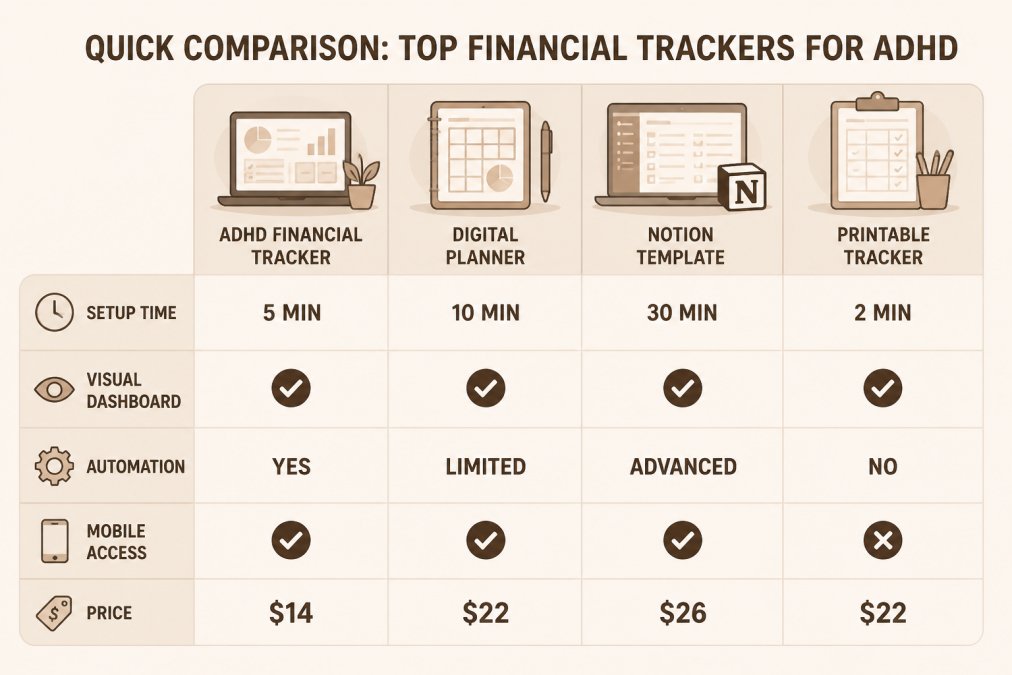
| Tracker Option | Setup Time | Best For | Starting Price | Key Strength |
|---|---|---|---|---|
| ADHD Financial Tracker | 5 minutes | Quick weekly check-ins | $14 | No-shame money snapshot |
| Printable ADHD Planner | 2 minutes | Print-and-fill tracking | $22 | Tactile, low-tech option |
| Digital ADHD Planner | 10 minutes | Tablet users | $22 | GoodNotes compatible |
| ADHD Life Dashboard (Notion) | 30 minutes | Integrated life management | $26 | Advanced automation |
ADHD Financial Tracker ($14) is the fastest entry point. You download it, fill in your bills and current balance, and you're done. The weekly check-in takes 10 minutes. There's no learning curve, no setup complexity, and no shame if you skip a week.

Printable ADHD Planner ($22) works best if you prefer pen and paper. The tactile experience of writing can actually help with memory and engagement. Print it, keep it visible, and reset when you need to. No digital distractions, no app notifications.
Digital ADHD Planner ($22) is ideal if you're already using a tablet for note-taking. It's built for GoodNotes and similar annotation apps, so you can write directly on it with a stylus. The low-clutter design means you're not overwhelmed by options.
ADHD Life Dashboard (Notion Template) ($26) is for people who already use Notion or want a fully integrated system. It includes meal planning, brain dump, and financial tracking in one dashboard. Setup takes longer, but the automation features are powerful once configured.
ADHD Financial Tracker: No-Shame Money Management
The philosophy behind a financial tracker designed for ADHD is fundamentally different from traditional budgeting tools. It assumes that shame and perfectionism are barriers to progress, not motivators. You're not trying to achieve a perfect month; you're trying to build visibility and notice patterns.
The ADHD Financial Tracker from Anchor Grove Studio includes five core components: a Money Snapshot that shows your current financial picture, a Bill Tracker for upcoming and recurring expenses, a Spending Log with space to note how you felt, a Weekly Check-In for reviewing the week's spending, and a Savings Goal Tracker to make progress visible.
What makes this different from a spreadsheet or generic budgeting app is the permission structure built in. You don't need perfect numbers. You don't need to track every dollar. You don't need to maintain a flawless streak. The goal is clarity and a repeatable check-in, not judgment.
Many people with ADHD have abandoned budgeting entirely because traditional systems feel punitive. A financial tracker for ADHD removes that emotional friction. You're checking in with yourself, not reporting to a system that grades your performance.
How to Budget With ADHD: Practical Strategies That Stick
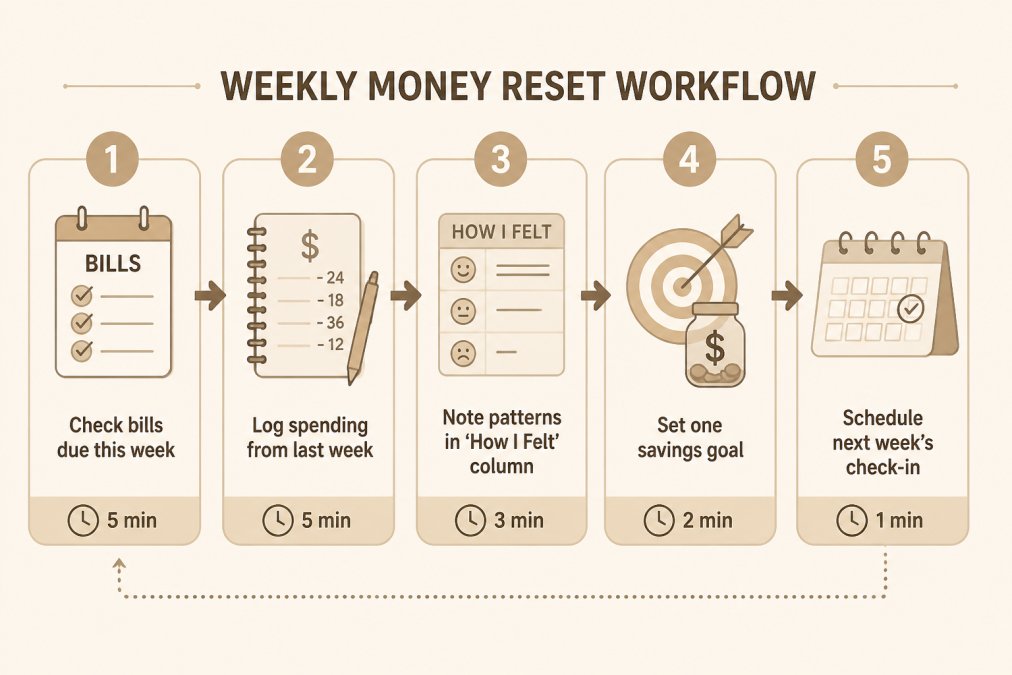
Budgeting with ADHD works when you stop trying to maintain a system and start building a habit. The difference is subtle but important. A system requires discipline. A habit requires repetition and environmental design.
Start with one weekly check-in, not daily tracking. Pick one day, Friday evening, Sunday morning, whatever, and spend 15 minutes on your money. That's it. During that 15 minutes, you check what bills are due, log what you spent, note any patterns, and set one realistic savings goal. This single habit creates visibility without requiring you to maintain daily discipline.
Make it the same time every week. Consistency matters more than frequency. Your brain will start anticipating the check-in if it happens at the same time. Some people pair it with their morning coffee on Sunday. Others do it Friday evening before the weekend. The specific time matters less than the repetition.
Automate everything that can be automated. Set up automatic bill payments so you're not manually entering them each week. Use automatic transfers to savings so you're not deciding whether to save, it just happens. Automation removes the executive function demand from recurring tasks.
Use the "How I Felt" column to interrupt impulse spending. Before you make an unplanned purchase, note your emotional state. Over time, you'll see whether you buy when tired, stressed, bored, or triggered by specific situations. That awareness alone often reduces impulse spending without requiring willpower.
Accept that some weeks you'll miss the check-in. And that's fine. The system is designed to survive gaps. You don't restart from zero. You just pick it up the next week. This permission structure is what makes a financial tracker for ADHD actually sustainable.
Managing Impulse Spending: An ADHD Impulse Spending Tracker Approach
Impulse spending isn't a character flaw; it's often a symptom of dopamine regulation challenges (peer-reviewed research). Your brain seeks stimulation, and spending provides immediate reward. An ADHD impulse spending tracker doesn't shame you for this, it helps you see the pattern and interrupt it.
The most effective approach is the 48-hour rule combined with pattern tracking (apa.org). When you want to make an unplanned purchase, write it down and wait 48 hours. During that window, track your emotional state: Were you tired? Bored? Stressed? Avoiding something? After 48 hours, reassess whether you still want the item. Most impulse purchases lose their appeal once the dopamine spike passes.
An ADHD impulse spending tracker captures this process without judgment. You're not tracking to punish yourself; you're tracking to understand your own patterns. Over three to four weeks, you'll see whether your impulse spending clusters around specific times, emotional states, or situations (peer-reviewed research).
Once you see the pattern, you can design your environment to interrupt it. If you impulse-buy when bored, build in a dopamine menu of free or low-cost activities. If you buy when avoiding a task, use body doubling or accountability to make task initiation easier. The tracker reveals the root cause; your response addresses the actual problem.
Building an ADHD Friendly Budget Template That Works for You
An ADHD friendly budget template looks radically different from traditional budget spreadsheets. It has fewer categories, more visual space, and built-in flexibility. The goal is a template you'll actually use, not one that looks perfect on paper while gathering digital dust.
Start with four spending categories, not twelve. Fixed bills, variable spending, savings, and one discretionary category. That's enough to see patterns without creating decision fatigue. Traditional budgets with 15+ categories require constant categorization decisions, exactly the kind of cognitive load that derails ADHD brains.
Use color coding for visual clarity. Green for bills, blue for spending, yellow for savings. Your brain processes color faster than text. A visual dashboard where you can see your money snapshot at a glance beats a spreadsheet you have to interpret.
Build in a "reset" feature. You should be able to start fresh on any page or any week without guilt. If you miss three weeks, you don't feel like you've failed the whole system. You just reset and begin again. This permission structure is what makes a budget template actually sustainable for ADHD brains.
Include space for notes, not just numbers. The "How I Felt" column in the ADHD Financial Tracker isn't decorative, it's functional. Emotional context reveals patterns that pure numbers never will. Your template should have room for these observations.
Keep it printable or digital, but not both. Switching between formats adds friction. Choose one medium and stick with it. If you're a pen-and-paper person, get a printable ADHD friendly budget template. If you're digital, use a tablet-compatible planner or Notion template.
The Printable ADHD Planner ($22) from Anchor Grove Studio includes budget pages designed this way. The Digital ADHD Planner ($22) works the same way on tablets. Both eliminate the complexity that makes traditional budgets feel overwhelming.

Conclusion: Start Simple, Stay Consistent
Financial tracking with ADHD doesn't require perfect systems or flawless execution. It requires visibility, permission to be imperfect, and a tool designed for how your brain actually works. A simple financial tracker for ADHD removes the shame and complexity that make traditional budgeting feel impossible.
The ADHD Financial Tracker from Anchor Grove Studio delivers exactly this: a no-shame money system with quick check-ins, visible bills, simple spending capture, and realistic savings goals. At $14, it's the fastest entry point to financial visibility. Get started with the ADHD Financial Tracker and build the habit that transforms your relationship with money.
Frequently Asked Questions
What makes a financial tracker actually work for ADHD brains?
A financial tracker for ADHD succeeds when it reduces cognitive load and removes shame. Look for tools that show your money snapshot in one place, don't require daily tracking, and let you restart anytime without penalty. The ADHD Financial Tracker, for example, uses a weekly check-in instead of constant monitoring, includes a 'How I Felt' column to spot spending patterns, and requires no perfect categorization. Visual dashboards, bill reminders, and quick-capture options all reduce the executive function barrier to getting started.
How do I stop impulse spending with ADHD?
An ADHD impulse spending tracker works by making spending visible and adding a pause between impulse and action. Capture purchases in a simple log with a 'How I Felt' column to notice emotional triggers. Set a 24-hour rule for non-essential purchases over a set amount. Automate recurring bills and savings so money moves without decision fatigue. Use visual spending categories (not detailed sub-categories) so you can spot patterns without overwhelm. The goal is awareness, not judgment, noticing you spend more when stressed is progress, not failure.
What's the difference between printable and digital financial trackers for ADHD?
Printable trackers offer tactile engagement and fewer distractions, useful if you struggle with app notifications or digital overwhelm. Digital trackers provide instant access, automatic reminders, and mobile capture when you're away from home. Notion templates offer customization and integration with other life areas (meal planning, task management). Choose based on your habits: if you carry paper everywhere, print. If you live on your phone, go digital. Many people use both, printing weekly summaries from a digital tracker for visual review.
Can I really use an ADHD friendly budget template if I have variable income?
Yes. An ADHD friendly budget template works best for variable income when it focuses on essential bills first, then builds a small emergency fund before planning savings goals. Instead of monthly budgets, use a rolling weekly check-in: what bills are due this week, what's left after essentials, what can safely go to savings. Automate fixed expenses (rent, insurance) on payday. Use your tracker to notice your average monthly income over 3 months, then set realistic savings targets based on your low-income month, not your best month. This removes the shame of months when income drops.
How do I actually stick with a financial tracker when I've abandoned five others?
The systems that stick share three traits: they take less than 10 minutes per week, they don't require daily discipline, and they're forgiving if you miss a week. Start with one tool, the ADHD Financial Tracker, a simple spreadsheet, or a Notion template, and use it for exactly one purpose (bill visibility, spending patterns, or savings progress). Set a specific day and time for your weekly check-in and pair it with something you already do (Sunday morning coffee, Friday lunch). Track the check-in itself, not perfect spending. Permission to restart on any page or week removes the all-or-nothing thinking that kills consistency.
This article was written using GrandRanker