
ADHD Planner for Low Energy Days: A How-To Guide
Table of Contents
- Why Traditional Planners Fail on Low-Energy Days
- The Energy-First Planning Method Explained
- Step 1: Categorize Tasks by Effort Level
- Step 2: Build a Flexible Daily Schedule
- Low-Energy Task List Examples to Copy
- ADHD Burnout Recovery Tips for Your Planning System
- Tools for Visual Task Organization
- Conclusion: Start Small and Build Sustainable Habits
- Frequently Asked Questions
Last Updated: September 4, 2026
Why Traditional Planners Fail on Low-Energy Days
Most planning systems assume your energy is stable (peer-reviewed research). For the ADHD brain, energy swings are the rule, not the exception. When a low-energy day hits, a rigid planner becomes a visual reminder of failure, which fuels productivity shame and makes task initiation even harder.
The core problem is a mismatch. Traditional planners are built around time management, but ADHD requires energy management. An adhd planner for low energy days must shift the focus from "what time is it?" to "how much fuel do I have right now?"
The Energy-First Planning Method Explained
The energy-first planning method is an adaptive planning approach that prioritizes your current cognitive load over the clock. Instead of assigning tasks to specific hours, you assign them to energy tiers based on the mental bandwidth they require.
This method acknowledges that executive dysfunction is situational. A task that takes ten minutes on a good day can feel impossible when your energy is depleted (PubMed). By categorizing tasks in advance, you remove the decision-making burden on low-energy days.
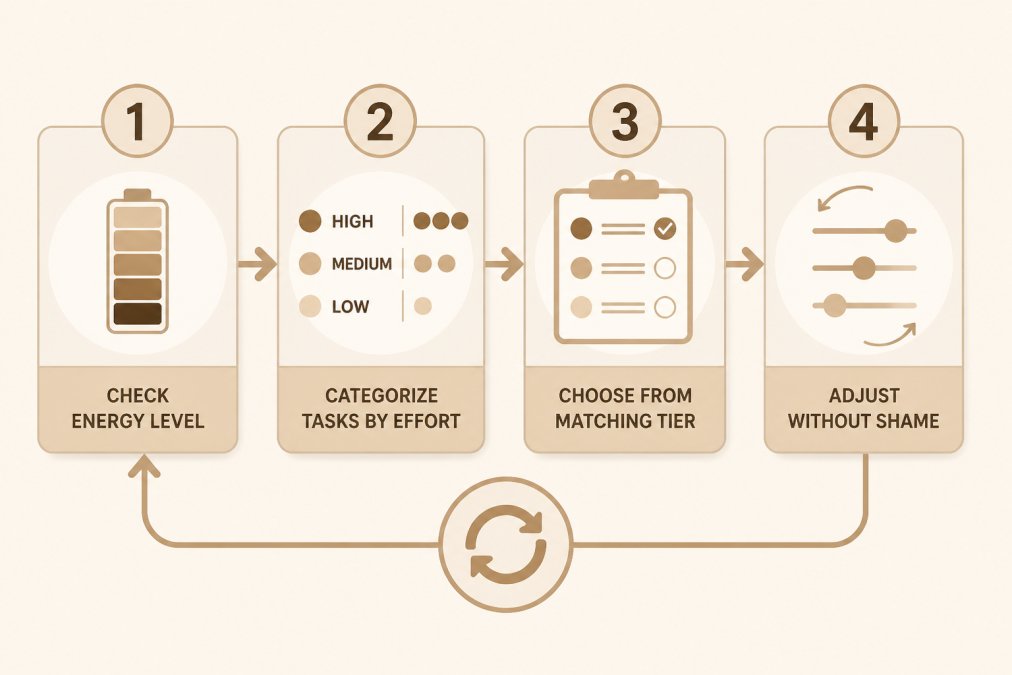
A common mistake is trying to force a "normal" schedule on a day that is anything but. Flexibility is not a feature; it is the core mechanism. You are building a task library to pull from based on your current state, not a routine to follow.
Step 1: Categorize Tasks by Effort Level
Start by creating three distinct energy tiers for your tasks. This is the foundation of your adhd planner for low energy days.
- High Energy: Deep work, creative projects, difficult conversations, financial tracking.
- Medium Energy: Errands, responding to emails, meal prep, cleaning one room.
- Low Energy: Showering, paying a single bill, reading, stretching, making a phone call.
Spend a few minutes on a good day writing out tasks that fit each tier. This is your task library. The goal is to have a pre-vetted list so you never have to decide what you are capable of while you are in the thick of executive dysfunction.

Step 2: Build a Flexible Daily Schedule
Once your tasks are sorted into energy tiers, the next step is constructing a daily schedule that bends rather than breaks. Traditional time-blocking assumes your executive function will cooperate at a predetermined moment. On a low-energy day, that assumption collapses. Instead, use a capacity-based scheduling framework that prioritizes three mechanisms: time-boxing, the 'one-touch rule,' and the 50% buffer.
Time-Boxing Over Time-Blocking
Time-blocking assigns a task to a specific hour. Time-boxing assigns a task to a limited window regardless of when you start. Instead of saying 'I will answer emails at 10:00 AM,' say 'I will spend 15 minutes on emails at some point before noon.' This removes the failure point of missing a start time while still creating a gentle boundary.
The 'One-Touch Rule' for Low-Energy Days
A common pattern in ADHD productivity is the 'task pile-up,' where uncompleted items from yesterday merge with today's list. The one-touch rule states that any task you touch must either be completed immediately or consciously deferred to a specific tier and day. This prevents the half-started tasks that drain cognitive bandwidth. On a low-energy day, apply this rule ruthlessly: if you cannot finish it in one sitting, do not start it.
The 50% Buffer Principle
Most planners assume a full day of capacity. A low-energy planner must assume the opposite. The 50% buffer principle means you schedule only half of what you think you can do on a good day, leaving the other half as unstructured recovery time (the CDC). The rest become 'optional overflow,' creating a built-in safety valve for the unpredictable energy crashes that define ADHD.
A Concrete Example: The 'Three-Tier Daily Template'
Here is a practical template you can copy into any planner or note app:
- Morning (Low-Energy Anchor): One low-energy task, such as taking medication or making a single phone call. This builds momentum without requiring focus.
- Midday (Medium-Energy Window): One medium-energy task, such as responding to one email or folding one load of laundry. Set a 15-minute timer.
- Afternoon (Flexible Overflow): If energy permits, attempt a second medium task. If not, stop. No penalty.
- Evening (Reset Ritual): Spend 5 minutes writing tomorrow's three-tier list. This shifts the decision burden off tomorrow morning's already-depleted self.
Why This Differs From a Standard Routine
A standard routine asks you to repeat the same actions daily. A flexible schedule asks you to choose from a menu based on your current capacity. The ADHD brain thrives on novelty and autonomy; a rigid routine becomes monotonous and triggers avoidance. A flexible schedule keeps the structure but changes the selection.
Handling the 'Good Day Trap'
A frequent pitfall is over-scheduling on a high-energy day, which then triggers a crash the following day. To prevent this, cap your high-energy day at three tasks total, even if you feel capable of more. The goal is sustainability, not maximal output. If you complete your three tasks and still have energy, add one 'bonus' task from your medium tier, but never more than one.
When to Abandon the Schedule Entirely
Flexibility also means knowing when to stop. If you have attempted two tasks and both felt like wading through mud, stop scheduling. Switch to your rescue list (covered in the burnout section below) and allow yourself a full reset. A low-energy day that ends with you having done one small task and rested is a success, not a failure.
Low-Energy Task List Examples to Copy
Here is a practical example of a low-energy task list to get you started. These are tasks that require minimal cognitive load but keep your life functioning.
- Drink a full glass of water and take medication.
- Put one load of laundry in the washer.
- Open mail and recycle the junk.
- Order groceries for pickup (do not go inside the store).
- Wipe down the kitchen counter.
- Send one text message to a friend or family member.
ADHD Burnout Recovery Tips for Your Planning System
ADHD burnout recovery requires a protocol, not just a lighter to-do list. When you are post-burnout, your executive function is severely impaired. This is not a low-energy day; it is a recovery phase that may last days or weeks.
During this period, your planning system should shrink to a "rescue list." This list contains only absolute necessities: eating, hydrating, basic hygiene, and sleeping. Do not attempt task prioritization for higher-level goals until your energy returns.
The contrastive insight here is that pushing through burnout is counterproductive. Many people try to "catch up" after a rough patch, which only extends the recovery time. A flexible scheduling system that allows for a full reset week is more effective for long-term consistency than a rigid system that demands daily output.
Tools for Visual Task Organization
Visual organization is not about making your planner look pretty, it is about reducing the cognitive load of seeing what needs to be done. For the ADHD brain, a dense text list creates a 'wall of overwhelm' that triggers avoidance. The most effective approach is not a standalone planner but the integration of a low-energy workflow into the digital ecosystem you already use daily.
The 'Energy Band' Method for Google Calendar and Outlook
Most people already have a calendar app on their phone. Instead of adding a separate planner, repurpose your existing calendar into an energy-management system. Create three recurring, color-coded blocks each day:
- Green Band (Low Energy): 9:00 AM - 11:00 AM. This block is not for tasks; it is a protected space for recovery, meals, and hygiene. Label it 'Low-Energy Buffer.'
- Yellow Band (Medium Energy): 11:00 AM - 2:00 PM. This is your window for one or two medium-energy tasks. Drag a single task from your task list into this block.
- Red Band (High Energy): 2:00 PM - 4:00 PM. This block is optional. If you have capacity, schedule one high-energy task here. If not, leave it blank.
This method works because it uses the calendar's native drag-and-drop interface. You are not learning a new app; you are changing how you populate an existing one. Google Calendar's 'Tasks' sidebar and Outlook's 'To Do' pane both allow you to drag a task directly onto a time block.
Color-Coding as a Cognitive Shortcut
Color-coding is not decorative; it is a functional shortcut. The ADHD brain processes color faster than text. Assign a single color to each energy tier and use it consistently across your calendar, task list, and physical sticky notes. When you open your calendar, you should be able to tell at a glance whether the day is mostly green (a recovery day) or has some yellow windows (a functional day).
The 'One-Screen' Rule for Digital Planners
A common mistake is using a planner app, a calendar app, and a notes app simultaneously. This fragments your attention and creates the very decision fatigue you are trying to avoid. The one-screen rule states that all task management should live in a single place. The tool matters less than the consolidation.
Physical Visual Tools for Paper Preference
If you prefer paper, the same principles apply. A single-page weekly spread with three columns, one per energy tier, is more effective than a traditional daily grid. At the end of the day, draw a line under the tasks you completed and leave the rest. This 'rolling list' approach prevents the visual guilt of a blank page while maintaining a clear record of what was done.
Integrating with Existing Ecosystems: A Step-by-Step Example
Here is a concrete workflow for integrating a low-energy system into Google Calendar without buying anything new:
- Create three recurring events titled 'Low-Energy Buffer,' 'Medium-Energy Window,' and 'High-Energy Optional,' each with its own color.
- Open the Google Tasks sidebar and create a list called 'Energy Tiers.'
- Add tasks to the appropriate tier as they come to mind throughout the day.
- Each morning, drag one task from the 'Low' or 'Medium' tier into the corresponding time block. Do not schedule more than two tasks total.
- At the end of the day, review which tasks were moved to tomorrow. This review takes 2 minutes and builds the habit of conscious deferral.
When a Dedicated Visual Tool Is Worth It
There is one scenario where a dedicated visual tool adds value: when you need a physical artifact to externalize your thoughts. For some, the tactile act of writing and crossing off tasks is essential for memory consolidation. In that case, a printable planner with large checkboxes and minimal text, such as the low-clutter layouts from Anchor Grove Studio, can be effective. The key is to choose one tool and commit to it for at least 30 days.

Conclusion: Start Small and Build Sustainable Habits
The biggest challenge with any planning system is consistency, not capability. An adhd planner for low energy days works only when it removes friction on your worst days, not just your best ones. If you are tired of abandoning planners after a week, the fix is to lower the initial barrier.
Start by printing one week of the ADHD Focus & Deep Work System to practice task initiation on difficult days. The Anchor Grove Studio system is designed to work with your brain, offering instant digital downloads and flexible pages that let you start over without shame. Get started with Anchor Grove Studio and build a planning habit that survives your energy swings.
Frequently Asked Questions
Can ADHD cause low energy?
Yes. The executive dysfunction associated with ADHD often leads to mental exhaustion. Constant task-switching and decision fatigue drain mental bandwidth faster than for neurotypical brains. Planning around your natural energy fluctuations, rather than fighting them, is the core of an energy-first planning method.
What is energy-first planning for neurodivergent brains?
Energy-first planning is the practice of building your schedule around your available energy, not a fixed clock. Instead of assigning tasks to 9 AM or 2 PM, you assign them to energy tiers like 'high,' 'medium,' and 'low.' This adaptive planning approach reduces productivity shame because it expects energy swings and helps you pick a realistic task from a pre-made list, like a low-effort task list example, regardless of how you feel.
How do you prioritize tasks when you have no energy?
On low-energy days, use the 'rescue' list method. This is a small, pre-written list of 3-5 low-effort tasks that count as wins, such as drinking a glass of water, brushing your teeth, or paying one bill. The goal is task initiation without cognitive load. If you can only do one thing, choose the one that alleviates the most stress, not the one that feels most productive.
What does ADHD burnout look like?
ADHD burnout often looks like a sudden loss of ability to start tasks you normally handle, increased irritability, and a deep desire to rest but an inability to relax. It is a state of physical, mental, and emotional exhaustion. Recovery requires dropping neurotypical standards of productivity, focusing on sleep and nutrition, and using an ADHD planner that allows for blank days without guilt. This is where specific ADHD burnout recovery tips become essential.
This article was written using GrandRanker